Are you tired of Wi-Fi dead zones, dropped connections, and endless buffering in certain areas of your home? You’re not alone. Many homeowners struggle with inconsistent wireless coverage, especially in larger houses or those with challenging layouts. Fortunately, a Wi-Fi extender can be the perfect solution to transform your network experience, bringing robust internet connectivity to every corner of your property. This comprehensive guide will equip you with all the knowledge needed to choose the ideal Wi-Fi extender for your specific needs, ensuring a seamless and reliable internet connection throughout your home.
1. What is a Wifi Extender and How Does It Work?
A Wi-Fi extender is a device engineered to broaden the reach of your existing wireless network. It achieves this by receiving the Wi-Fi signal from your main router and then rebroadcasting it to areas where the signal is weak or nonexistent. Often referred to as Wi-Fi boosters or repeaters, these devices effectively expand your network without necessitating additional internet service or complex wiring.
At its core, a Wi-Fi extender acts as a bridge, establishing two connections. First, it wirelessly connects to your primary router. Second, it creates a secondary network, which may share the same name (SSID) as your main network or have a distinct one, broadcasting the amplified signal to previously unreachable spots. This process essentially creates a relay system, allowing devices in the extended coverage area to connect to the extender, which then communicates with your main router for internet access.
Modern Wi-Fi extenders typically operate on both the 2.4GHz and 5GHz frequency bands. The 2.4GHz band offers a wider range and better penetration through walls, while the 5GHz band provides faster speeds but has a shorter reach and less ability to penetrate solid objects. Some advanced models even feature a dedicated “backhaul” connection, minimizing interference and maximizing throughput.
There are several types of Wi-Fi extenders available:
- Desktop Range Extenders: These resemble small routers, often featuring external adjustable antennas, multiple Ethernet ports for wired devices, and sometimes USB ports for peripherals. They offer powerful performance and are best suited for a dedicated space.
- Plug-In Range Extenders: Compact and convenient, these devices plug directly into a wall outlet, making them discreet and easy to install. They usually have fewer Ethernet ports and are generally more affordable.
- Mesh-Ready Range Extenders: A newer category, these extenders can integrate with compatible routers to create a unified mesh network, allowing for seamless roaming and a single network name throughout your home.
- Outdoor Range Extenders: Specifically designed with weather-resistant enclosures and longer-range antennas, these are perfect for extending Wi-Fi to patios, yards, or detached structures.
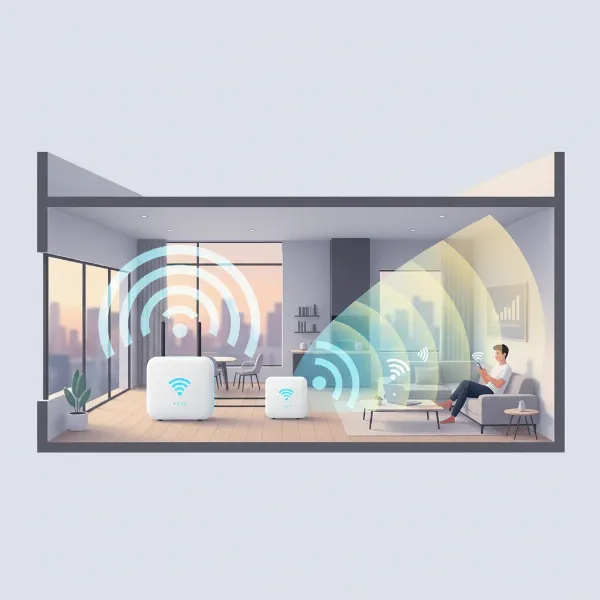 Illustration of a Wifi extender receiving a signal from a router and rebroadcasting it to extend coverage in a home.
2. Benefits of Using a Wifi Extender
Investing in a quality Wi-Fi extender offers a multitude of advantages, significantly improving your home network experience.
- Eliminate Dead Zones: Perhaps the most compelling benefit, extenders eradicate areas in your home where the Wi-Fi signal is weak or non-existent, often referred to as “dead zones.” This means you can enjoy reliable internet connectivity in every room, basement, attic, or even a far-flung corner of your office.
- Improve Signal Strength and Stability: For areas with a weak, inconsistent signal, a Wi-Fi extender boosts the connection, leading to faster speeds and fewer interruptions during activities like streaming or online gaming.
- Cost-Effective Solution: Compared to upgrading your entire router or installing a complex mesh Wi-Fi system, a range extender is a significantly more affordable way to enhance your network coverage.
- Simple Installation: Most modern Wi-Fi extenders are designed for quick and user-friendly setup, often involving just a few button presses (WPS) or guided steps via a mobile app, requiring minimal technical expertise.
- Flexibility: These devices are typically small and can be easily relocated if your network needs change, allowing you to adapt your coverage as desired.
- Support More Devices: With a stronger, more widespread signal, your network can reliably support a greater number of connected devices, from smartphones and tablets to smart home gadgets and streaming services.
- Enhance Outdoor Coverage: For those who wish to use Wi-Fi in their backyard, patio, or garage, certain extenders can effectively push your wireless signal outdoors.
3. When Do You Need a Wifi Extender?
Identifying the right time to introduce a Wi-Fi extender into your home network can save you from daily connectivity frustrations. Consider a Wi-Fi extender if you encounter any of the following scenarios:
- Large or Multi-Story Homes: In expansive houses or those with multiple floors, a single router often struggles to cover the entire area, leading to significant signal degradation on distant floors or rooms. Extenders bridge this distance, ensuring coverage beyond the router’s immediate vicinity.
- Thick Walls or Physical Obstructions: Materials like brick, concrete, metal, or even large appliances can severely weaken Wi-Fi signals. If you notice a drastic drop in signal strength when moving between rooms, an extender can help bypass these barriers.
- Desire for Outdoor Wi-Fi: If you dream of streaming music by the pool, working on your laptop on the patio, or having Wi-Fi in a detached garage, an outdoor or strategically placed indoor extender can make it a reality.
- Many Connected Devices: As smart homes become more prevalent, the number of devices vying for bandwidth increases. An extender can help distribute the load, improving performance for all devices, especially in areas with high usage.
- Frequent Buffering or Dropped Connections: If video calls freeze, streaming content buffers constantly, or devices frequently disconnect in specific rooms, these are clear indicators of poor Wi-Fi coverage that an extender can resolve.
You can also use Wi-Fi analyzer apps on your smartphone to map signal strength throughout your home and precisely identify dead zones where the signal consistently drops below -70dBm, confirming the need for an extender.
4. Key Factors to Consider When Choosing a Wifi Extender
Selecting the right Wi-Fi extender involves more than just picking the cheapest option. To ensure you get the best performance and value, consider these crucial factors:
Tốc độ Wifi
|
Our Picks for the Best Wifi extender in 2026
As an Amazon Associate I earn from qualifying purchases.
|
||
| Num | Product | Action |
|---|---|---|
| 1 | WiFi Extender Signal Booster for Home 2026 Internet Repeater Long Range Up to 9995 Sq. Ft. Whole Home WiFi Coverage |

|
| 2 | TP-Link WiFi Extender with Ethernet Port, Dual Band 5GHz/2.4GHz, Up to 44% More Bandwidth Than Single Band, Covers Up to 1200 Sq.ft and 30 Devices, Signal Booster Amplifier Supports OneMesh(RE220) |
|
| 3 | WiFi Extender, WiFi Extenders Signal Booster for Home Up to 5000 sq.ft and 50 Devices, WiFi Range Extender, Wireless Repeater, Long Range Amplifier with Ethernet Port, 1-Tap Setup, Alexa Compatible |
|
| 4 | 1200Mbps WiFi Extender Signal Booster for Home, Dual Band 5GHz/2.4GHz Wireless Internet Repeater with 4 External Antennas, Covers Up to 3600 Sq.ft & Supports 80 Devices, AP Mode with Ethernet Port |
|
| 5 | WiFi Extender WiFi Booster 1200 Mbps Dual Band (5GHz/2.4GHz) WiFi Extenders Signal Booster for Home, Internet Extended Booster WiFi Repeater (White) |
|
| 6 | TP-Link AC1200 WiFi Extender, 2023 Engadget Best Budget Pick, 1.2Gbps Signal Booster for Home, Dual Band 5GHz/2.4GHz, Covers Up to 1500 Sq.ft and 30 Devices,Support Onemesh, One Ethernet Port (RE315) |
|
| 7 | TP-Link AX3000 WiFi 6 Range Extender | PCMag Editor's Choice | Dual-Band Wireless Repeater w/Ethernet Port | Up to 2400 Sq. Ft., 64 Devices | Internet Signal Booster | APP Setup | EasyMesh (RE715X) |
|
| 8 | WiFi Extender Signal Booster, WiFi Booster Dual Band 5.8GHz&2.4GHz, Covers Up to 10000 Sq.ft, 1.2Gbps WiFi Repeater with One Ethernet Port, One-tap Setup |
|
| 9 | TP-Link AC1900 WiFi Range Extender RE550 | Dual-Band Wireless Repeater Amplifier w/Gigabit Ethernet Port | Up to 2200 Sq. Ft., 32 Devices | Internet Signal Booster | APP Setup | EasyMesh Compatible |
|
| 10 | 2026 WiFi Extender Signal Booster - 2.4GHz 300Mbps WiFi Booster for Home, Covers Up to 9999 Sq. Ft, Easy Setup, Ethernet Port & Access Point, Stable Internet Performance with 60+ Devices(White) |
|
The extender’s Wi-Fi speed, typically measured in Mbps (megabits per second), should ideally match or exceed that of your main router. For bandwidth-intensive activities like 4K streaming, online gaming, or video conferencing, opt for higher-speed extenders (e.g., AX3000, AC1900). Remember that an extender cannot make your internet faster than your ISP’s plan, but it can ensure you receive your maximum subscribed speed in extended areas.
Băng tần
Most modern extenders are dual-band, supporting both 2.4GHz and 5GHz frequencies. Dual-band extenders offer greater flexibility, allowing devices to connect to the band best suited for their needs – 2.4GHz for longer range and better wall penetration, or 5GHz for faster speeds at closer distances. Some high-performance models even offer tri-band support, providing a dedicated band for communication between the router and extender, minimizing speed reduction.
Phạm vi phủ sóng
Choose an extender with a coverage area (often specified in square feet) that aligns with your home’s size and the extent of your dead zones. Basic models might cover 1,000-1,500 sq ft, while premium options can extend coverage up to 5,000 sq ft or more. Consider your home’s layout, including thick walls or multiple floors, as these can impact the effective range.
Số lượng cổng Ethernet
If you have wired devices like gaming consoles, smart TVs, or desktop computers that require a stable and high-speed connection, look for an extender equipped with Gigabit Ethernet ports. Connecting these devices directly to the extender via an Ethernet cable can offer a more reliable and faster connection than Wi-Fi alone.
Tính năng bổ sung
Advanced features can significantly enhance your experience:
- Mesh Compatibility: Look for “mesh-ready” extenders (e.g., TP-Link OneMesh, Asus AiMesh) that can seamlessly integrate with compatible routers to create a single, unified network, eliminating the need to manually switch between different network names.
- MU-MIMO (Multi-User, Multiple-Input, Multiple-Output): This technology allows the extender to communicate with multiple devices simultaneously, improving efficiency and speed in multi-device households.
- Beamforming: This feature focuses the Wi-Fi signal directly towards connected devices, strengthening the connection and extending its reach.
- WPS (Wi-Fi Protected Setup): Simplifies the pairing process with your router, often requiring just a press of a button.
- App-Based Management: Many extenders come with companion apps that allow for easy setup, monitoring, and control of network settings from your smartphone.
- Guest Networks: Some extenders offer the ability to create separate guest networks, keeping your main network secure.
- Security: Ensure the extender supports the latest encryption standards like WPA2 or WPA3 to protect your network from unauthorized access.
- Pass-Through Outlets: If wall outlets are scarce, some plug-in extenders include a pass-through outlet, allowing you to use the power socket for other devices.
Thương hiệu và giá cả
Choose extenders from reputable brands known for their network equipment, such as TP-Link, Netgear, Linksys, Asus, and D-Link. While budget-friendly options exist for basic needs, investing in a mid-range or high-end model from a trusted brand often provides better performance, reliability, and customer support. Always compare features and reviews against the price point.
5. Comparison of Popular Wifi Extenders
When exploring the market, you’ll encounter numerous Wi-Fi extenders, each with unique strengths. Here’s a comparison of some popular models to help illustrate what to look for:
| Tên sản phẩm | Thương hiệu | Tốc độ Wifi (Max) | Băng tần | Phạm vi phủ sóng (ước tính) | Số lượng cổng Ethernet | Tính năng bổ sung | Giá cả (ước tính) | Ưu điểm | Nhược điểm |
|---|---|---|---|---|---|---|---|---|---|
| TP-Link AX3000 Mesh Wi-Fi 6 Extender (RE715X) | TP-Link | 3 Gbps | Dual-band Wi-Fi 6 | Up to 12,000 sq ft | 1 Gigabit | OneMesh, external antennas, 160MHz channels | $105 – $120 | Fast speeds, Wi-Fi 6, Mesh-ready for seamless roaming, easy setup, strong 5GHz performance. | Bulky design, no pass-through outlet. |
| Netgear Nighthawk Wi-Fi 6 Mesh Range Extender (EAX80) | Netgear | 6 Gbps | Dual-band Wi-Fi 6 | Large areas | 4 Gigabit | Mesh-ready, eight streams, MU-MIMO | $220 – $250 | Blazing fast speeds, excellent for heavy use and multiple devices, multiple Gigabit Ethernet ports, Mesh-ready. | Expensive, might be overkill for average households. |
| Linksys RE7000 Wi-Fi Extender | Linksys | 1.9 Gbps | Dual-band Wi-Fi 5 | Up to 2,500 sq ft | 1 Gigabit | Spot Finder, seamless roaming | $89 – $99 | Great for specific dead spots over shorter distances, good roaming technology, useful Spot Finder feature for optimal placement. | Wi-Fi 5 standard (not Wi-Fi 6), less ideal for long-range needs. |
| TP-Link RE315 Wi-Fi Extender | TP-Link | 1.2 Gbps | Dual-band Wi-Fi 5 | Up to 1,500 sq ft | 1 Fast Ethernet | OneMesh, Tether app, signal indicator | $25 – $30 | Very budget-friendly, compact, easy setup via Tether app, supports up to 30 devices, good value for money. | Smaller coverage area, Fast Ethernet port (not Gigabit), Wi-Fi 5 standard. |
| Asus RP-AX58 AX3000 Dual Band Range Extender | Asus | 3 Gbps | Dual-band Wi-Fi 6 | Large areas | 1 Gigabit | AiMesh, 160MHz channels | $79 – $99 | Solid Wi-Fi 6 performance, AiMesh compatible for mesh network creation, easy to install, supports 160MHz bandwidth. | No pass-through AC outlet, signal strength can be middling in some cases. |
Note: Prices are approximate and subject to change based on retailers and promotions.
6. How to Install and Optimize Your Wifi Extender
Proper installation and strategic placement are paramount for maximizing your Wi-Fi extender’s performance. Even the most advanced extender will underperform if not set up correctly.
Hướng dẫn cài đặt Wifi Extender
Most modern Wi-Fi extenders offer a straightforward setup process:
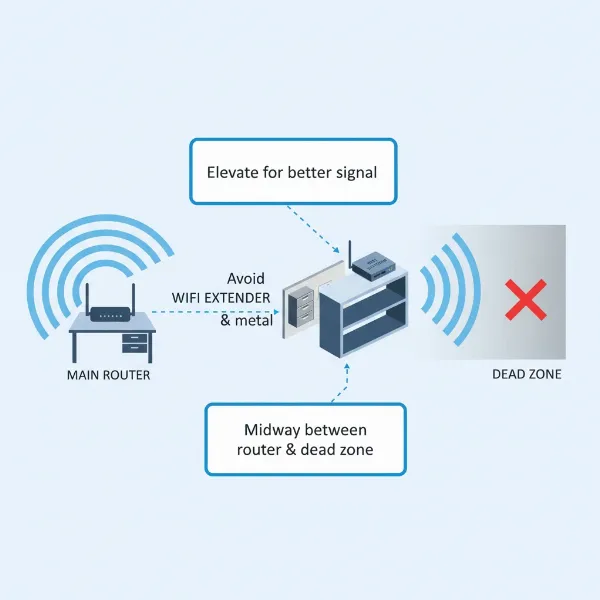
- Choose the Ideal Location: This is the most crucial step. Plug the extender into a power outlet roughly halfway between your main router and the Wi-Fi “dead zone” you want to cover. Ensure this spot still receives at least 50% signal strength from your router. Avoid placing it near large metal objects, thick walls, mirrors, microwaves, cordless phones, or refrigerators, as these can cause interference. Ideally, position the extender at a similar height to your router, around four feet off the ground, and face its front towards the router.
- Power Up: Plug the extender into a wall outlet and wait for the indicator lights to show it’s ready.
- Sync with Your Network:
- WPS Method (Wi-Fi Protected Setup): Press the WPS button on your main router, then quickly press the WPS button on your extender (usually within two minutes). The indicator lights on both devices should confirm a successful connection.
- App-Based Setup: Many brands (like TP-Link, Netgear, Asus) offer dedicated mobile apps. Download the app, connect your phone to the extender’s temporary Wi-Fi network, and follow the on-screen instructions to link it to your existing router.
- Web Interface: Connect a computer or smartphone to the extender’s default Wi-Fi network (often named “NETGEAR_EXT” or “TP-Link_Extender”). Open a web browser, enter the extender’s default IP address or setup URL (found in the manual), and follow the setup wizard.
- Test and Adjust: Once connected, test the Wi-Fi signal strength in the previously problematic areas. Use your smartphone or a Wi-Fi analyzer app. If the signal isn’t optimal, try fine-tuning the extender’s placement slightly closer or further from the router until the indicator lights or app confirm strong signal reception.
- Secure Your Network: Always change the default password for your extended network to a strong, unique one and ensure the latest security protocols (WPA2 or WPA3) are enabled to protect your data.
Mẹo tối ưu hóa hiệu suất Wifi Extender
- Update Firmware Regularly: Check the manufacturer’s website or app for firmware updates. These often include performance improvements and security patches.
- Elevate the Device: Placing the extender on a shelf or desk rather than the floor can improve signal spread.
- Minimize Interference: Keep the extender away from other electronics that emit radio frequencies, such as microwaves, cordless phones, and baby monitors.
- Avoid Physical Obstructions: Ensure a clear line of sight between the extender and your router whenever possible.
- Use Access Point (AP) Mode When Possible: If running an Ethernet cable from your main router to the extender’s location is feasible, configure the extender in AP mode. This provides a wired “backhaul” for data, leading to faster, more stable performance than a purely wireless connection.
Khắc phục các sự cố thường gặp
- Slow Speeds: Check placement for interference, ensure the extender is using the appropriate frequency band (5GHz for speed, 2.4GHz for range), and update firmware. If your extender has a “High-Speed” mode, enable it to dedicate one band for router communication.
- Connection Drops: Update firmware, verify compatibility with your router, and try resetting the extender. Poor placement (too far from the router) is a common culprit.
- Limited Range: The extender might be too close or too far from the router. Adjust its position, using signal indicators as a guide. Consider if your home size requires a higher-performance extender or multiple units.
7. Mua Wifi Extender ở đâu?
Wi-Fi extenders are widely available, making them easy to purchase both online and in physical stores.
- Online Retailers: Major online platforms like Amazon, Best Buy, Walmart, Staples, and Office Depot offer a vast selection of Wi-Fi extenders from various brands. Shopping online provides convenience, competitive pricing, and access to numerous customer reviews that can aid your decision-making.
- Local Electronics Stores: Retailers such as Best Buy often have a range of extenders available, allowing you to see the products firsthand and get advice from sales associates.
- Manufacturer Websites: You can also purchase directly from manufacturer websites like TP-Link, Netgear, or Linksys. This can sometimes offer specific models or bundles not available elsewhere.
When purchasing, especially online, always check the retailer’s return policy and warranty information to ensure peace of mind.
8. Buying Guide: Choosing the Right Wifi Extender
With the array of options available, selecting the perfect Wi-Fi extender for your home can still feel overwhelming. Here’s a concise buying guide to help streamline your decision:
- Ngân sách: Determine how much you are willing to spend. Basic extenders are affordable, while high-performance, mesh-ready, or Wi-Fi 6 models come at a higher price point. Your budget should align with your coverage needs and desired performance level.
- Nhu cầu sử dụng: Clearly define what you need the extender for. Is it to eliminate a single dead spot for browsing, boost speeds for 4K streaming and gaming, or extend Wi-Fi to an outdoor area? Your primary use case will dictate the necessary speed, features, and range.
- Khả năng tương thích: Ensure the Wi-Fi extender is compatible with your existing router. While most modern extenders work universally, matching the Wi-Fi standard (e.g., Wi-Fi 6 with Wi-Fi 6) will ensure optimal performance. If your router supports advanced features like MU-MIMO or Mesh (e.g., AiMesh, OneMesh), look for an extender that supports these to create a more integrated network.
- Đọc đánh giá: Before making a final decision, consult user reviews and expert ratings from reputable tech websites. Real-world experiences can provide valuable insights into a product’s performance, reliability, and ease of use.
By carefully considering these factors, you can confidently choose a Wi-Fi extender that effectively addresses your home network challenges and provides the seamless connectivity you deserve.
“A Wi-Fi extender is a fantastic way to tackle those frustrating dead zones without the heavy investment of a full mesh system. It’s all about smart placement and choosing the right tech for your unique home.”
Conclusion
Wi-Fi range extenders are a practical and cost-effective solution for anyone struggling with inconsistent wireless coverage. They effectively eliminate dead zones, improve signal strength, and allow for a more stable internet connection across your entire home. From basic plug-in models to advanced mesh-ready devices supporting Wi-Fi 6, there’s an extender designed to meet nearly every need and budget. The key to unlocking their full potential lies in understanding your specific requirements and carefully considering factors like speed, frequency bands, coverage area, and additional features. Proper placement and a straightforward setup process further ensure that you can enjoy robust connectivity for all your devices, whether you’re working, streaming, or gaming. Investing in the right Wi-Fi extender can significantly enhance your digital lifestyle, providing the seamless internet experience you deserve. Ready to finally conquer those Wi-Fi dead zones and enjoy uninterrupted connectivity?
Câu Hỏi Thường Gặp
Does a Wifi extender reduce internet speed?
While basic Wi-Fi extenders can sometimes cause a slight reduction in speed because they use bandwidth to communicate with the main router, modern dual-band and tri-band extenders significantly minimize this impact. Many achieve this by using a dedicated band for router-to-extender communication, ensuring that devices connecting to the extender still experience robust and dependable speeds, often delivering significantly better performance than a weak direct connection.
Can I use multiple Wifi extenders?
Yes, you can use multiple Wi-Fi extenders to cover different areas of a large home. However, for optimal performance, it is generally recommended that each extender connects directly to your main router rather than “daisy-chaining” them. For very large homes or complex layouts, consider mesh-ready extenders or a full mesh Wi-Fi system for easier management and more seamless coverage.
What is the difference between a Wi-Fi extender, repeater, and booster?
For most consumer purposes, these terms are largely synonymous and often used interchangeably by manufacturers. Historically, a “repeater” simply repeated the signal, potentially halving bandwidth, while an “extender” implies more intelligent signal amplification and potentially a separate network. “Booster” is a generic marketing term. Modern devices typically function as advanced extenders, minimizing speed loss and offering enhanced features.
Do Wifi extenders work with all routers?
Most Wi-Fi range extenders are designed to be compatible with any standard wireless router, regardless of brand or model. However, for the best performance and to utilize advanced features like mesh compatibility or specific Wi-Fi standards (e.g., Wi-Fi 6, Wi-Fi 7), it is advisable to match your extender’s Wi-Fi standard to your router’s capabilities, or choose a mesh-ready extender from the same brand as your router.