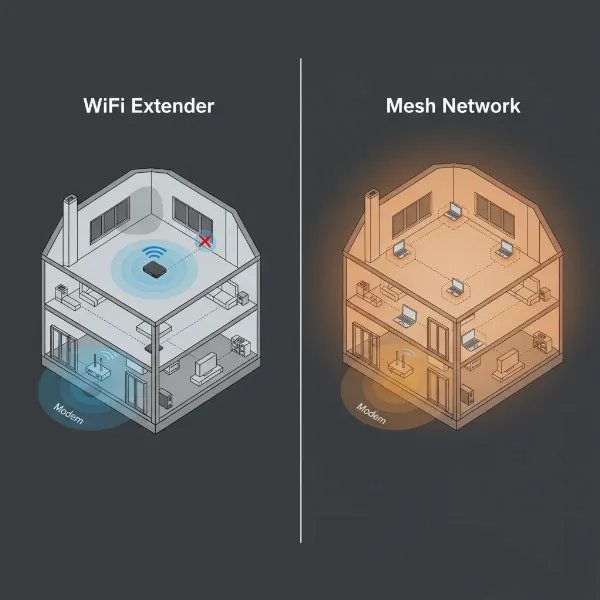
In today’s connected world, a weak Wi-Fi signal in your apartment isn’t just an inconvenience; it can disrupt everything from remote work and online learning to streaming your favorite shows and staying in touch with loved ones. Many apartment dwellers face frustrating dead zones, slow speeds, and unreliable connections, even in seemingly compact spaces. Thick walls, building interference, or simply the layout of your home can wreak havoc on your router’s signal, leaving certain areas underserved.
Fortunately, there’s a straightforward and cost-effective solution: a Wi-Fi extender. These handy devices are designed to pick up your existing Wi-Fi signal, amplify it, and rebroadcast it, effectively expanding your network’s reach to eliminate those pesky dead spots. You don’t need to replace your entire router or invest in an expensive mesh system for an apartment. With the right Wi-Fi extender, you can transform your connectivity, ensuring every corner of your small apartment enjoys a strong, stable, and speedy internet connection. Let’s explore how to choose the perfect Wi-Fi extender to optimize your apartment living experience.
1. What is a Wi-Fi Extender and How Does It Work?
A Wi-Fi extender, also commonly known as a Wi-Fi booster or repeater, is a device that expands the coverage of your existing wireless network. Its primary function is to eliminate “dead zones” where your Wi-Fi signal is weak or nonexistent. Think of it as a middleman: it receives the wireless signal from your main router, amplifies it, and then transmits this boosted signal further into your home.
This extension process typically works in a couple of ways. Some extenders create a new network name (SSID), requiring you to manually switch between your main router’s network and the extender’s network as you move around. However, many modern extenders, especially those with features like TP-Link’s OneMesh or ASUS’s AiMesh, can operate under the same network name as your main router, allowing for seamless roaming as your devices automatically connect to the strongest signal. This makes for a much smoother user experience, particularly important in a small apartment where you might move frequently between rooms.
Common types of Wi-Fi extenders include plug-in wall units, which are compact and discreet, and desktop models that resemble smaller routers, often offering more features like additional Ethernet ports. For small apartments, plug-in wall units are usually preferred due to their unobtrusive design and ease of placement.
2. Benefits of Using a Wi-Fi Extender
Deploying a Wi-Fi extender in your small apartment offers several compelling advantages, drastically improving your internet experience without a major overhaul. The most immediate benefit is the elimination of Wi-Fi dead zones, those frustrating areas where your signal drops or disappears entirely, turning usable space into an internet black hole. An extender ensures that every room, from your bedroom to the kitchen or even a small balcony, receives a strong and consistent signal.
Beyond just extending reach, a good Wi-Fi extender can also significantly improve the speed and stability of your connection in previously weak areas. This means smoother streaming of 4K video, lag-free online gaming, and uninterrupted video calls. Compared to upgrading your entire internet plan or investing in a full mesh Wi-Fi system, extenders are typically much more cost-effective, offering a targeted solution to signal issues. Their installation is also generally straightforward, often involving a simple plug-and-play setup or guided configuration via a mobile app, making them accessible even for those new to network devices.
[image-1|wifi-extender-apartment-coverage|A compact Wi-Fi extender plugged into an electrical outlet in a modern, small apartment living room, extending Wi-Fi coverage.|
A sleek, white, compact Wi-Fi extender is plugged into a wall outlet in a brightly lit, modern small apartment living room. A comfortable sofa and a coffee table are visible in the background, suggesting expanded internet coverage for leisure activities. The extender has a subtle LED indicator, and the overall style is clean and unobtrusive. Editorial photography style, wide-angle shot, natural lighting.]
3. When Do You Need a Wi-Fi Extender for Your Apartment?
Even in a small apartment, you might encounter situations that warrant a Wi-Fi extender. If you find yourself constantly moving closer to your router to get a decent signal, or if certain rooms consistently experience slow speeds, dropped connections, or buffering, an extender is likely your answer. This is especially true if your apartment has thick concrete walls, which can be notorious for blocking Wi-Fi signals, or if the layout creates long corridors that weaken the signal’s reach.
You might also consider an extender if you enjoy using Wi-Fi in outdoor areas like a patio or balcony, where your main router’s signal struggles to reach. Furthermore, if you have multiple devices connected simultaneously, such as smart TVs, gaming consoles, laptops, and smart home gadgets, an extender can help distribute the load and maintain stable connections across your network, preventing congestion and slowdowns. For apartments between 1,500 and 2,800 square feet, a Wi-Fi extender is often the ideal solution to fill coverage gaps.
4. Key Factors to Consider When Choosing a Wi-Fi Extender
Selecting the best Wi-Fi extender for your small apartment requires a thoughtful approach, focusing on specific features that align with your needs and budget. Prioritizing these factors will ensure you get the most out of your investment.
Wi-Fi Speed and Standard
|
Our Picks for the Best Wifi extender in 2026
As an Amazon Associate I earn from qualifying purchases.
|
||
| Num | Product | Action |
|---|---|---|
| 1 | TP-Link WiFi Extender with Ethernet Port, Dual Band 5GHz/2.4GHz, Up to 44% More Bandwidth Than Single Band, Covers Up to 1200 Sq.ft and 30 Devices, Signal Booster Amplifier Supports OneMesh(RE220) |

|
| 2 | WiFi Extender WiFi Booster 1200 Mbps Dual Band (5GHz/2.4GHz) WiFi Extenders Signal Booster for Home, Internet Extended Booster WiFi Repeater (White) |
|
| 3 | 1200Mbps WiFi Extender Signal Booster for Home, Dual Band 5GHz/2.4GHz Wireless Internet Repeater with 4 External Antennas, Covers Up to 3600 Sq.ft & Supports 80 Devices, AP Mode with Ethernet Port |
|
| 4 | WiFi Extender Signal Booster for Home 2026 Internet Repeater Long Range Up to 9995 Sq. Ft. Whole Home WiFi Coverage |
|
| 5 | TP-Link AC1900 WiFi Range Extender RE550 | Dual-Band Wireless Repeater Amplifier w/Gigabit Ethernet Port | Up to 2200 Sq. Ft., 32 Devices | Internet Signal Booster | APP Setup | EasyMesh Compatible |
|
| 6 | WiFi Extender Signal Booster, WiFi Booster Dual Band 5.8GHz&2.4GHz, Covers Up to 10000 Sq.ft, 1.2Gbps WiFi Repeater with One Ethernet Port, One-tap Setup |
|
| 7 | 2026 WiFi Extender Signal Booster - 2.4GHz 300Mbps WiFi Booster for Home, Covers Up to 9999 Sq. Ft, Easy Setup, Ethernet Port & Access Point, Stable Internet Performance with 60+ Devices(White) |
|
| 8 | WiFi Extender, WiFi Extenders Signal Booster for Home Up to 5000 sq.ft and 50 Devices, WiFi Range Extender, Wireless Repeater, Long Range Amplifier with Ethernet Port, 1-Tap Setup, Alexa Compatible |
|
| 9 | TP-Link AC1200 WiFi Extender, 2023 Engadget Best Budget Pick, 1.2Gbps Signal Booster for Home, Dual Band 5GHz/2.4GHz, Covers Up to 1500 Sq.ft and 30 Devices,Support Onemesh, One Ethernet Port (RE315) |
|
| 10 | TP-Link AX3000 WiFi 6 Range Extender | PCMag Editor's Choice | Dual-Band Wireless Repeater w/Ethernet Port | Up to 2400 Sq. Ft., 64 Devices | Internet Signal Booster | APP Setup | EasyMesh (RE715X) |
|
Look for an extender that supports a Wi-Fi standard comparable to or higher than your main router. Modern extenders typically support Wi-Fi 5 (802.11ac) or Wi-Fi 6 (802.11ax), with some cutting-edge models even offering Wi-Fi 7 (802.11be) for future-proofing. While Wi-Fi 7 might be overkill for many small apartments, Wi-Fi 6 offers significant speed improvements and better handling of multiple devices. Dual-band (2.4GHz and 5GHz) extenders are essential, as they provide both wider coverage (2.4GHz) and faster speeds (5GHz).
Coverage Area
For a small apartment, you don’t necessarily need an extender designed for multi-story homes. Many budget-friendly extenders offer coverage around 1,500 square feet, which is often ample for an apartment. Over-investing in an extender with massive coverage might be unnecessary for your living space.
Number of Ethernet Ports
If you have devices that benefit from a wired connection, such as a gaming console, smart TV, or desktop PC, choose an extender with at least one Gigabit Ethernet port. This allows you to connect these devices directly to the extender for a more stable and faster connection, freeing up wireless bandwidth.
Additional Features
Modern Wi-Fi extenders come with various features that can enhance your experience. Look for app support (like TP-Link Tether or Netgear Nighthawk app) for easy setup and management. Features like OneMesh (TP-Link) or AiMesh (ASUS) enable seamless roaming with compatible routers, creating a single, unified Wi-Fi network. Beamforming helps direct the Wi-Fi signal more efficiently to your connected devices, while MU-MIMO improves performance when multiple devices are transmitting data simultaneously.
Brand and Price
Opt for extenders from reputable brands known for network equipment, such as TP-Link, Netgear, and ASUS, to ensure reliability and good customer support. Prices for apartment-friendly extenders can range from as low as $20 to around $100, depending on the Wi-Fi standard and features. Set a budget and compare options within that range to find the best value.
5. Comparing Popular Wi-Fi Extenders for Small Apartment Living
For apartment living, where space and specific dead zones are the primary concerns, certain Wi-Fi extenders stand out for their balance of performance, affordability, and compact design. Here’s a comparison of some popular options frequently recommended for smaller spaces and specific signal boosts:
| Product Name | Brand | Wi-Fi Speed (Combined) | Wi-Fi Standard | Range/Coverage | Ethernet Ports | Key Features/Notes | Price (Approx.) | Pros | Cons |
|---|---|---|---|---|---|---|---|---|---|
| TP-Link RE315 AC1200 | TP-Link | 1.2 Gbps | Wi-Fi 5 | Up to 1,500 sq ft | 1 | Dual-band, Tether app, Smart Signal Indicator, OneMesh compatible | $20-30 | Very affordable, easy setup, adjustable antennas, good for extending to one room | Wi-Fi 5 (older standard), limited speeds, struggles on higher floors |
| TP-Link RE220 AC750 | TP-Link | 750 Mbps | Wi-Fi 5 | Small-scale extension | 1 | Dual-band, Tether app, compact design, Intelligent Signal Light | $15-25 | Extremely affordable, very easy setup, good for IoT devices or casual browsing | Less power/throughput, not for heavy use, limited range (60 ft for stable signal) |
| TP-Link RE700X AX3000 | TP-Link | 3 Gbps | Wi-Fi 6 | Expansive | 1 | Dual-band, Tether app, compact design, “dead zone killer,” easy to set up | $80-100 | Excellent overall performance, Wi-Fi 6, affordable for its class, compact | No mains passthrough |
| TP-Link RE605X AX1800 | TP-Link | 1.8 Gbps | Wi-Fi 6 | Up to 1,500 sq ft | 1 | Dual-band, Tether app, Intelligent Signal Light, OneMesh compatible | $70-90 | Affordable Wi-Fi 6, works with any router, good performance boost for budget | Only dual-band, 1800Mbps speed, no dedicated backhaul |
| Linksys RE7350 | Linksys | 1.7 Gbps | Wi-Fi 6 | Up to 2,000 sq ft | 1 | Dual-band, compact & unobtrusive, quick setup | $60-80 | Small, unobtrusive design, Wi-Fi 6, easy setup, decent coverage | Lower speeds compared to TP-Link options, performance can drop with distance |
The TP-Link RE315 AC1200 is an excellent choice for budget-conscious users who need to extend Wi-Fi to a single problematic room or a small section of their apartment. Its ease of setup and affordable price make it an appealing entry-level option. For those seeking more robust performance with Wi-Fi 6 capabilities without breaking the bank, the TP-Link RE605X AX1800 offers a great balance of features and value, working seamlessly with most routers. If overall performance and a truly compact, “dead zone killer” design are paramount, the TP-Link RE700X AX3000 is often hailed as a top contender, providing Wi-Fi 6 at an accessible price point.
6. Guide to Installing and Optimizing Your Wi-Fi Extender
Setting up a Wi-Fi extender might seem daunting, but most modern devices are designed for quick and easy installation. Here’s a step-by-step guide to get you connected and some tips for optimal performance:
Step-by-Step Installation
- Unpack and Plug In: Unbox your extender and plug it into an electrical outlet near your main Wi-Fi router.
- Connect to the Extender’s Wi-Fi: On your smartphone or computer, search for available Wi-Fi networks. You should see a new network name (SSID) broadcast by the extender (e.g., “TP-Link_Extender” or “NETGEAR_EXT”). Connect to this network.
- Access the Setup Page: Open a web browser (like Chrome or Firefox) and enter the default setup address provided in your extender’s manual (often something like
tplinkrepeater.net,mywifiext.net, or an IP address like192.168.0.254). Alternatively, many brands offer a dedicated mobile app (e.g., TP-Link Tether app, Netgear Nighthawk app) that guides you through the process, which is often the easiest method. - Follow On-Screen Instructions: Create an administrator password, then select your main Wi-Fi network from the list of available networks. Enter your main Wi-Fi password when prompted.
- Configure Network Name (SSID): You’ll typically have the option to use the same network name as your main router (for seamless roaming, often called OneMesh or AiMesh if compatible) or create a new, distinct name for the extended network. For small apartments and ease of use, a unified network name is generally preferred.
- Find Optimal Placement: Unplug the extender and move it to a location roughly halfway between your main router and the Wi-Fi dead zone. Look for an intelligent signal indicator light on the extender, which will typically turn green or blue to indicate a strong connection to your main router. Avoid placing it too close to the router (which defeats the purpose of extending coverage) or too far away (where it can’t pick up a strong signal to begin with).
- Connect Devices: Once the extender is optimally placed and configured, your devices should automatically connect to the stronger signal, or you may need to reconnect them to the unified network name.
Tips for Optimizing Performance
- Location is Key: The placement of your extender is crucial. Aim for a clear line of sight to your main router if possible, and avoid placing it behind large appliances, thick walls, or near sources of interference like microwaves or cordless phones.
- Elevate the Extender: Placing your extender higher up, like on a shelf or cabinet, can help its signal broadcast more effectively, especially in multi-level apartments.
- Keep Firmware Updated: Regularly check for and install firmware updates via the extender’s app or web interface. Manufacturers often release updates that improve performance, stability, and security.
- Utilize Dual Bands: If your extender is dual-band, ensure your devices are connecting to the appropriate band. The 5GHz band offers faster speeds over shorter distances, while the 2.4GHz band provides better range and wall penetration.
- Consider a Wired Connection: For stationary devices like smart TVs or gaming consoles, use the Ethernet port on your extender if available. This provides a more stable and faster connection, reducing reliance on the wireless signal.
7. Where to Purchase Your Wi-Fi Extender
When you’re ready to buy a Wi-Fi extender for your small apartment, you’ll find a wide array of options both online and in physical stores. Major online retailers like Amazon, Walmart, Best Buy, and Newegg offer extensive selections, competitive pricing, and user reviews that can help inform your decision. These platforms often provide detailed product specifications, comparison tools, and customer feedback, making it easy to find a model that fits your specific needs.
If you prefer to see the product in person or need immediate assistance, electronics stores such as Best Buy, Micro Center, or even general merchandise stores like Walmart and Target typically stock a range of popular Wi-Fi extenders. Buying online often provides the best deals and widest selection, but ensure you check return policies and warranty information before making a purchase. Always look for authorized sellers to guarantee you receive a genuine product with full manufacturer support.
8. Buying Guide: Finding the Right Wi-Fi Extender for Your Needs
Navigating the world of Wi-Fi extenders can feel complex, but focusing on a few critical aspects will simplify your decision, especially for small apartment living.
- Determine Your Budget: Wi-Fi extenders range from very affordable (under $30) to more premium options (over $100). For a small apartment, you often don’t need the most expensive model. Budget-friendly extenders like the TP-Link RE315 or RE220 can effectively solve common dead zone issues without breaking the bank. If your budget allows for a bit more, Wi-Fi 6 models like the TP-Link RE700X or RE605X offer better performance and future-proofing.
- Assess Your Usage Needs: Consider what you’ll be using the extended Wi-Fi for. If it’s just for casual browsing or connecting smart home devices in a single room, a basic Wi-Fi 5 extender might suffice. If you’re streaming 4K video, online gaming, or frequently video conferencing across multiple devices, investing in a Wi-Fi 6 dual-band extender with higher speeds will provide a more robust experience.
- Check Compatibility: While most Wi-Fi extenders are universally compatible with any router, some offer enhanced features (like seamless OneMesh or AiMesh) when paired with routers from the same brand. Check if your current router is compatible with any specific “mesh-like” features an extender advertises for the best possible integration.
- Read User Reviews: Before making a final decision, take time to read reviews from other apartment dwellers or users with similar network setups. These real-world insights can highlight practical performance, ease of setup, and potential quirks that might not be obvious from product specifications alone.
- Consider Compactness: For apartment living, a smaller, unobtrusive plug-in design is often preferable to a bulky desktop unit that might block other outlets or take up valuable space.
“A well-chosen Wi-Fi extender can be a game-changer for apartment dwellers, transforming frustrating dead zones into areas of seamless connectivity. It’s often the most practical and economical upgrade to your home network.”
Conclusion
A strong and reliable Wi-Fi connection is no longer a luxury but a necessity, especially when living in a small apartment where signal inconsistencies can quickly become frustrating. Investing in the best Wi-Fi extender for your small living space can effectively eliminate dead zones, boost speeds, and ensure a seamless online experience across all your devices. Whether you opt for a budget-friendly model to extend coverage to a single stubborn room or a more powerful Wi-Fi 6 extender for enhanced streaming and gaming, the right device can dramatically improve your home network. By considering factors like speed, coverage, features, and ease of use, you can confidently choose an extender that perfectly matches your apartment’s needs and budget. Are you ready to say goodbye to buffering and embrace uninterrupted connectivity in every corner of your home?
Frequently Asked Questions
Will a Wi-Fi extender actually make my internet faster?
While a Wi-Fi extender primarily extends your existing signal, it can make your internet feel faster in areas where the signal was previously weak. By providing a stronger, more stable connection, it reduces lag and buffering, allowing devices to reach closer to your main internet plan speeds in those extended zones. However, an extender cannot exceed the maximum speed of your original internet plan or router.
Is a Wi-Fi extender better than a mesh Wi-Fi system for an apartment?
For most small apartments, a Wi-Fi extender is often a more cost-effective and simpler solution than a mesh Wi-Fi system. Extenders are ideal for filling a few dead spots or extending coverage to a specific area. Mesh systems are generally better for larger homes (over 2,800 square feet) or multi-story residences requiring extensive, uniform coverage.
Where is the best place to put a Wi-Fi extender in an apartment?
The optimal placement for a Wi-Fi extender is roughly halfway between your main router and the area you want to cover. It needs to be close enough to receive a strong signal from the router and far enough to effectively re-broadcast that signal to the weak spot. Many extenders have indicator lights to help you find this ideal location, usually a solid green or blue.
Can I connect multiple devices to a Wi-Fi extender at once?
Yes, modern Wi-Fi extenders are designed to handle multiple connected devices simultaneously, similar to your main router. However, the total bandwidth will be shared among these devices. For optimal performance with many devices, consider an extender that supports Wi-Fi 6 and features like MU-MIMO, which improve efficiency when multiple devices are active.
Do Wi-Fi extenders work with any internet provider or router?
Most Wi-Fi extenders are universally compatible with all standard Wi-Fi routers and internet service providers (ISPs). As long as your router uses common Wi-Fi protocols, an extender should connect and extend your network without issues. Some brands offer enhanced “mesh-like” features that work best with their own branded routers, but basic extension functionality remains universal.