Are you constantly battling Wi-Fi dead zones, experiencing frustrating buffering, or struggling with inconsistent internet speeds in certain areas of your home? You’re not alone. Many households face the challenge of extending their wireless network beyond the primary router’s reach. The good news is that two popular solutions, Wi-Fi extenders and Mesh Network systems, are designed to solve these exact problems. While both aim to expand your Wi-Fi coverage, they operate on fundamentally different principles, leading to distinct advantages and drawbacks depending on your specific needs and home environment. Understanding these differences is crucial to making an informed decision and finally achieving reliable, fast Wi-Fi everywhere you need it.
1. Understanding Wifi Extenders: How They Work and Their Purpose
A Wi-Fi extender, also commonly known as a Wi-Fi booster or repeater, is a device specifically engineered to capture an existing wireless signal from your main router and rebroadcast it. Its primary function is to expand the reach of your current Wi-Fi network into areas where the signal is weak or entirely absent, effectively eliminating “dead zones.”
At its core, a Wi-Fi extender acts as an intermediary. It receives the Wi-Fi signal from your main router, amplifies it, and then transmits this boosted signal further into your home. This process is akin to someone repeating a message to ensure it reaches a distant listener who couldn’t hear the original speaker directly. While effective, this retransmission can sometimes introduce a slight delay or a reduction in speed, as the extender is simultaneously receiving and sending data on the same wireless channel. Depending on the model, extenders might create a separate network name (SSID) for the extended coverage, meaning your devices might not automatically switch to the stronger signal as you move around, potentially requiring manual intervention.
2. Exploring Mesh Network Systems: Architecture and Functionality
Mesh Wi-Fi systems represent a more advanced and comprehensive approach to whole-home Wi-Fi coverage. Unlike a single router or extender, a Mesh Network utilizes multiple interconnected devices, referred to as “nodes” or “satellites,” to create a unified and seamless wireless network across an entire property.
In a typical Mesh setup, one node connects directly to your modem and acts as the main router. The other nodes are strategically placed throughout your home, forming a distributed network. These nodes communicate with each other, often via a dedicated wireless channel known as “backhaul,” which can be either wireless or wired. This interconnected system allows data to travel efficiently from one node to another until it reaches your device, ensuring consistent signal strength. Crucially, all nodes operate under a single network name (SSID), meaning your devices will automatically and seamlessly switch to the strongest available signal as you move from room to room, without any interruptions or manual switching. Mesh networks are also “self-configuring” and “self-healing,” automatically incorporating new nodes and finding the most efficient data paths, even if one node experiences an issue.
3. Key Benefits of Each Solution
Both Wi-Fi extenders and Mesh Network systems offer compelling benefits, but they cater to different needs and priorities. Understanding these advantages can guide you toward the best choice for your home.
Wifi Extender Benefits:
- Cost-Effective: Wi-Fi extenders are generally much more affordable than Mesh systems, making them an excellent budget-friendly option for addressing localized Wi-Fi issues.
- Simple Setup: Installation is often straightforward, typically involving plugging the device into an outlet and connecting it to your existing router with minimal configuration.
- Targeted Dead Zone Fix: They are ideal for resolving specific, isolated areas with weak signals, such as a single far-off room or a basement corner, without overhauling your entire network.
|
Our Picks for the Best Wifi extender in 2026
As an Amazon Associate I earn from qualifying purchases.
|
||
| Num | Product | Action |
|---|---|---|
| 1 | WiFi Extender, WiFi Extenders Signal Booster for Home Up to 5000 sq.ft and 50 Devices, WiFi Range Extender, Wireless Repeater, Long Range Amplifier with Ethernet Port, 1-Tap Setup, Alexa Compatible |

|
| 2 | TP-Link AX3000 WiFi 6 Range Extender | PCMag Editor's Choice | Dual-Band Wireless Repeater w/Ethernet Port | Up to 2400 Sq. Ft., 64 Devices | Internet Signal Booster | APP Setup | EasyMesh (RE715X) |
|
| 3 | TP-Link AC1200 WiFi Extender, 2023 Engadget Best Budget Pick, 1.2Gbps Signal Booster for Home, Dual Band 5GHz/2.4GHz, Covers Up to 1500 Sq.ft and 30 Devices,Support Onemesh, One Ethernet Port (RE315) |
|
| 4 | 2026 WiFi Extender Signal Booster - 2.4GHz 300Mbps WiFi Booster for Home, Covers Up to 9999 Sq. Ft, Easy Setup, Ethernet Port & Access Point, Stable Internet Performance with 60+ Devices(White) |
|
| 5 | 1200Mbps WiFi Extender Signal Booster for Home, Dual Band 5GHz/2.4GHz Wireless Internet Repeater with 4 External Antennas, Covers Up to 3600 Sq.ft & Supports 80 Devices, AP Mode with Ethernet Port |
|
| 6 | TP-Link AC1900 WiFi Range Extender RE550 | Dual-Band Wireless Repeater Amplifier w/Gigabit Ethernet Port | Up to 2200 Sq. Ft., 32 Devices | Internet Signal Booster | APP Setup | EasyMesh Compatible |
|
| 7 | WiFi Extender WiFi Booster 1200 Mbps Dual Band (5GHz/2.4GHz) WiFi Extenders Signal Booster for Home, Internet Extended Booster WiFi Repeater (White) |
|
| 8 | WiFi Extender Signal Booster for Home 2026 Internet Repeater Long Range Up to 9995 Sq. Ft. Whole Home WiFi Coverage |
|
| 9 | TP-Link WiFi Extender with Ethernet Port, Dual Band 5GHz/2.4GHz, Up to 44% More Bandwidth Than Single Band, Covers Up to 1200 Sq.ft and 30 Devices, Signal Booster Amplifier Supports OneMesh(RE220) |
|
| 10 | WiFi Extender Signal Booster, WiFi Booster Dual Band 5.8GHz&2.4GHz, Covers Up to 10000 Sq.ft, 1.2Gbps WiFi Repeater with One Ethernet Port, One-tap Setup |
|
Mesh Network Benefits:
- Whole-Home Coverage: Mesh systems are designed to blanket large areas, including multi-story homes and spaces with many obstacles, with consistently strong Wi-Fi.
- Seamless Roaming: Devices automatically connect to the strongest node as you move, ensuring an uninterrupted connection without needing to manually switch networks.
- Consistent Speed and Performance: By intelligently routing data and utilizing dedicated backhaul channels, Mesh systems typically offer more stable and higher speeds across the entire coverage area, even with many connected devices.
- Scalability: You can easily expand your Mesh network by adding more nodes, making it flexible for growing homes or increasing coverage needs.
- Centralized Control: Most Mesh systems come with intuitive smartphone apps that allow for easy setup, network management, and parental controls.
4. When to Choose a Wifi Extender
Choosing a Wi-Fi extender can be the right decision under specific circumstances, especially when budget and simplicity are primary concerns. Consider a Wi-Fi extender if:
- You live in a smaller home or apartment: For compact living spaces where a single router almost provides adequate coverage, but there’s just one or two small “dead zones,” an extender can provide the necessary boost without over-engineering your network.
- You need to fix a single weak spot: If only one particular room or area experiences a noticeably weaker signal, and the rest of your home has strong Wi-Fi, an extender offers a cost-effective, targeted solution to that specific problem.
- You have budget constraints: Wi-Fi extenders are significantly less expensive than most Mesh Network systems, making them an attractive option if you’re looking for a quick and affordable fix for your Wi-Fi woes.
- Your internet usage is moderate: If your household primarily engages in basic browsing, email, and occasional streaming, and you don’t have a multitude of devices simultaneously demanding high bandwidth, an extender will likely suffice.
- You don’t mind managing separate networks: Some extenders create a secondary network name. If you’re comfortable manually switching your device’s Wi-Fi connection when moving between your router’s and extender’s coverage areas, this might not be an issue.
5. When to Invest in a Mesh Network
For more demanding environments and users who prioritize comprehensive, high-performance Wi-Fi, a Mesh Network system is often the superior choice. Consider investing in a Mesh Network if:
- You have a large home or multiple floors: Mesh systems excel in blanketing extensive areas, including multi-story houses, with consistent and reliable Wi-Fi, eliminating dead zones that a single router (even with an extender) might struggle to cover.
- You have numerous connected devices: Modern smart homes are filled with smartphones, tablets, smart TVs, gaming consoles, IoT gadgets, and more. A Mesh Network is designed to handle a high volume of simultaneous connections without compromising speed or stability.
- You engage in demanding online activities: If your household frequently streams 4K video, plays online multiplayer games, participates in video conferences, or relies on cloud-based applications, a Mesh system provides the consistent, high-bandwidth connection these activities require.
- You desire seamless, consistent coverage: With a single network name and automatic device handoff between nodes, a Mesh system ensures you stay connected to the strongest signal as you move throughout your home, providing a truly uninterrupted online experience.
- You want easy network management: Most Mesh systems come with user-friendly mobile apps that simplify setup, allow for easy management of connected devices, guest networks, parental controls, and performance monitoring.
- You anticipate future expansion: Mesh systems are easily scalable. If you plan to expand your living space or foresee needing even broader coverage in the future, simply adding another compatible node can extend your network further.
6. Critical Factors to Consider Before Buying
Before deciding between a Wi-Fi extender and a Mesh Network, several crucial factors should influence your choice. Thoughtful consideration of these elements will ensure you select the solution that best aligns with your home’s unique requirements and your internet usage patterns.
- Coverage Area: How large is your home, and how many floors does it have? Mesh systems are designed for large, multi-story homes, offering comprehensive coverage. Wi-Fi extenders are better for smaller spaces or targeting specific dead zones.
- Performance & Speed: Are you performing bandwidth-intensive activities like 4K streaming or online gaming? Mesh networks generally provide more consistent speeds and handle high traffic better. Extenders can sometimes reduce overall speed due to their retransmission method.
- Network Management & Roaming: Do you want a single, unified Wi-Fi network that devices seamlessly connect to? Mesh systems offer this “single SSID” experience. Many Wi-Fi extenders create a separate network name, requiring manual switching.
- Number of Devices: How many devices are regularly connected to your network? Mesh systems are built to efficiently manage a high volume of simultaneous connections without degradation in performance.
- Installation & Setup: What is your technical comfort level? Wi-Fi extenders are often plug-and-play simple. Mesh systems, while guided by intuitive apps, involve setting up multiple nodes strategically.
- Cost & Budget: What is your budget for improving your Wi-Fi? Wi-Fi extenders are a significantly more affordable option for basic signal boosting. Mesh systems, due to their multi-device nature and advanced technology, command a higher price point.
- Scalability: Do you foresee needing to expand your network further in the future? Mesh systems are highly scalable, allowing you to easily add more nodes. Extenders have limitations in how much they can be expanded effectively.
- Existing Equipment: Is your current router relatively new and high-performing, or is it an older model? Some extenders may work better with specific router brands, while Mesh systems typically replace your existing Wi-Fi router entirely, offering a fresh start.
“Choosing the right Wi-Fi solution goes beyond just extending range; it’s about creating a smart, reliable, and high-performance network tailored to your digital lifestyle.”
7. Comparative Analysis: Wifi Extender vs. Mesh Network
To provide a clearer picture, let’s compare Wi-Fi extenders and Mesh Networks across several key parameters. This table highlights their distinct characteristics, helping you quickly identify which solution aligns with your priorities.
| Feature | Wi-Fi Extender | Mesh Network System |
|---|---|---|
| Coverage | Extends signal to specific weak spots | Whole-home, seamless coverage |
| Network Name | Often creates a separate SSID (e.g., MyWiFi_EXT) | Single, unified SSID across all nodes |
| Seamless Roaming | Manual switching between networks often required | Automatic, seamless device handoff between nodes |
| Performance | Can experience speed degradation; half-duplex | Consistent, higher speeds; optimized data paths |
| Scalability | Limited; adding more can cause interference | Highly scalable; easily add more nodes |
| Cost | Lower upfront cost, budget-friendly | Higher upfront cost, premium solution |
| Ideal Use Case | Small homes, single dead zones, basic internet | Large homes, multi-story, many devices, heavy use |
| Installation | Generally plug-and-play; simple setup | App-guided setup; strategic node placement |
| Reliability | Depends on single device; if it fails, coverage drops | High; if one node fails, others reroute traffic |
| Backhaul | Relies on main router’s Wi-Fi | Dedicated wireless or wired backhaul |
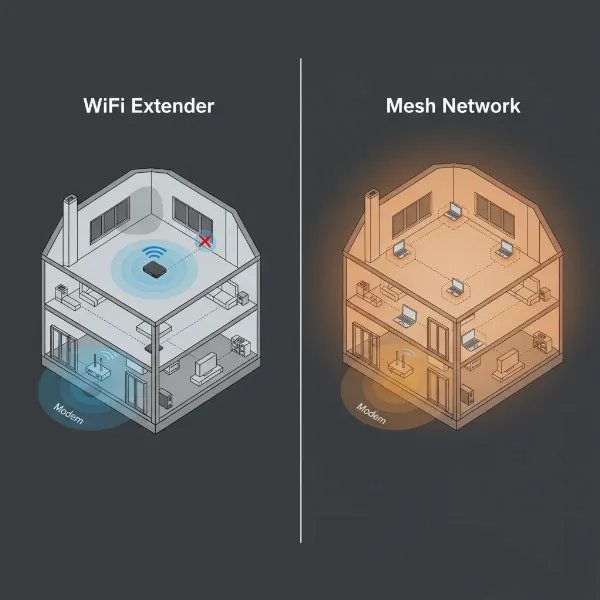 Comparison of Wifi Extender and Mesh Network topology in a home setting
8. Installation and Optimization Tips
Proper installation and optimization are key to maximizing the performance of both Wi-Fi extenders and Mesh Network systems. A well-placed device can make a significant difference in your network’s efficiency and coverage.
Wifi Extender:
- Strategic Placement: The most crucial tip for extenders is placement. Place your extender halfway between your main router and the Wi-Fi dead zone. It needs to receive a strong enough signal from the router to effectively rebroadcast it. Too far from the router, and it will just repeat a weak signal. Too close, and it won’t extend coverage significantly.
- Avoid Obstacles: Position the extender away from physical obstructions like thick walls, large metal objects, and appliances that can interfere with Wi-Fi signals (e.g., microwaves, cordless phones).
- Firmware Updates: Always ensure your extender’s firmware is up to date for optimal performance and security.
- Single Device Focus: Remember that extenders are best for addressing one or two specific weak spots, rather than trying to cover an entire large home.
Mesh Network:
- Node Placement: Place your Mesh nodes strategically to create overlapping coverage throughout your home. Start with the main node connected to your modem, then space satellite nodes evenly to cover your desired areas. Most systems will guide you through optimal placement using their mobile apps.
- Backhaul Optimization: If your Mesh system supports wired backhaul (connecting nodes via Ethernet cable), utilize it for the best performance. This frees up wireless channels for your devices, leading to faster, more stable connections.
- App Control: Leverage the dedicated smartphone app for your Mesh system. These apps provide invaluable tools for monitoring network performance, running speed tests, setting up guest networks, and managing parental controls.
- Minimal Interference: While more robust than extenders, still try to avoid placing nodes directly next to major electronics or in enclosed spaces that can impede signal propagation.
General Tips for Both:
- Test Your Current Signal: Before purchasing any device, use a Wi-Fi analyzer app on your smartphone or computer to identify your home’s actual dead zones and signal strengths. This helps confirm whether an extender or Mesh system is truly needed.
- Consider Your Internet Plan: No Wi-Fi solution can improve speeds beyond what your internet service provider (ISP) delivers. Ensure your internet plan speed is adequate for your household’s needs. If speeds are slow everywhere, you might need an ISP upgrade, not just a coverage solution.
9. Where to Purchase Wifi Extenders and Mesh Systems
When you’re ready to enhance your home’s Wi-Fi, knowing where to buy these devices is as important as knowing what to buy. Both Wi-Fi extenders and Mesh Network systems are widely available through various channels.
- Online Retailers: Major online marketplaces such as Amazon, Best Buy, and Newegg offer a vast selection of models from different brands, often with competitive pricing and detailed customer reviews. This allows for easy comparison and home delivery.
- Electronics Stores: Brick-and-mortar electronics retailers like Best Buy or other local computer stores provide the advantage of seeing devices in person and getting immediate advice from sales associates. You can also pick up your purchase instantly.
- Manufacturer Websites: Buying directly from brands like TP-Link, Netgear, Linksys, Eero, or Google Wi-Fi can sometimes offer exclusive deals, bundles, or direct access to manufacturer support.
- Internet Service Providers (ISPs): Some ISPs offer their own branded Mesh systems or Wi-Fi extenders, often integrated with their service. This can sometimes simplify setup and support, but may limit your hardware choices.
When purchasing, always look for reputable brands known for network hardware. Read recent customer reviews to gauge real-world performance and reliability. Check the warranty and return policy, as networking devices can sometimes have compatibility nuances or require troubleshooting.
10. A Smart Buying Guide for Your Wi-Fi Solution
Navigating the options for Wi-Fi improvement can feel overwhelming. This buying guide distills the essential steps to ensure you select the perfect solution for your home, whether it’s a simple extender or a sophisticated Mesh system.
- Assess Your Needs Thoroughly: Start by identifying your primary problem. Is it just one or two specific weak spots, or is your entire home plagued by poor coverage? How many people and devices are consistently using the internet? What are your most common online activities (streaming, gaming, working from home)? Your usage patterns will heavily dictate the best solution.
- Set a Realistic Budget: Wi-Fi extenders are typically priced from $30 to $100, offering an entry-level solution. Mesh Network systems, which involve multiple nodes, usually range from $150 to $500 or more, representing a more significant investment for a premium experience.
- Check Compatibility (Especially for Extenders): If you’re considering a Wi-Fi extender, ensure it’s compatible with your existing router. While most are universally compatible, some brands offer better performance when paired with their own ecosystem. Mesh systems often replace your existing router’s Wi-Fi function, so compatibility is less of a concern there.
- Read Reviews and Expert Opinions: Before making a purchase, consult independent reviews from tech publications and user reviews on retailer sites. Pay attention to feedback regarding real-world performance, ease of setup, and long-term reliability. Look for consistent positive feedback on aspects important to you, like gaming performance or handling many devices.
- Consider Future Growth: Will your home’s internet needs grow in the next few years? Perhaps you’re adding more smart devices, or family members will be streaming more content. Mesh systems are inherently more scalable, allowing you to easily add nodes as your needs evolve, making them a more future-proof investment for many.
By carefully evaluating these factors, you can confidently choose between a Wi-Fi extender and a Mesh Network system, ensuring your home is equipped with the optimal solution for seamless, high-performance internet connectivity.
Conclusion
Navigating the world of home networking can be complex, but choosing between a Wi-Fi extender and a Mesh Network boils down to understanding your specific needs. While a Wi-Fi extender offers an affordable and straightforward fix for isolated dead zones in smaller spaces, a Mesh Network provides a robust, seamless, and high-performance solution for comprehensive whole-home coverage, especially in larger homes with numerous connected devices. Both technologies have their place in enhancing your digital life, ensuring you can stream, game, and work without frustrating interruptions. By assessing your home size, internet usage, and budget, you can empower yourself to make the best decision for a consistently strong and reliable Wi-Fi experience. What steps will you take to optimize your home Wi-Fi network?
Frequently Asked Questions
Does a Wifi extender slow down internet speed?
Yes, Wi-Fi extenders can sometimes reduce internet speed. This often happens because the extender has to receive the signal from your router and then rebroadcast it, which can create a bottleneck. Additionally, if the extender and your devices are all on the same wireless channel, they have to take turns communicating, leading to slower overall performance compared to directly connecting to your main router or using a Mesh system’s dedicated backhaul.
Can I use a Wifi extender with a Mesh network?
Generally, it’s not recommended to use a standard Wi-Fi extender with a Mesh network. Mesh systems are designed to create a unified network with their own nodes working in conjunction. Adding a traditional extender can disrupt this optimized system, potentially creating interference, separate networks, and diminishing the seamless performance a Mesh system aims to provide. If you need more coverage with a Mesh system, it’s best to add another compatible Mesh node.
How many Mesh nodes do I need?
The number of Mesh nodes you need depends on your home’s size, layout, and materials (e.g., thick walls can block signals). As a general guideline, a two-pack Mesh system typically covers homes up to 2,000-3,000 sq ft, while a three-pack can extend coverage to 4,000-5,500 sq ft. Many manufacturers provide coverage estimates for their systems, and their mobile apps can often help you determine optimal placement and how many nodes are ideal for your specific environment.
What is “backhaul” in a Mesh network?
“Backhaul” in a Mesh network refers to the dedicated connection or communication channel between the different Mesh nodes and the main router. This link is crucial for transmitting data efficiently throughout the system without interfering with the Wi-Fi signals sent to your devices. Backhaul can be wireless (often using a dedicated band like 5GHz or 6GHz to avoid congestion) or wired (using Ethernet cables), with wired backhaul generally offering the most stable and fastest performance.
Are Wifi extenders secure?
Wi-Fi extenders can be secure, but their security largely depends on how they are configured and the security standards they support. Like your main router, an extender should be set up with strong encryption protocols (WPA2 or WPA3 is recommended) and a unique, complex password. Ensure you keep the extender’s firmware updated to patch any known vulnerabilities. Using outdated security settings or neglecting firmware updates can leave your extended network susceptible to security risks.