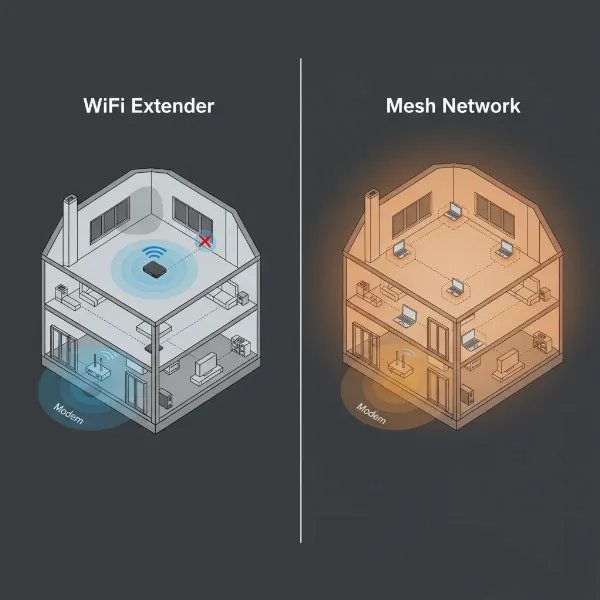
Navigating the complexities of home networking can be daunting, especially when trying to eliminate frustrating dead zones or improve sluggish internet speeds. For many, the choice boils down to a Wifi extender for wireless flexibility or an Ethernet cable for unparalleled stability. Understanding the core differences and ideal use cases for each is crucial to building a robust home network that meets your specific demands.
1. Wifi Extenders: Extending Your Wireless Reach
A Wifi extender, sometimes called a range extender or repeater, is a device designed to expand the coverage area of your existing wireless network. It works by capturing the Wifi signal from your main router and then rebroadcasting it, effectively extending the signal to areas of your home where coverage might be weak or non-existent.
The primary appeal of Wifi extenders lies in their ease of use and flexibility. They are generally cost-effective and integrate with your current router without requiring a full system overhaul. Installation is often simple, making them a plug-and-play solution for quick fixes. You can easily move them around to target specific dead zones, offering a degree of flexible placement that wired solutions cannot match. However, this convenience comes with inherent trade-offs. Extenders typically introduce a potential speed reduction, sometimes halving the available bandwidth, especially if they use a single radio for both receiving and retransmitting data. This process also adds latency, which can be noticeable in activities requiring quick response times, like online gaming or video calls. Many basic extenders also create a separate network name (SSID), requiring devices to manually switch between networks as you move around your home. Moreover, Wifi signals are susceptible to interference from other electronic devices, neighboring networks, or physical obstacles like walls and appliances, which can further degrade performance.
Optimal performance from a Wifi extender depends heavily on its placement, ideally halfway between your router and the weak signal area, with minimal obstructions. Compatibility with your existing router, updated firmware, and choosing a dual-band model (2.4GHz and 5GHz) can also significantly influence its effectiveness.
2. Ethernet Cables: The Unrivaled Wired Connection
An Ethernet cable provides a direct, physical connection between a network device (like a computer, gaming console, or smart TV) and your router or modem. Unlike wireless signals that travel through the air, data sent over an Ethernet cable moves through a dedicated pathway, offering a fundamentally different networking experience.
The most significant advantage of Ethernet cables is their superior performance in terms of speed and latency. A wired connection consistently delivers higher data transfer speeds and virtually minimal latency compared to Wifi, making it the preferred choice for bandwidth-intensive tasks. They offer unwavering reliability and consistent performance, as they are far less susceptible to electromagnetic interference, signal degradation over distance (within specified limits), or physical barriers. This enhanced stability also contributes to greater security, as data transmitted via a physical cable is inherently harder for unauthorized users to intercept than wireless signals. While initial installation might involve running cables through walls or along baseboards, the long-term benefits of a stable, high-speed connection often outweigh this effort.
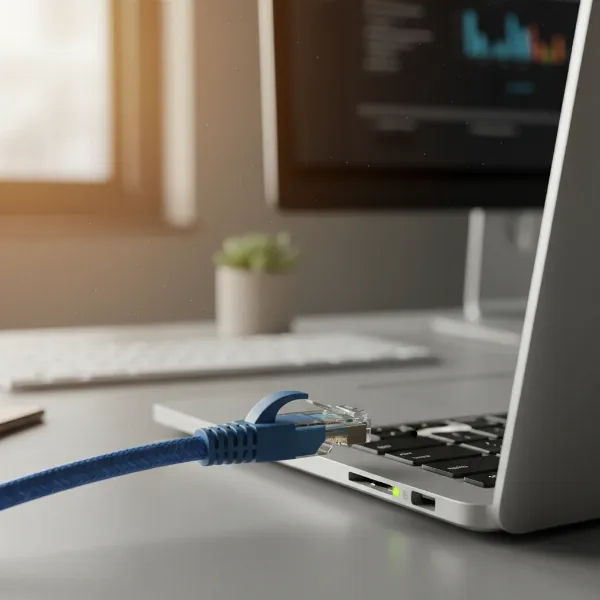 Ethernet cable connected to a laptop for a stable internet connection.
However, Ethernet cables present some limitations. Their primary drawback is limited mobility; devices are tethered to the cable, restricting their placement and user movement. Installation complexity can be a concern, particularly in existing structures where running visible cables might be impractical or aesthetically undesirable. While robust, Ethernet cables also have distance limitations, with most standard twisted-pair cables performing optimally up to 100 meters (328 feet). Exceeding this length can lead to signal loss and reduced performance. The cable category (e.g., Cat5e, Cat6, Cat6a) also affects its maximum speed and bandwidth, with newer categories offering higher performance.
3. When to Choose a Wifi Extender
A Wifi extender shines in specific scenarios where wireless convenience takes precedence over maximum performance. If you’re struggling with minor dead zones in areas like a rarely used guest bedroom or a patio where a wired connection is impractical, an extender can provide a straightforward solution. They are ideal for extending connectivity to devices without Ethernet ports, such as smartphones, tablets, or some smart home gadgets, allowing them to access the internet in previously unreachable spots. For light internet usage like casual browsing, social media, or email in far-flung corners of your home, a Wifi extender can provide sufficient coverage without the hassle of running cables. It’s also a good choice if your home layout makes physical cabling difficult or expensive, or if you rent and cannot make permanent modifications.
4. When to Choose an Ethernet Cable
For tasks that demand the utmost in speed, stability, and low latency, an Ethernet cable is the undisputed champion. This makes it the go-to choice for high-bandwidth activities such as competitive online gaming, streaming 4K or 8K video on multiple devices simultaneously, and transferring large files over a local network. Any device requiring a critical, consistent connection, like a work-from-home computer, a network-attached storage (NAS) device, or a home server, will benefit immensely from Ethernet’s reliability. If your home has an office where uninterrupted productivity is paramount, or if you frequently engage in video conferencing, an Ethernet connection ensures a stable and lag-free experience. Essentially, whenever high performance and unwavering stability are non-negotiable, and running cables is feasible, Ethernet stands as the superior choice.
 A high-performance gaming setup with an Ethernet cable ensuring stable connection.
5. An Alternative Solution: Powerline Adapters
When running long Ethernet cables is not an option but you still desire a more stable connection than a Wifi extender, powerline adapters offer an intriguing alternative. These devices use your home’s existing electrical wiring to create a wired network. You simply plug one adapter into a wall socket near your router and connect it via Ethernet, then plug another adapter into a socket in the room where you need internet access and connect your device to it with another Ethernet cable.
Powerline adapters generally offer greater stability and often faster speeds compared to wireless extenders, as data travels through dedicated electrical circuits rather than being broadcast wirelessly. They can also provide a more secure connection because the data is contained within your home’s electrical system, making it less susceptible to external interception. Setting them up is typically straightforward, often a plug-and-play process. However, their performance can be highly dependent on the quality and age of your home’s electrical wiring, and they perform best when both adapters are on the same electrical circuit.
6. Comparing Wifi Extenders and Ethernet Cables
To simplify your decision, here’s a direct comparison of Wifi extenders and Ethernet cables across key performance indicators:
| Feature | Wifi Extender | Ethernet Cable |
|---|---|---|
| Speed | Can reduce bandwidth, susceptible to slowdowns | Generally provides full theoretical speeds |
| Latency | Higher, noticeable lag for sensitive tasks | Very low, ideal for real-time applications |
| Reliability | Susceptible to interference, less stable | Highly stable, consistent performance |
| Security | Less secure (wireless interception risk) | More secure (physical access required for breach) |
| Mobility | High, flexible device placement | Low, device is tethered |
| Installation | Simple plug-and-play, no cabling needed | Can be complex (running wires), may need drilling |
| Cost | Generally affordable | Cable cost can vary, installation adds to cost |
| Best Use Case | Extending coverage to minor dead zones | High-bandwidth, low-latency applications |
7. Optimizing Your Network: Best Practices
Regardless of whether you choose a Wifi extender or an Ethernet cable, several best practices can help maximize your network’s performance. For Wifi extenders, strategic placement is paramount. Position it about halfway between your main router and the area with weak signal, ensuring it receives a strong signal from the router to effectively retransmit it. Avoid placing it near large metal objects, thick walls, or other electronics that can cause interference. Regularly updating the firmware of both your router and extender can also improve compatibility and performance.
For Ethernet connections, choosing the right cable category is important. Cat5e is sufficient for most Gigabit Ethernet needs, while Cat6 or Cat6a cables support higher speeds (up to 10 Gbps) over shorter distances and are more robust against crosstalk. Ensure your cables are not excessively long (staying under 100 meters for optimal performance) and are physically protected from damage, sharp bends, or being pinched. A well-organized cable management system not only improves aesthetics but also prevents damage and simplifies troubleshooting.
“A well-planned home network, leveraging the strengths of both wired and wireless connections, is the cornerstone of seamless digital life.” – Sarah Chen, Network Architect
8. Buying Guide: Making the Right Decision
Making the right choice between a Wifi extender and an Ethernet cable begins with a clear understanding of your specific needs and environment. First, assess your usage requirements: do you primarily browse the web and stream casual content, or do you engage in high-demand activities like online gaming or 4K streaming? This will dictate the required speed and latency. Next, consider your home layout and the feasibility of running physical cables. Is your home multi-story with thick walls, or is it an open-plan space? Think about the devices you need to connect—do they have Ethernet ports, or are they exclusively wireless? Finally, determine your budget for both the equipment and potential installation costs. While Ethernet cables might initially seem more expensive due to installation, their long-term performance and reliability can offer significant value. Don’t forget to read reviews and check compatibility between any new device and your existing network hardware.
Conclusion
Choosing between a Wifi extender and an Ethernet cable is not about one being universally “better” than the other, but rather about selecting the optimal tool for specific networking challenges. While Wifi extenders offer convenient, flexible wireless coverage for tackling minor dead zones, they often come with compromises in speed and latency. Ethernet cables, conversely, provide unmatched speed, stability, and security, making them ideal for high-performance applications where a direct, wired connection is feasible. Powerline adapters offer a middle ground, leveraging existing electrical wiring for a more stable connection than wireless. By carefully evaluating your unique needs, home environment, and budget, you can make an informed decision to optimize your home network, ensuring a fast, reliable, and secure internet experience across every corner of your living space. What combination of wired and wireless solutions will best empower your digital lifestyle?
Frequently Asked Questions
Do Wifi extenders really halve your speed?
|
Our Picks for the Best Wifi extender in 2026
As an Amazon Associate I earn from qualifying purchases.
|
||
| Num | Product | Action |
|---|---|---|
| 1 | WiFi Extender Signal Booster for Home 2026 Internet Repeater Long Range Up to 9995 Sq. Ft. Whole Home WiFi Coverage |

|
| 2 | 2026 WiFi Extender Signal Booster - 2.4GHz 300Mbps WiFi Booster for Home, Covers Up to 9999 Sq. Ft, Easy Setup, Ethernet Port & Access Point, Stable Internet Performance with 60+ Devices(White) |
|
| 3 | TP-Link WiFi Extender with Ethernet Port, Dual Band 5GHz/2.4GHz, Up to 44% More Bandwidth Than Single Band, Covers Up to 1200 Sq.ft and 30 Devices, Signal Booster Amplifier Supports OneMesh(RE220) |
|
| 4 | WiFi Extender, WiFi Extenders Signal Booster for Home Up to 5000 sq.ft and 50 Devices, WiFi Range Extender, Wireless Repeater, Long Range Amplifier with Ethernet Port, 1-Tap Setup, Alexa Compatible |
|
| 5 | WiFi Extender Signal Booster, WiFi Booster Dual Band 5.8GHz&2.4GHz, Covers Up to 10000 Sq.ft, 1.2Gbps WiFi Repeater with One Ethernet Port, One-tap Setup |
|
| 6 | WiFi Extender WiFi Booster 1200 Mbps Dual Band (5GHz/2.4GHz) WiFi Extenders Signal Booster for Home, Internet Extended Booster WiFi Repeater (White) |
|
| 7 | TP-Link AC1900 WiFi Range Extender RE550 | Dual-Band Wireless Repeater Amplifier w/Gigabit Ethernet Port | Up to 2200 Sq. Ft., 32 Devices | Internet Signal Booster | APP Setup | EasyMesh Compatible |
|
| 8 | TP-Link AX3000 WiFi 6 Range Extender | PCMag Editor's Choice | Dual-Band Wireless Repeater w/Ethernet Port | Up to 2400 Sq. Ft., 64 Devices | Internet Signal Booster | APP Setup | EasyMesh (RE715X) |
|
| 9 | TP-Link AC1200 WiFi Extender, 2023 Engadget Best Budget Pick, 1.2Gbps Signal Booster for Home, Dual Band 5GHz/2.4GHz, Covers Up to 1500 Sq.ft and 30 Devices,Support Onemesh, One Ethernet Port (RE315) |
|
| 10 | 1200Mbps WiFi Extender Signal Booster for Home, Dual Band 5GHz/2.4GHz Wireless Internet Repeater with 4 External Antennas, Covers Up to 3600 Sq.ft & Supports 80 Devices, AP Mode with Ethernet Port |
|
Many basic Wifi extenders that use a single radio for both receiving and retransmitting data can indeed effectively halve the bandwidth available to connected devices. More advanced dual-band or tri-band extenders, especially those with dedicated backhaul bands, can mitigate this issue by using separate radios or bands for communication with the router, thus reducing the performance impact.
Can a long Ethernet cable be too long?
Yes, standard copper Ethernet cables, such as Cat5e or Cat6, have a maximum recommended length of 100 meters (approximately 328 feet) for optimal performance. Beyond this distance, signal attenuation (loss of strength) can occur, leading to decreased speeds, increased latency, and potential data errors. For longer distances, fiber optic cables or network switches are often required.
Is Ethernet always faster than Wifi?
In most practical scenarios, especially for high-bandwidth activities and within typical home or office environments, a direct Ethernet connection will consistently offer faster speeds and lower latency compared to a Wifi connection. While modern Wifi standards (like Wifi 6 and Wifi 7) boast impressive theoretical speeds, real-world Wifi performance is often impacted by interference, distance, and obstacles, making Ethernet generally more reliable for peak performance.
What’s the difference between a Wifi extender and a mesh system?
A Wifi extender connects wirelessly to your existing router and rebroadcasts the signal, often creating a separate network and potentially halving bandwidth. A mesh Wifi system, on the other hand, consists of multiple nodes that work together to form a single, seamless, and intelligent network with the same SSID. Mesh systems typically offer better performance, broader coverage, and more advanced features like automatic band steering, making them a premium solution for whole-home coverage.