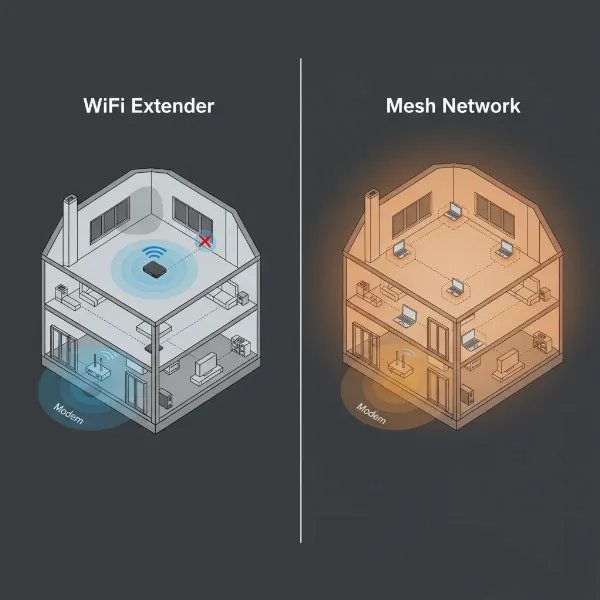
Are you battling frustrating Wi-Fi dead zones, slow internet speeds, or dropped connections in your home? You’re not alone. Many households face the challenge of an inconsistent wireless network, struggling to get reliable internet access in every room. The solution often comes down to two main options: investing in a Wi-Fi extender or upgrading to a new, more powerful router. Both aim to boost your home’s connectivity, but they achieve this in distinct ways, each with its own set of advantages and limitations. Understanding these differences is crucial to making an informed decision that truly solves your network woes and provides the smooth, fast internet experience you deserve.
1. Understanding Your Wi-Fi Challenges: When to Act?
Before diving into solutions, it’s essential to identify the root cause of your Wi-Fi frustrations. Are certain rooms simply out of range, or is your entire network sluggish, even near the router? Common issues include “dead zones” where the signal barely reaches, inconsistent speeds that fluctuate dramatically, or frequent disconnections that disrupt work or entertainment. These problems can stem from your home’s layout, building materials, interference from other devices, or simply an outdated router struggling to keep up with modern demands. A quick speed test in various locations and checking your router’s age can provide valuable clues, helping you determine if a simple boost or a fundamental upgrade is necessary.
2. What is a Wi-Fi Extender?
A Wi-Fi extender, also known as a Wi-Fi repeater or booster, is a device designed to expand the coverage of your existing wireless network. It works by capturing the Wi-Fi signal from your main router and then rebroadcasting it to create a secondary network, effectively stretching the signal to areas previously out of reach. Think of it as a middleman, extending the existing signal further into your home. Most extenders operate in repeat mode, connecting wirelessly to your main router. Some advanced models can also function in Access Point (AP) mode, where they connect to your router via an Ethernet cable and then broadcast a new Wi-Fi signal, often providing more stable and faster extended coverage.
3. The Advantages and Disadvantages of Wi-Fi Extenders
Wi-Fi extenders offer a quick and often budget-friendly solution to common connectivity issues, but they come with trade-offs.
Advantages of Wi-Fi Extenders:
- Cost-Effective: Typically, extenders are significantly cheaper than purchasing a new router or a mesh Wi-Fi system, making them an attractive option for those on a tight budget.
- Easy Setup: Many extenders boast a simple plug-and-play setup, often requiring just a few presses of a WPS button or a quick configuration via a web interface or app.
- Extended Coverage for Dead Zones: Their primary benefit is bringing a Wi-Fi signal to specific spots in your home where the original router’s signal is weak or non-existent, like a basement office or an upstairs bedroom.
- Works with Existing Router: Extenders are generally compatible with any standard Wi-Fi router, regardless of brand, allowing you to utilize your current equipment.
Disadvantages of Wi-Fi Extenders:
- Potential Speed Reduction: A significant drawback is the common reduction in bandwidth. Because an extender receives and retransmits data using the same wireless radio, the effective speed for devices connected to it can be cut in half.
- Separate Network: Many extenders create a new network name (e.g., “YourNetwork_EXT”), meaning your devices might not seamlessly switch between the main router and the extender, potentially requiring manual switching for the best connection.
- No Improvement to Weak Source Signal: If the signal the extender receives from the main router is already weak, it will simply rebroadcast that weak signal, offering little actual improvement in performance.
- Interference Issues: Placing an extender poorly or having multiple extenders can lead to signal overlap and interference, making your network less stable.
- Not Ideal for Heavy Use: For large households with many devices, online gaming, or 4K streaming, the speed reduction and potential for instability can make extenders less suitable.
4. The Power of Upgrading: What a New Router Offers
A new Wi-Fi router serves as the central hub of your home network, receiving internet from your service provider and distributing it to all your connected devices. Upgrading your router means investing in the core of your network, and this often brings a cascade of benefits far beyond simple range extension. Modern routers, especially those supporting the latest Wi-Fi standards like Wi-Fi 6 or Wi-Fi 7, are engineered for significantly improved performance across the board. They offer more powerful processors, advanced antenna designs, and sophisticated software that can dramatically enhance your entire online experience.
[image-1|modern-wifi-router-home-network|Sleek, modern Wi-Fi router in a contemporary home environment, optimizing network performance|
A high-tech, sleek black Wi-Fi 7 router with multiple external antennas, placed on a clean wooden desk in a bright, modern living room. The router has subtle LED indicators, and a blurred background shows a comfortable home setting, emphasizing advanced network technology in a domestic context. Realistic photo, eye-level shot, soft ambient lighting.]
Benefits of Upgrading to a New Router:
- Faster Speeds and Increased Bandwidth: New routers support the latest Wi-Fi standards (like Wi-Fi 6, 6E, and 7), which are designed for much higher speeds and greater data capacity, allowing more devices to connect simultaneously without slowdowns.
- Improved Reliability and Stability: Enhanced hardware and software, including features like Quality of Service (QoS), help manage network traffic more efficiently, leading to fewer dropped connections and a smoother experience for activities like streaming and gaming.
- Comprehensive Whole-Home Coverage: While not always guaranteed, a modern, powerful router often has better antennas and signal processing capabilities, which can extend a stronger, more consistent signal throughout a larger area than an older model.
- Enhanced Security: Newer routers come equipped with the latest security protocols, such as WPA3 encryption, offering superior protection against cyber threats and ensuring your home network and smart devices are more secure. Regular firmware updates from reputable brands also patch vulnerabilities quickly.
- Advanced Features: Modern routers often include sophisticated features like robust parental controls, dedicated guest networks, USB ports for network storage, and beamforming technology to direct signals more precisely to devices.
- Better Multi-Device Support: With more smart home devices, laptops, phones, and streaming gadgets than ever, new routers are built to handle a higher density of connected devices without performance degradation.
- Future-Proofing: Investing in a router with the latest Wi-Fi standards ensures your network is ready for upcoming devices and higher internet speeds for years to come.
5. When a New Router is the Superior Choice
Upgrading your router is often the best long-term solution, particularly in several key scenarios. If your current router is several years old (typically 3-5 years or more), it’s likely struggling to meet the demands of modern internet usage. An outdated router can be the bottleneck for your entire network, preventing you from fully utilizing the high-speed internet plan you’re paying for. You should prioritize a new router if you experience slow speeds even when close to your existing router, frequent disconnections, or a generally unreliable connection throughout your home. This is especially true if you have a large number of connected devices, engage in bandwidth-intensive activities like 4K streaming or online gaming, or require advanced network management features and enhanced security. A new router addresses the core of your network, providing a more robust, stable, and faster foundation for all your online activities.
6. The Mesh Wi-Fi Alternative: A Seamless Solution
Beyond traditional routers and simple extenders, Mesh Wi-Fi systems have emerged as a powerful alternative for comprehensive home coverage. A mesh system consists of a main router unit connected to your modem and several satellite nodes placed strategically around your home. Unlike extenders that create separate networks, mesh units work together to form a single, unified Wi-Fi network, providing seamless roaming as you move from room to room.
Key characteristics of Mesh Wi-Fi:
- Unified Network: All units broadcast the same network name (SSID), eliminating the need to manually switch between networks.
- Seamless Roaming: Devices automatically connect to the strongest mesh node as you move, ensuring an uninterrupted experience.
- Wider Coverage: Mesh systems are designed to cover very large homes or multi-story buildings more effectively than a single router or extender setup.
- Intelligent Traffic Management: Mesh systems often employ smart technology to route data efficiently, minimizing latency and optimizing speeds across the network.
While Mesh Wi-Fi systems are generally more expensive than a single new router or an extender, they offer a superior combination of coverage, speed, and reliability for larger homes with numerous connected devices. They bridge the gap between the limited capabilities of an extender and the single-point weakness of even a powerful traditional router. For many, a mesh system represents the optimal solution for achieving truly seamless whole-home connectivity.
7. Key Factors to Consider When Deciding
Choosing between a Wi-Fi extender, a new router, or a mesh system depends heavily on your specific needs, budget, and home environment.
- Budget: Wi-Fi extenders are the most economical choice, typically costing less than a new router. A new, high-performance router represents a mid-range investment, while a full mesh Wi-Fi system is usually the most significant financial outlay.
- Home Size & Layout: For addressing a small, isolated dead zone in an otherwise well-covered small home, an extender might suffice. For medium-sized homes with general performance issues or more widespread dead zones, a new router is a strong contender. Large homes, multi-story houses, or properties with significant signal obstacles (thick walls) will benefit most from a mesh Wi-Fi system.
- Current Router Age & Performance: If your existing router is old (5+ years) or performs poorly even near it, an extender won’t fix the fundamental problem. In this case, a new router or mesh system is essential. If your router is relatively new and strong, but simply can’t reach one specific area, an extender could be a temporary fix.
- Number of Devices & Usage: Households with many devices, heavy streaming, online gaming, or significant data transfer require the higher capacity, speed, and stability offered by a new, advanced router or a mesh system. For basic browsing with a few devices, an extender might be tolerable, but don’t expect top performance.
- Desired Features: If you need advanced security, robust parental controls, guest networks, or specific traffic prioritization (QoS), a new, feature-rich router or a mesh system will provide these capabilities. Extenders typically offer very limited feature sets.
- Ease of Management: While extenders are simple to set up, they can complicate network management with separate SSIDs. New routers offer integrated management. Mesh systems, despite multiple units, often provide intuitive app-based management for the entire unified network.
“When deciding, consider not just your immediate dead zones, but also your household’s future needs in terms of speed, device count, and overall reliability. A solution that feels right today might be obsolete tomorrow if you don’t account for growth.” – Alex Chen, Network Solutions Architect
8. Making Your Choice: Wi-Fi Extender, New Router, or Mesh?
The “real winner” in the Wi-Fi extender vs. new router debate isn’t a single device but rather the solution that best aligns with your specific connectivity needs and expectations.
- Choose a Wi-Fi Extender if: You have one or two small, localized dead zones in an otherwise well-performing network, you’re on a very tight budget, and you don’t demand top-tier speeds or seamless roaming in the extended area.
- Opt for a New Router if: Your current router is old or underperforming, you experience slow speeds and dropped connections throughout your home (even near the router), you have numerous devices, or you desire enhanced security, advanced features, and faster speeds for a medium-sized home.
- Invest in a Mesh Wi-Fi System if: You have a large home with multiple floors or significant architectural obstructions, require seamless whole-home coverage without speed degradation, have many connected devices, and are willing to invest more for a truly unified and reliable network experience.
Ultimately, the goal is to achieve consistent, fast, and reliable Wi-Fi throughout your entire living space. By carefully evaluating your current network’s pain points and considering the distinct strengths of each solution, you can empower your home with the optimal connectivity it needs to thrive in today’s digital world.
Conclusion
Navigating the complexities of home Wi-Fi can be daunting, but choosing between a Wi-Fi extender, a new router, or a mesh system is a critical step towards a better online experience. While extenders offer an affordable, quick fix for isolated dead zones, they often come at the cost of reduced speed and a fragmented network. A new, upgraded router provides a more robust foundation, delivering enhanced speed, security, and features that benefit your entire home network, especially if your current hardware is outdated. For truly expansive coverage and a seamless user experience, mesh Wi-Fi systems stand out as the premium solution, creating a unified and highly efficient network across large areas. Carefully assess your home’s size, your budget, and your specific online demands to determine the most effective approach. What kind of Wi-Fi challenges are you currently facing in your home, and which solution do you think would best address them?
Frequently Asked Questions
Does a Wi-Fi extender decrease internet speed?
|
Our Picks for the Best Wifi extender in 2026
As an Amazon Associate I earn from qualifying purchases.
|
||
| Num | Product | Action |
|---|---|---|
| 1 | 1200Mbps WiFi Extender Signal Booster for Home, Dual Band 5GHz/2.4GHz Wireless Internet Repeater with 4 External Antennas, Covers Up to 3600 Sq.ft & Supports 80 Devices, AP Mode with Ethernet Port |

|
| 2 | TP-Link AC1200 WiFi Extender, 2023 Engadget Best Budget Pick, 1.2Gbps Signal Booster for Home, Dual Band 5GHz/2.4GHz, Covers Up to 1500 Sq.ft and 30 Devices,Support Onemesh, One Ethernet Port (RE315) |
|
| 3 | TP-Link AX3000 WiFi 6 Range Extender | PCMag Editor's Choice | Dual-Band Wireless Repeater w/Ethernet Port | Up to 2400 Sq. Ft., 64 Devices | Internet Signal Booster | APP Setup | EasyMesh (RE715X) |
|
| 4 | WiFi Extender Signal Booster for Home 2026 Internet Repeater Long Range Up to 9995 Sq. Ft. Whole Home WiFi Coverage |
|
| 5 | 2026 WiFi Extender Signal Booster - 2.4GHz 300Mbps WiFi Booster for Home, Covers Up to 9999 Sq. Ft, Easy Setup, Ethernet Port & Access Point, Stable Internet Performance with 60+ Devices(White) |
|
| 6 | TP-Link WiFi Extender with Ethernet Port, Dual Band 5GHz/2.4GHz, Up to 44% More Bandwidth Than Single Band, Covers Up to 1200 Sq.ft and 30 Devices, Signal Booster Amplifier Supports OneMesh(RE220) |
|
| 7 | WiFi Extender WiFi Booster 1200 Mbps Dual Band (5GHz/2.4GHz) WiFi Extenders Signal Booster for Home, Internet Extended Booster WiFi Repeater (White) |
|
| 8 | WiFi Extender, WiFi Extenders Signal Booster for Home Up to 5000 sq.ft and 50 Devices, WiFi Range Extender, Wireless Repeater, Long Range Amplifier with Ethernet Port, 1-Tap Setup, Alexa Compatible |
|
| 9 | TP-Link AC1900 WiFi Range Extender RE550 | Dual-Band Wireless Repeater Amplifier w/Gigabit Ethernet Port | Up to 2200 Sq. Ft., 32 Devices | Internet Signal Booster | APP Setup | EasyMesh Compatible |
|
| 10 | WiFi Extender Signal Booster, WiFi Booster Dual Band 5.8GHz&2.4GHz, Covers Up to 10000 Sq.ft, 1.2Gbps WiFi Repeater with One Ethernet Port, One-tap Setup |
|
Yes, a Wi-Fi extender can decrease internet speed, often by as much as half. This is because most extenders use a single wireless radio to both receive the signal from your main router and then rebroadcast it. This “double duty” process means that data takes longer to travel, resulting in slower speeds for devices connected to the extender compared to connecting directly to the main router.
How do I know if I need a new router or an extender?
You likely need a new router if your overall internet speed is slow even near your current router, you experience frequent disconnections across your home, or your router is more than 3-5 years old and doesn’t support modern Wi-Fi standards. An extender is more suitable if your main router provides good speeds and reliability but simply doesn’t reach one or two specific areas of your home, creating “dead zones.”
Can a Wi-Fi extender replace a router?
No, a Wi-Fi extender cannot replace a router. An extender works by extending the signal of an existing router; it does not have the core routing capabilities to manage your internet connection or create a network from scratch. It always requires a main router to function.