Are you tired of sluggish internet, frustrating dead zones, and dropped connections in your home or office? In today’s hyper-connected world, a reliable Wi-Fi signal everywhere isn’t a luxury; it’s a necessity. From streaming your favorite shows in the bedroom to taking video calls in the backyard, inconsistent Wi-Fi can severely impact your daily life. Fortunately, there’s a straightforward and often budget-friendly solution: the Wi-Fi extender. This comprehensive guide will demystify Wi-Fi extenders, helping you understand how they work, their benefits, and crucial factors to consider so you can select the perfect device to blanket your entire space with strong, stable internet.
1. What is a Wifi Extender and How Does It Work?
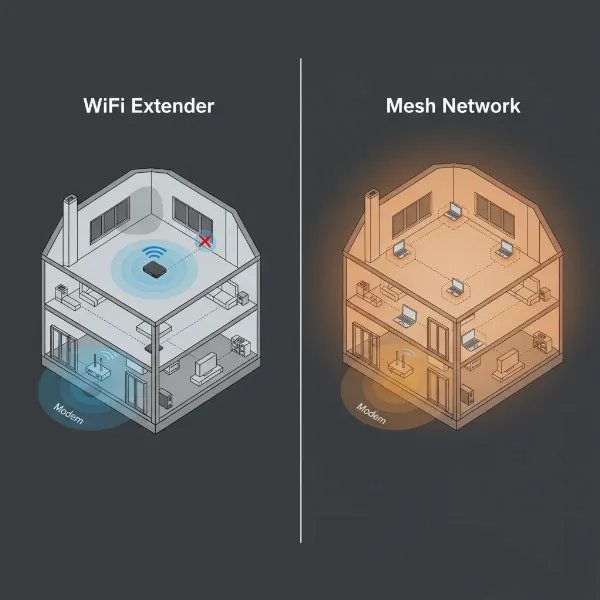
A Wi-Fi extender is a device designed to expand the coverage area of your existing wireless network, ensuring a stronger signal reaches previously underserved parts of your home or office. It acts as a bridge, capturing the Wi-Fi signal from your main router and then rebroadcasting it to extend its reach. This process effectively eliminates “dead zones” where Wi-Fi was weak or non-existent, transforming them into reliable connection points.
Fundamentally, a Wi-Fi extender operates by receiving the radio waves from your primary router and then re-transmitting them further. Think of it as a middleman: if your router is speaking, and a device is too far to hear clearly, the extender listens and repeats the message, ensuring it travels the extra distance. There are primarily two types often confused: Wi-Fi repeaters, which simply rebroadcast the signal (sometimes creating a separate network and potentially halving bandwidth), and Wi-Fi extenders, which are generally considered a more advanced solution. Modern extenders often create a single, seamless network and can utilize dual-band technology or even powerline adapters to deliver a more stable connection without significant speed degradation.
2. Benefits of Using a Wifi Extender
Investing in a Wi-Fi extender offers a multitude of advantages that can dramatically improve your internet experience, making it a popular choice for many households and small businesses. These devices are purpose-built to tackle common connectivity frustrations, delivering tangible improvements without requiring a complete overhaul of your existing network.
The most significant benefit is the expansion of Wi-Fi coverage, reaching areas previously plagued by weak signals or frustrating dead zones, such as basements, attics, or distant rooms. By improving signal strength in these areas, extenders also enhance the speed and stability of your connection, allowing for smoother streaming, gaming, and browsing. Compared to upgrading your primary router or installing a complex mesh system, Wi-Fi extenders are often a cost-effective solution, providing significant improvements at a much lower price point. Furthermore, most modern extenders boast simple and quick installation processes, often featuring plug-and-play functionality or intuitive app-guided setups. Their compact design also offers flexibility, allowing you to easily relocate the extender as your network needs evolve. Lastly, by providing a robust signal across a larger area, extenders support more connected devices simultaneously, ensuring that all your smart home gadgets, laptops, and smartphones maintain a reliable connection.
3. When Do You Need to Use a Wifi Extender?
Recognizing when a Wi-Fi extender is the right solution for your connectivity woes can save you a lot of frustration. If you’ve ever experienced persistent Wi-Fi issues despite having a decent internet plan and router, an extender might be precisely what you need. It’s about bridging the gap where your current setup falls short.
You likely need a Wi-Fi extender if your home has multiple floors or a large footprint, as a single router often struggles to cover such expansive areas effectively. Thick walls, large appliances, or other physical obstructions can severely weaken Wi-Fi signals, creating isolated “dead zones” where connections are unreliable; an extender can bypass these barriers. If you enjoy using your Wi-Fi in outdoor areas like a garden, patio, or garage, an extender can broadcast the signal beyond your home’s immediate perimeter. Lastly, in households with numerous devices connected simultaneously – from smart TVs and gaming consoles to laptops and security cameras – an extender helps manage the network load and ensures each device receives a consistent signal. As network expert John Smith wisely notes, “A Wi-Fi extender is an excellent way to cover those annoying Wi-Fi dead zones, ensuring you don’t have to upgrade your entire internet package.”
4. Key Factors to Consider When Choosing a Wifi Extender
Selecting the right Wi-Fi extender is crucial for achieving optimal network performance and seamless coverage. With a variety of models and specifications available, understanding the key factors will help you make an informed decision tailored to your specific needs. It’s not just about boosting a signal, but about boosting it intelligently.
Wifi Speed (Standards)
|
Our Picks for the Best Wifi extender in 2026
As an Amazon Associate I earn from qualifying purchases.
|
||
| Num | Product | Action |
|---|---|---|
| 1 | 2026 WiFi Extender Signal Booster - 2.4GHz 300Mbps WiFi Booster for Home, Covers Up to 9999 Sq. Ft, Easy Setup, Ethernet Port & Access Point, Stable Internet Performance with 60+ Devices(White) |

|
| 2 | TP-Link WiFi Extender with Ethernet Port, Dual Band 5GHz/2.4GHz, Up to 44% More Bandwidth Than Single Band, Covers Up to 1200 Sq.ft and 30 Devices, Signal Booster Amplifier Supports OneMesh(RE220) |
|
| 3 | TP-Link AC1900 WiFi Range Extender RE550 | Dual-Band Wireless Repeater Amplifier w/Gigabit Ethernet Port | Up to 2200 Sq. Ft., 32 Devices | Internet Signal Booster | APP Setup | EasyMesh Compatible |
|
| 4 | WiFi Extender Signal Booster for Home 2026 Internet Repeater Long Range Up to 9995 Sq. Ft. Whole Home WiFi Coverage |
|
| 5 | TP-Link AX3000 WiFi 6 Range Extender | PCMag Editor's Choice | Dual-Band Wireless Repeater w/Ethernet Port | Up to 2400 Sq. Ft., 64 Devices | Internet Signal Booster | APP Setup | EasyMesh (RE715X) |
|
| 6 | 1200Mbps WiFi Extender Signal Booster for Home, Dual Band 5GHz/2.4GHz Wireless Internet Repeater with 4 External Antennas, Covers Up to 3600 Sq.ft & Supports 80 Devices, AP Mode with Ethernet Port |
|
| 7 | WiFi Extender, WiFi Extenders Signal Booster for Home Up to 5000 sq.ft and 50 Devices, WiFi Range Extender, Wireless Repeater, Long Range Amplifier with Ethernet Port, 1-Tap Setup, Alexa Compatible |
|
| 8 | WiFi Extender WiFi Booster 1200 Mbps Dual Band (5GHz/2.4GHz) WiFi Extenders Signal Booster for Home, Internet Extended Booster WiFi Repeater (White) |
|
| 9 | WiFi Extender Signal Booster, WiFi Booster Dual Band 5.8GHz&2.4GHz, Covers Up to 10000 Sq.ft, 1.2Gbps WiFi Repeater with One Ethernet Port, One-tap Setup |
|
| 10 | TP-Link AC1200 WiFi Extender, 2023 Engadget Best Budget Pick, 1.2Gbps Signal Booster for Home, Dual Band 5GHz/2.4GHz, Covers Up to 1500 Sq.ft and 30 Devices,Support Onemesh, One Ethernet Port (RE315) |
|
The speed rating of an extender indicates the maximum data transfer rate it can handle, measured in Mbps or Gbps. Look for extenders that support Wi-Fi standards compatible with or newer than your main router, such as Wi-Fi 5 (802.11ac), Wi-Fi 6 (802.11ax), or even Wi-Fi 6E/7 for future-proofing. Opting for an extender with a speed rating equal to or higher than your internet plan’s speed will prevent bottlenecks and ensure you get the most out of your connection. Remember that advertised speeds are theoretical maximums; real-world performance will vary.
Frequency Band (Dual-Band or Tri-Band)
Most modern Wi-Fi extenders are dual-band, operating on both the 2.4GHz and 5GHz frequencies. The 2.4GHz band offers better range and wall penetration but slower speeds, making it ideal for general browsing and smart home devices. The 5GHz band provides faster speeds but with a shorter range, perfect for streaming, gaming, and bandwidth-intensive tasks. Tri-band extenders add a dedicated third band (often another 5GHz or 6GHz band) for communication between the extender and the router, reducing congestion and improving overall efficiency, especially in busy networks.
Coverage Range
Consider the physical area you need to cover. Extenders specify their coverage in square feet. Choose a model with a range suitable for your dead zones, keeping in mind that actual coverage can be affected by obstructions. Strategic placement – ideally halfway between your router and the dead zone – is essential to maximize the extender’s effectiveness.
Ethernet Ports
If you have wired devices like smart TVs, gaming consoles, or desktop PCs that require a stable, high-speed connection, select an extender with one or more Gigabit Ethernet ports. This allows you to connect these devices directly to the extender, benefiting from a fast and reliable wired connection to your extended Wi-Fi network.
Additional Features
Modern Wi-Fi extenders come with advanced features that enhance performance and usability.
- MU-MIMO (Multi-User, Multiple-Input, Multiple-Output): Allows the extender to communicate with multiple devices simultaneously, improving efficiency in busy networks.
- Beamforming: Directs Wi-Fi signals specifically towards connected devices, strengthening the connection and extending coverage.
- WPS (Wi-Fi Protected Setup): Offers a one-touch button setup for quick and easy connection to your router.
- Mesh-Ready/OneMesh compatibility: Some extenders can integrate into a mesh network, providing seamless roaming and a single network name across your home, offering a stepping stone towards a full mesh system without replacing your main router.
- Smart Indicators: LED lights that help you find the optimal placement for your extender.
Brand and Price
Opt for reputable brands known for their networking equipment, such as TP-Link, Netgear, Linksys, and Asus, to ensure reliability and good customer support. Prices vary widely based on speed, features, and brand, so determine your budget and find a model that offers the best balance of features and performance within that range. A basic model might cost around $30, while advanced Wi-Fi 6 extenders can exceed $100.
5. Comparison of Popular Wifi Extenders on the Market
To help you navigate the myriad of options, here’s a detailed comparison of some popular Wi-Fi extenders, highlighting their key specifications, features, and suitability for different user needs. This table offers a snapshot of devices that represent various performance tiers and price points.
| Feature | TP-Link AX3000 (RE715X) | Netgear Nighthawk EAX80 | TP-Link RE315 (AC1200) | Linksys RE7000 (AC1900) |
|---|---|---|---|---|
| Brand | TP-Link | Netgear | TP-Link | Linksys |
| Wifi Speed | Up to 3000Mbps (AX3000, Wi-Fi 6) | Up to 6000Mbps (AX6000, Wi-Fi 6) | Up to 1200Mbps (AC1200, Wi-Fi 5) | Up to 1900Mbps (AC1900, Wi-Fi 5) |
| Band | Dual-band (2.4GHz & 5GHz) | Dual-band (2.4GHz & 5GHz) | Dual-band (2.4GHz & 5GHz) | Dual-band (2.4GHz & 5GHz) |
| Coverage Range | Up to 1,500 sq ft | Up to 2,500 sq ft | Up to 1,500 sq ft | Up to 2,500 sq ft |
| Ethernet Ports | 1x Gigabit Ethernet | 4x Gigabit Ethernet | 1x Fast Ethernet (10/100 Mbps) | 1x Gigabit Ethernet |
| Features | OneMesh, Adaptive Path Selection, AP Mode | Mesh Wi-Fi, Smart Roaming, Access Point Mode | OneMesh, Intelligent Signal Light, AP Mode | Seamless Roaming, Cross-band, Spot Finder |
| Price (Approx.) | $105 – $120 | $220 – $250 | $27 – $40 | $89 – $99 |
| Pros | Excellent Wi-Fi 6 performance, Mesh compatibility, easy setup | Top-tier speed, ideal for gaming/4K streaming, multiple Ethernet ports | Very affordable, compact, good for small-medium homes, easy setup | Good balance of speed and coverage, seamless roaming, compact design |
| Cons | Pricier than basic extenders | Highest price point, large footprint | Lower max speed, Fast Ethernet port a bottleneck for wired devices | Not Wi-Fi 6, less advanced features than top-tier options |
- Note: Prices are approximate and subject to change based on retailers and promotions.
6. How to Install and Use Your Wifi Extender
Setting up a Wi-Fi extender is generally a straightforward process, designed to be user-friendly even for those without extensive technical knowledge. Most manufacturers offer simple methods to get your device up and running quickly.
Step-by-Step Installation Guide
- Choose the Ideal Location: This is the most crucial step. Plug your extender into a power outlet roughly halfway between your main router and the Wi-Fi dead zone. Ensure it receives at least a 50% signal strength from your router. Avoid placing it near thick walls, large metal objects, or appliances like microwaves that can cause interference.
- Power Up and Connect: Plug the extender into a wall socket and wait for its power indicator light to stabilize.
- Sync with Your Existing Wi-Fi Network:
- Using WPS (Wi-Fi Protected Setup – Recommended for ease):
- Press the WPS button on your main router.
- Within two minutes, press the WPS button on your Wi-Fi extender.
- Wait for the indicator lights on the extender to show a successful connection (usually a solid green or blue light).
- Manual Setup via Web Interface:
- Plug in the extender and connect your computer or smartphone to its default Wi-Fi network (the name is usually printed on the extender or in its manual, e.g., “TP-Link_Extender”).
- Open a web browser and enter the default IP address (e.g., 192.168.0.254) or domain name (e.g., tplinkrepeater.net) provided in the extender’s manual.
- Log in (default username/password often “admin”).
- Follow the on-screen instructions to select your existing Wi-Fi network(s), enter its password, and configure the extender. You might be prompted to create a new network name for the extended signal or use the same one for seamless roaming.
- Using WPS (Wi-Fi Protected Setup – Recommended for ease):
- Test and Adjust: Once connected, test the Wi-Fi signal strength in the areas you wanted to cover. If needed, slightly adjust the extender’s placement until you achieve optimal signal strength and speed in those areas.
Tips to Optimize Performance
- Optimal Placement: As mentioned, halfway between your router and the weak spot is key. Use the extender’s signal indicator lights or a Wi-Fi analyzer app to pinpoint the best location.
- Firmware Updates: Regularly check for and install firmware updates from the manufacturer’s website. These updates often include performance improvements and security patches.
- Avoid Interference: Keep the extender away from other electronics that emit radio waves, such as cordless phones, Bluetooth devices, and microwaves.
- Consider a Wired Backhaul: If your extender has an Ethernet port, connecting it to your main router via an Ethernet cable (if feasible) can provide a more stable and faster backhaul connection, leading to better overall performance.
7. Where to Buy a Wifi Extender?
Finding a reliable Wi-Fi extender is easier than ever, with numerous options available both online and in physical retail stores. Knowing where to look and what to consider for each purchasing avenue can help you secure the best deal and the right device for your needs.
For convenience and a broad selection, online retailers like Amazon, Best Buy, Target, and Walmart are excellent choices. These platforms offer competitive pricing, extensive customer reviews, and detailed product specifications, allowing for thorough research and comparison before purchase. Key benefits of online shopping include the ability to compare multiple brands and models side-by-side, access to user feedback that can highlight real-world performance, and the convenience of home delivery.
If you prefer to see the device in person or need immediate assistance, physical electronics stores such as Best Buy, Staples, or even department stores like Target and Walmart often stock a range of Wi-Fi extenders. Home improvement stores like The Home Depot also carry some networking equipment. Shopping in-store allows you to ask sales associates questions, inspect the product packaging, and take it home immediately.
Important Considerations When Buying Online:
- Reputable Sellers: Always purchase from the official brand store or a highly-rated seller to avoid counterfeit products or warranty issues.
- Return Policy: Familiarize yourself with the return policy, especially if you’re unsure about compatibility or performance in your home environment.
- Shipping Costs: Factor in shipping costs if not already included, as they can sometimes negate online discounts.
- Customer Reviews: Pay close attention to recent customer reviews, filtering for common complaints or praises regarding setup, speed, and reliability.
8. Buying Guide: How to Choose the Right Wifi Extender
Choosing the right Wi-Fi extender doesn’t have to be overwhelming. By focusing on a few critical aspects, you can confidently select a device that perfectly aligns with your connectivity needs and budget. It’s about making an informed decision that enhances your digital lifestyle.
Determine Your Budget
Wi-Fi extenders vary significantly in price, from basic models under $30 to advanced Wi-Fi 6 devices exceeding $100. Start by setting a realistic budget. Remember that investing a little more in a dual-band or Wi-Fi 6 compatible extender can often provide a much better experience and greater longevity. Balance cost with the features you truly need, avoiding unnecessary spending on overkill specifications.
Assess Your Usage Needs
Consider how you use your internet. Are you primarily looking to eliminate a small dead zone for light browsing, or do you need to support 4K streaming, online gaming, and multiple smart devices across a large area?
- Basic Needs: If you just need to extend coverage to one small area for emails and general browsing, a simple dual-band Wi-Fi 5 extender might suffice.
- High-Demand Users: For gaming, large file transfers, or numerous connected devices, prioritize Wi-Fi 6 or higher, dual or tri-band extenders with Gigabit Ethernet ports.
- Outdoor Coverage: Look for models specifically designed for outdoor use with enhanced durability and weather resistance.
Check Compatibility with Your Existing Router
While most Wi-Fi extenders are universally compatible with any standard router, checking for specific compatibility is still a good practice. If your router supports advanced features like Wi-Fi 6 or a proprietary mesh system (e.g., TP-Link OneMesh, Netgear Nighthawk Mesh), choosing an extender from the same brand or one that supports these technologies can lead to more seamless integration and better performance. Ensure the extender supports the same Wi-Fi frequency bands (2.4GHz, 5GHz) as your router to maximize speed and efficiency.
Read Reviews and Expert Opinions
Before finalizing your purchase, take time to read both customer reviews and expert analyses. Customer reviews on retailer websites can offer insights into real-world performance, ease of setup, and common issues. Expert reviews from tech publications often provide detailed performance metrics and comparisons, helping you understand how a device stacks up against its competitors. Look for consistent feedback regarding reliability, speed, and technical support. This collective wisdom can highlight potential pitfalls or unexpected benefits that specifications alone might not reveal.
Conclusion
Navigating the world of Wi-Fi extenders can seem complex, but with the right knowledge, you can easily find a solution to your connectivity challenges. These devices offer a powerful and often cost-effective way to banish frustrating dead zones and enhance signal strength throughout your home or office. By understanding what a Wi-Fi extender does, recognizing when you need one, and carefully considering factors like speed, band, and extra features, you empower yourself to make a smart choice. Whether you’re a casual browser or a heavy gamer, there’s a Wi-Fi extender perfectly suited to bring seamless internet to every corner of your digital life. What will you do with your newfound, reliable Wi-Fi coverage?
Frequently Asked Questions
Can a Wi-Fi extender decrease internet speed?
A Wi-Fi extender can sometimes lead to a slight reduction in speed, primarily because it has to receive and then rebroadcast the signal, which can introduce latency and bandwidth sharing. However, modern dual-band or tri-band extenders, especially those with dedicated backhaul bands or Wi-Fi 6 technology, are designed to minimize this impact, providing a much-improved experience compared to having no signal at all. Proper placement is also key to maintaining optimal speeds.
What is the difference between a Wi-Fi extender and a Mesh Wi-Fi system?
A Wi-Fi extender typically connects to your existing router and rebroadcasts its signal, often creating a separate network name you might manually switch to. A Mesh Wi-Fi system, on the other hand, consists of multiple nodes that work together to create a single, unified network across your entire home. Mesh systems offer seamless roaming, consistent performance, and easier scalability, but they are generally more expensive and often replace your existing router entirely, whereas an extender works alongside it.