Imagine a smart home where every device responds instantly, every stream is seamless, and every command is heard without a hitch. This vision hinges entirely on a robust and reliable Wi-Fi network. However, homes often have “dead zones” where signals weaken, leaving smart thermostats unresponsive, security cameras lagging, and smart speakers silent. A Wi-Fi extender offers a practical and often cost-effective solution to bridge these gaps, ensuring your smart home ecosystem functions flawlessly. This comprehensive guide will walk you through everything you need to know about selecting the perfect Wi-Fi extender to power your connected lifestyle, from understanding how these devices work to identifying critical features and making an informed purchase.
1. What is a Wi-Fi Extender and How Does It Work?
A Wi-Fi extender, also commonly known as a Wi-Fi booster or repeater, is a device designed to expand the coverage area of your existing wireless network. Its primary function is to eliminate dead zones and weak signal spots within your home, ensuring a more consistent internet connection for all your devices, including the ever-growing array of smart home gadgets. These devices operate by receiving the wireless signal from your main router, amplifying it, and then rebroadcasting it to areas where the original signal struggles to reach.
The operational principle of a Wi-Fi extender is relatively straightforward: it acts as a relay station. When you set up an extender, it establishes a connection with your primary wireless router. It then creates a secondary network, often with a slightly different name (though some modern extenders can adopt the same network name for a more seamless experience). Devices located in the extended coverage area connect to this extender, which in turn communicates with your main router to provide internet access. This process effectively creates a bridge, extending the reach of your Wi-Fi signal to previously unreachable corners of your home. Different types of extenders exist, including compact wall-plug models, more powerful desktop units with external antennas, and even Powerline or MoCA extenders that leverage your home’s electrical or coaxial wiring for a more stable wired backbone connection.
2. Why a Wi-Fi Extender is Essential for Your Smart Home
In today’s interconnected world, a strong and stable Wi-Fi network is the backbone of any smart home. Wi-Fi extenders play a crucial role in maintaining this stability, offering several key benefits that enhance the performance and reliability of your smart home devices.
Firstly, extenders provide improved connectivity and coverage, eliminating the frustrating dead zones that can plague larger homes or those with thick walls. This means your smart devices, from security cameras in the backyard to smart plugs in the basement, will remain consistently connected. Secondly, they ensure enhanced device performance by reducing latency and improving data transfer rates, which is vital for devices that stream video (like smart doorbells or security cameras) or require real-time data transmission (like smart speakers and thermostats). A lagging smart camera or an unresponsive voice assistant can severely undermine the convenience of your smart home, making a reliable connection indispensable.
Furthermore, Wi-Fi extenders offer increased reliability and stability, preventing dropped connections and ensuring your critical smart home devices operate without interruption. They also provide support for multiple devices, a necessity as the number of IoT gadgets in homes continues to grow. A robust extender can handle numerous smart lights, sensors, and appliances simultaneously without compromising performance. Lastly, Wi-Fi extenders represent a cost-effective solution compared to investing in a brand new, more powerful router or a complete mesh Wi-Fi system, especially if you only need to address specific areas of weak signal.
[image-1|wifi-extender-smart-home-benefits|A graphic illustrating the benefits of a Wi-Fi extender for smart home devices.|
An illustrative graphic showing a house with Wi-Fi signals reaching previously dead zones, connecting various smart home devices like a smart thermostat, security camera, smart lights, and a smart speaker. The style is clean, modern, and infographic-like, with subtle glows indicating improved signal strength. Bright and friendly colors.]
3. When Your Smart Home Needs a Wi-Fi Extender
While the benefits of a Wi-Fi extender are clear, understanding when to integrate one into your smart home setup is equally important. Not every home will require an extender, but several common scenarios indicate that such a device could significantly improve your smart home experience.
You likely need a Wi-Fi extender if you live in a large home or a multi-story property where the signal from your main router cannot adequately cover all areas. Thick walls, concrete floors, or other physical obstructions can also severely attenuate Wi-Fi signals, creating isolated pockets of poor connectivity. If you find certain rooms consistently struggling with weak Wi-Fi, an extender is a prime candidate for a fix.
Consider an extender if you want to extend connectivity to outdoor smart devices, such as security cameras, smart lighting, or even smart sprinklers in your garden or on your patio. Your indoor router’s signal might not be strong enough to reach these external areas reliably. Additionally, if you have numerous smart devices connected simultaneously, your existing router might be experiencing congestion, leading to slower speeds and unresponsive devices. An extender can help offload some of this traffic and provide dedicated bandwidth where needed. Finally, if you experience inconsistent signal strength in specific areas, where the Wi-Fi signal fluctuates from strong to weak or drops entirely, an extender can stabilize the connection, ensuring your smart devices remain online and responsive.
4. Key Factors to Consider When Choosing a Wi-Fi Extender for Smart Home Use
Selecting the right Wi-Fi extender for your smart home involves evaluating several crucial factors to ensure it meets your specific needs and provides optimal performance for your connected devices.
First, consider the Wi-Fi Standards it supports. Look for extenders that support the latest standards like 802.11ac (Wi-Fi 5), Wi-Fi 6 (802.11ax), or even Wi-Fi 7 (802.11be). Wi-Fi 6 and 7 offer faster speeds, better efficiency, and improved capacity for multiple devices, which is highly beneficial for a smart home with many simultaneous connections. While an older extender might work, choosing a newer standard helps future-proof your network.
Next, Frequency Bands are vital. Most modern extenders are dual-band, supporting both 2.4 GHz and 5 GHz frequencies. The 2.4 GHz band offers a longer range and better penetration through obstacles, making it ideal for distant or older smart devices that often only operate on this band. The 5 GHz band provides faster speeds but with a shorter range, perfect for high-bandwidth smart devices like streaming cameras or smart TVs. Some advanced extenders are tri-band, offering a dedicated third band for communication between the extender and the router (backhaul), which can significantly improve performance by preventing bandwidth reduction.
Speed and Throughput ratings (measured in Mbps) should match your internet plan and the demands of your smart devices. For 4K streaming security cameras or seamless smart home hubs, higher speeds are paramount. Evaluate the Coverage Area specified by the manufacturer to ensure it aligns with the size of your home and the dead zones you aim to eliminate. Ethernet Ports are another critical consideration. Many smart devices, such as smart TVs, gaming consoles, or certain smart home hubs, benefit greatly from a wired connection for enhanced stability and speed. An extender with one or more Gigabit Ethernet ports can provide this reliable connection.
Ensure the extender offers good Compatibility with your existing router to avoid setup difficulties and performance issues. Look for Ease of Installation and Management, with features like a WPS button for quick pairing or a user-friendly mobile app for configuration and monitoring. Security Features are non-negotiable for a smart home; look for encryption standards like WPA2 or the newer, more robust WPA3 to protect your network and personal data. Additional features like MU-MIMO (Multi-User, Multiple-Input, Multiple-Output) and Beamforming can further enhance performance by efficiently directing signals to multiple devices simultaneously. Finally, consider the Form Factor (wall-plug for discreet placement, desktop for more features) and research Brand Reputation and Price for reliability and customer support within your budget.
5. Wi-Fi Extender vs. Mesh Wi-Fi for Smart Homes: Which is Right for You?
When addressing Wi-Fi dead zones and improving coverage for your smart home, you’ll primarily encounter two main solutions: Wi-Fi extenders and mesh Wi-Fi systems. While both aim to expand your network, they operate differently and cater to distinct needs. Understanding these differences is key to making the best choice for your smart home setup.
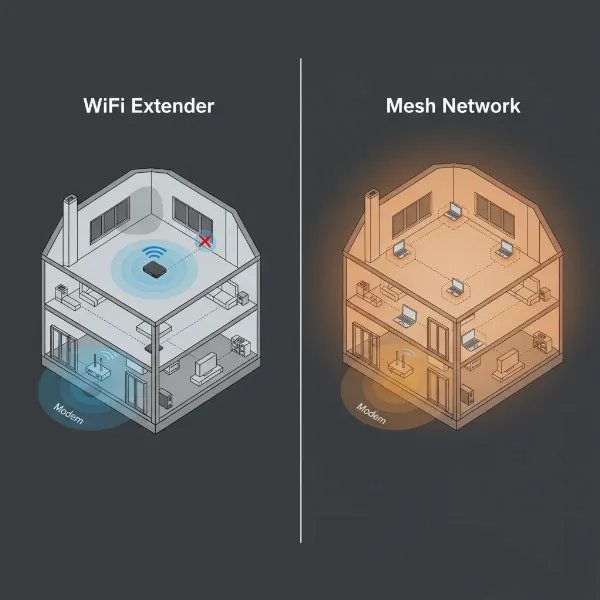
Wi-Fi Extenders are generally more affordable and offer a simpler setup. They work by capturing your existing Wi-Fi signal and rebroadcasting it, effectively extending its reach. This makes them an excellent choice for fixing small, isolated dead zones or extending coverage to a specific room or outdoor area. However, a notable drawback is that many extenders create a separate network name (SSID), meaning your devices might not seamlessly switch between your main router and the extender as you move around, potentially causing brief disconnections. They can also introduce a speed reduction because the extender uses bandwidth to communicate with both the router and your devices simultaneously. For smart homes with only a few unresponsive devices in a limited area, an extender can be a cost-effective and sufficient solution.
Mesh Wi-Fi Systems, on the other hand, offer a more sophisticated approach. They consist of multiple interconnected devices, called nodes, that work together to create a single, unified network with the same SSID. This provides seamless whole-home coverage, allowing your smart devices to automatically connect to the strongest signal as you move without interruption. Mesh systems are designed for better speeds, especially across larger areas and with many connected devices, as nodes can communicate with each other over a dedicated backhaul channel. They are ideal for large homes, multi-story houses, or environments with many smart devices that require consistent, high-speed connectivity and seamless roaming. The primary downside is that mesh systems are typically more expensive than individual Wi-Fi extenders.
For a smart home, the decision often comes down to scale and budget. If you have one or two specific areas with weak signals and a limited number of smart devices, a Wi-Fi extender can be an effective and economical fix. However, if you live in a larger home with numerous smart devices spread throughout, and you desire truly seamless, high-performance Wi-Fi without manual network switching, a mesh Wi-Fi system will generally provide a superior smart home experience.
[image-2|wifi-extender-vs-mesh-smart-home|An infographic comparing a Wi-Fi extender setup with a Mesh Wi-Fi system setup in a smart home.|
An infographic illustrating two house diagrams side-by-side. On the left, a Wi-Fi router and a single Wi-Fi extender show the signal extending but with a potential weak spot or separate network. On the right, a Mesh Wi-Fi system with multiple nodes provides seamless, even coverage throughout the entire house. Both diagrams feature small icons representing smart home devices like cameras and lights. The style is clear, comparative, and uses distinct color coding for each system.]
6. Setting Up and Optimizing Your Wi-Fi Extender for Smart Home Performance
Once you’ve chosen your Wi-Fi extender, proper setup and optimization are crucial to maximize its effectiveness and ensure your smart home devices operate without a hitch. The process is typically user-friendly, but a few key steps and tips can make a significant difference.
The most critical aspect of setup is placement. An extender should be positioned approximately halfway between your main router and the Wi-Fi dead zone you’re trying to cover. It needs to be close enough to your router to receive a strong signal itself (ideally at least 50% signal strength) but also close enough to the dead zone to effectively re-broadcast the signal. Avoid placing it near large metal objects, microwaves, cordless phones, or thick walls, as these can interfere with the Wi-Fi signal. Experiment with different locations to find the sweet spot, often indicated by a signal strength LED on the extender itself.
Configuration is usually straightforward. Many modern extenders feature a WPS (Wi-Fi Protected Setup) button; simply press the WPS button on your router, then within two minutes, press the WPS button on your extender to automatically connect them. Alternatively, most extenders come with a dedicated mobile app (like TP-Link Tether or Netgear Nighthawk) or a web-based interface that guides you through the setup process step-by-step. These apps often allow you to manage settings, monitor connected devices, and perform firmware updates.
To optimize performance for your smart home:
- Utilize Dual-Band: If your extender is dual-band, assign high-bandwidth smart devices (e.g., streaming cameras, smart TVs) to the faster 5 GHz band, while less demanding devices (e.g., smart plugs, sensors) can use the 2.4 GHz band for better range.
- Update Firmware: Regularly check for and install firmware updates, as these often include performance enhancements, security patches, and compatibility improvements.
- Minimize Interference: Keep the extender away from other electronics that can emit radio frequency interference.
- Consider Wired Connections: For stationary smart home hubs or media streamers that benefit from maximum stability, use the extender’s Ethernet ports to create a wired connection.
By paying attention to placement and configuration, you can significantly enhance your extender’s performance, providing a stable and reliable network for all your smart home devices.
7. Where to Purchase a Wi-Fi Extender
When you’re ready to invest in a Wi-Fi extender for your smart home, knowing where to purchase one reliably and securely is important. Several reputable avenues offer a wide range of options, ensuring you can find a device that fits both your needs and your budget.
Online retailers are often the most convenient and offer the broadest selection. Websites like Amazon, Best Buy, Walmart, and Newegg host countless models from various brands, often accompanied by extensive customer reviews and competitive pricing. Purchasing online allows you to easily compare specifications, read user feedback, and take advantage of sales. When buying online, always verify the seller’s reputation and check their return policies.
For those who prefer a hands-on experience or need immediate assistance, brick-and-mortar electronics stores such as Best Buy, Micro Center, or regional equivalents are excellent options. Store associates can offer personalized advice, and you can physically inspect the devices before purchasing. However, the selection might be more limited, and prices could occasionally be higher than online.
Another option is to check with your Internet Service Provider (ISP). Some ISPs offer their own branded extenders or recommendations that are guaranteed to be compatible with their equipment. While this can simplify compatibility concerns, be aware that their options might be limited, and you may find more feature-rich or cost-effective solutions elsewhere. Regardless of where you choose to buy, remember to prioritize reputable brands known for reliability and customer support. Always look for products with good warranty terms and a clear return policy.
8. Buying Guide: Your Smart Home Wi-Fi Extender Checklist
Navigating the world of Wi-Fi extenders can feel overwhelming with the myriad of options available. To simplify your decision-making process for your smart home, use this comprehensive buying guide checklist. By systematically addressing each point, you can ensure your chosen extender perfectly aligns with your home’s unique requirements.
1. Budget Determination: Start by setting a realistic budget. Wi-Fi extenders range from basic, entry-level models to high-performance devices. Knowing your spending limit will help narrow down your choices.
2. Identify Your Specific Needs: Clearly define why you need an extender. Are you targeting a single dead zone in the living room, or do you need to extend coverage to an outdoor smart camera? Do you have many high-bandwidth smart devices like 4K streaming security cameras or simply a few smart lights and plugs? This will dictate the required speed, range, and features.
3. Router Compatibility: Ensure the Wi-Fi extender is compatible with your existing Wi-Fi router. While most modern extenders are universally compatible, checking specifications (especially Wi-Fi standards like Wi-Fi 5, Wi-Fi 6, or Wi-Fi 7) can prevent installation headaches and optimize performance. Ideally, match the Wi-Fi standard of your extender to your router or choose an extender with a newer standard for a potential upgrade.
4. Read Reviews and Ratings: User reviews from multiple sources (online retailers, tech websites) offer invaluable insights into real-world performance, reliability, ease of setup, and potential issues. Pay attention to feedback regarding smart home device connectivity.
5. Consider Wi-Fi Standards for Future-Proofing: While your current router might be Wi-Fi 5, investing in a Wi-Fi 6 or even Wi-Fi 7 extender can offer better future compatibility and performance as you upgrade other devices. These newer standards are designed to handle more connected devices with greater efficiency, which is perfect for a growing smart home.
6. Dual-band or Tri-band: For smart homes, dual-band (2.4GHz and 5GHz) is almost always recommended. Tri-band is a premium option that can offer a dedicated backhaul channel for even better performance, especially in very demanding environments.
7. Ethernet Ports: If you have stationary smart devices that could benefit from a wired connection, ensure the extender has at least one Gigabit Ethernet port.
8. Security Features: Prioritize extenders with robust security protocols like WPA3 to safeguard your smart home network from potential threats.
By meticulously checking these points, you’ll be well-equipped to select a Wi-Fi extender that not only solves your immediate connectivity issues but also enhances the overall functionality and reliability of your smart home.
Conclusion
A well-chosen Wi-Fi extender can be a game-changer for any smart home, transforming frustrating dead zones into areas of seamless connectivity. By understanding the fundamentals of how these devices work, recognizing when your home truly needs one, and carefully considering factors like Wi-Fi standards, frequency bands, speed, and security, you can make an informed decision that elevates your smart home experience. Remember to prioritize proper placement and regularly update firmware to ensure optimal performance for all your connected devices. While mesh systems offer an alternative for whole-home coverage, a Wi-Fi extender remains a highly effective and often more budget-friendly solution for targeted signal boosting. Empower your smart home with the reliable Wi-Fi it deserves, and enjoy the convenience and peace of mind that comes with a fully connected living space. What smart home device are you most looking forward to getting online with your new extender?
Frequently Asked Questions
Does a Wi-Fi extender slow down internet speed?
|
Our Picks for the Best Wifi extender in 2026
As an Amazon Associate I earn from qualifying purchases.
|
||
| Num | Product | Action |
|---|---|---|
| 1 | TP-Link WiFi Extender with Ethernet Port, Dual Band 5GHz/2.4GHz, Up to 44% More Bandwidth Than Single Band, Covers Up to 1200 Sq.ft and 30 Devices, Signal Booster Amplifier Supports OneMesh(RE220) |

|
| 2 | WiFi Extender, WiFi Extenders Signal Booster for Home Up to 5000 sq.ft and 50 Devices, WiFi Range Extender, Wireless Repeater, Long Range Amplifier with Ethernet Port, 1-Tap Setup, Alexa Compatible |
|
| 3 | TP-Link AC1200 WiFi Extender, 2023 Engadget Best Budget Pick, 1.2Gbps Signal Booster for Home, Dual Band 5GHz/2.4GHz, Covers Up to 1500 Sq.ft and 30 Devices,Support Onemesh, One Ethernet Port (RE315) |
|
| 4 | TP-Link AX3000 WiFi 6 Range Extender | PCMag Editor's Choice | Dual-Band Wireless Repeater w/Ethernet Port | Up to 2400 Sq. Ft., 64 Devices | Internet Signal Booster | APP Setup | EasyMesh (RE715X) |
|
| 5 | WiFi Extender Signal Booster for Home 2026 Internet Repeater Long Range Up to 9995 Sq. Ft. Whole Home WiFi Coverage |
|
| 6 | WiFi Extender Signal Booster, WiFi Booster Dual Band 5.8GHz&2.4GHz, Covers Up to 10000 Sq.ft, 1.2Gbps WiFi Repeater with One Ethernet Port, One-tap Setup |
|
| 7 | WiFi Extender WiFi Booster 1200 Mbps Dual Band (5GHz/2.4GHz) WiFi Extenders Signal Booster for Home, Internet Extended Booster WiFi Repeater (White) |
|
| 8 | 1200Mbps WiFi Extender Signal Booster for Home, Dual Band 5GHz/2.4GHz Wireless Internet Repeater with 4 External Antennas, Covers Up to 3600 Sq.ft & Supports 80 Devices, AP Mode with Ethernet Port |
|
| 9 | 2026 WiFi Extender Signal Booster - 2.4GHz 300Mbps WiFi Booster for Home, Covers Up to 9999 Sq. Ft, Easy Setup, Ethernet Port & Access Point, Stable Internet Performance with 60+ Devices(White) |
|
| 10 | TP-Link AC1900 WiFi Range Extender RE550 | Dual-Band Wireless Repeater Amplifier w/Gigabit Ethernet Port | Up to 2200 Sq. Ft., 32 Devices | Internet Signal Booster | APP Setup | EasyMesh Compatible |
|
A Wi-Fi extender can sometimes reduce internet speed because it acts as a relay, using bandwidth to communicate with both your main router and your connected devices. However, the perceived slowdown often depends on the extender’s quality, placement, and network congestion. Modern dual-band or tri-band extenders with technologies like dedicated backhaul or Wi-Fi 6/7 can significantly minimize this speed reduction, often providing a much faster connection in previously weak areas than no extender at all.
Can I use multiple Wi-Fi extenders?
While technically possible, using multiple traditional Wi-Fi extenders can sometimes lead to network complications, such as interference between extenders or devices struggling to switch between networks. It’s generally recommended to use only one extender or, if broader coverage is needed, consider a mesh Wi-Fi system. Mesh systems are designed to work together seamlessly with multiple nodes, creating a unified network that avoids the issues often associated with multiple standalone extenders.
Do Wi-Fi extenders work with all smart home devices?
Most Wi-Fi extenders are compatible with the vast majority of smart home devices that connect via Wi-Fi. Smart devices typically use either the 2.4 GHz or 5 GHz band, both of which are supported by modern dual-band extenders. However, some very specific smart home hubs or devices might have unique networking requirements, so it’s always a good idea to check the compatibility specifications of both the extender and your smart devices if you have any concerns.