Struggling with slow Wi-Fi, dropped connections, or frustrating dead zones in your home? You’re not alone. Many households face the challenge of inconsistent wireless coverage, turning what should be a seamless online experience into a daily battle. As an expert with over a decade in network devices, particularly Wi-Fi extenders, I’ve seen countless solutions emerge to combat these issues. While terms like “Wifi Extender” and “Signal Booster” are often used interchangeably, they represent devices with distinct functionalities and ideal use cases. Understanding these differences is crucial to selecting the optimal solution for your specific connectivity needs and budget. Let’s delve into the world of wireless enhancement to illuminate which device will truly optimize your home internet.
1. Understanding Wi-Fi Extenders: Expanding Your Network’s Reach
A Wi-Fi extender, also widely known as a Wi-Fi range extender or wireless repeater, is a network device designed to expand the coverage area of your existing wireless network. Its primary function is to eliminate “dead zones” – areas in your home or office where the Wi-Fi signal from your main router is weak or non-existent. These devices act as an intermediary, capturing your router’s signal and rebroadcasting it to reach further distances.
The fundamental way a Wi-Fi extender works is by receiving the Wi-Fi signal from your primary router and then retransmitting it. This process effectively creates a secondary Wi-Fi network, often with a slightly different name (e.g., “YourNetwork_EXT”). When you connect to this extended network, your device communicates with the extender, which then relays data to and from your main router. This “hop” allows the signal to cover areas that were previously out of range. Common types of Wi-Fi extenders include wall-plug models, which are compact and plug directly into an electrical outlet, and desktop models, which might offer more powerful antennas or additional Ethernet ports. While highly effective at broadening coverage, it’s worth noting that due to the nature of rebroadcasting, extenders can sometimes introduce a slight reduction in overall speed or increase latency, as the data has an extra step to travel.
2. Deciphering Wi-Fi Signal Boosters: Amplifying Your Existing Signal
The term “Wi-Fi Signal Booster” is often used broadly in the market and can sometimes refer to a Wi-Fi extender itself. However, when distinguished, a true Wi-Fi signal booster primarily focuses on amplifying the strength of an existing Wi-Fi signal rather than creating an entirely new, extended network. These devices are sometimes referred to as amplifiers or repeaters, particularly when they operate to strengthen a signal without establishing a separate SSID (Service Set Identifier).
A dedicated Wi-Fi signal booster works by taking the weak Wi-Fi signal from your router and enhancing its power before sending it out again. The goal here isn’t necessarily to extend the absolute reach into entirely new areas, but to provide a more robust and stable connection within an area where the signal is present but consistently weak. This amplification can be particularly beneficial for improving signal penetration through physical barriers like thick walls, multiple floors, or other obstacles that degrade Wi-Fi quality. Unlike many extenders that create a new network, a booster typically operates within your original network, allowing devices to maintain a seamless connection to the same SSID as they move through your space. While the marketing terms can be confusing, thinking of a booster as a device focused on quality within a reachable area, versus an extender focused on quantity of coverage, helps clarify their core difference.
3. Key Differences: Wifi Extender vs. Signal Booster
While both Wi-Fi extenders and signal boosters aim to improve your wireless experience, their methods and optimal applications vary significantly. Understanding these core distinctions is paramount for choosing the right device.
The most prominent difference lies in network creation. A traditional Wi-Fi extender connects to your main router and then rebroadcasts a new Wi-Fi signal, essentially creating a secondary network with a distinct SSID (e.g., “HomeNetwork_EXT”). This means devices might need to manually switch between your main router’s network and the extender’s network as you move through your home, potentially interrupting streaming or downloads. In contrast, a pure Wi-Fi signal booster typically amplifies your existing signal without creating a new network. Your devices remain connected to the original SSID, providing a more seamless roaming experience.
This leads to a difference in their primary goal: coverage versus strength. Extenders are primarily focused on extending the physical range of your Wi-Fi, pushing the signal into areas that were previously dead zones or had extremely weak connectivity. Boosters, on the other hand, aim to improve the quality and strength of an existing signal in areas where it’s weak but still present, ensuring a more stable and faster connection within that already covered region.
Regarding speed impact, extenders, due to the extra “hop” and potential for half-duplex operation (where the device transmits and receives on the same channel, effectively halving bandwidth), can sometimes introduce a slight reduction in overall speed. Boosters, by primarily amplifying the signal, often aim to maintain or even improve effective speeds in weak areas by reducing packet loss and improving signal-to-noise ratio. Finally, roaming is smoother with a booster as your devices stay on the same network. With an extender, devices may cling to the weaker main signal or require manual switching, leading to a less fluid user experience.
4. Benefits of Using a Wi-Fi Extender
Wi-Fi extenders offer several compelling benefits, particularly for specific home networking challenges. Their greatest advantage lies in their ability to eliminate frustrating dead zones. If you have a large home, multiple floors, or areas far removed from your main router where the Wi-Fi signal completely drops off, an extender can bring connectivity to those previously unreachable spots. This can transform a basement, attic, or far-flung bedroom into a functional online space.
Furthermore, Wi-Fi extenders are often a highly cost-effective solution compared to upgrading your entire router setup or investing in a more complex mesh Wi-Fi system. For a relatively low investment, you can significantly broaden your network’s physical footprint. They are also typically designed for easy setup, with many models featuring a simple WPS (Wi-Fi Protected Setup) button for quick pairing with your existing router, making them accessible even for users with limited technical knowledge. This straightforward approach allows for rapid deployment and immediate improvements in areas needing basic coverage expansion.
5. Benefits of Using a Wi-Fi Signal Booster
When the issue isn’t a complete lack of signal but rather a consistently weak and unreliable connection, a dedicated Wi-Fi signal booster shines. One of its primary benefits is its capacity to improve signal stability and speed in problematic areas. By amplifying the existing signal, boosters can reduce instances of dropped connections, buffering, and slow loading times, making activities like streaming 4K video or engaging in online gaming much smoother and more enjoyable.
Another significant advantage is the seamless roaming experience they often provide. Since a booster works by amplifying your current network signal without creating a new SSID, your devices remain connected to the same Wi-Fi network as you move around your home. This eliminates the need for manual network switching, ensuring an uninterrupted connection. Additionally, boosters can be particularly effective at improving penetration through obstacles. Thick walls, concrete floors, and even certain furniture can severely degrade Wi-Fi signals. By amplifying the signal, a booster helps it cut through these physical barriers more effectively, delivering a stronger connection where it’s most needed.
6. When to Choose a Wi-Fi Extender?
Deciding whether a Wi-Fi extender is the right solution largely depends on the specific nature of your connectivity problems. You should opt for a Wi-Fi extender in situations where you have definitive “dead zones” in your home or office. These are areas where your Wi-Fi signal is practically non-existent, meaning devices cannot connect at all, or the connection is so intermittent it’s unusable. This often occurs in large multi-story homes, elongated single-story layouts, or buildings with significant architectural barriers that completely block the signal from your main router.
Consider an extender if your primary goal is to simply get any Wi-Fi signal to a remote part of your property, such as a detached garage, an outdoor patio, or a far-flung bedroom that your main router cannot reach. While there might be a slight compromise on speed, the benefit of having connectivity where there was none before often outweighs this drawback. Extenders are a straightforward and economical way to broaden the physical perimeter of your Wi-Fi network, ensuring basic internet access across a wider area.
7. When to Choose a Wi-Fi Signal Booster?
A Wi-Fi signal booster is the preferred choice when your primary challenge isn’t a complete absence of Wi-Fi, but rather consistently weak signal strength in specific areas that are still within your router’s general coverage. For example, if you can connect to Wi-Fi in your living room, but the signal strength is always one or two bars, leading to buffering during video calls or slow downloads, a booster is likely what you need. These devices excel at taking an already present but faltering signal and fortifying it.
This makes boosters ideal for improving connectivity through physical obstacles like thick interior walls, concrete structures, or around large appliances that tend to absorb or block Wi-Fi signals. If your home has a complex layout or older construction that degrades Wi-Fi quality, a booster can help the signal penetrate these barriers more effectively. Furthermore, if you value a seamless network experience where your devices stay connected to a single Wi-Fi network (SSID) as you move from room to room, a booster that amplifies the existing signal without creating a new one will generally provide a smoother transition than an extender.
8. Factors to Consider When Choosing Between Them
Making an informed decision between a Wi-Fi extender and a signal booster requires evaluating several key factors related to your home environment, internet usage, and budget.
First, consider your home size and layout. For truly large homes with significant dead zones where no signal reaches, an extender is typically more effective at pushing Wi-Fi into those distant areas. If your home is smaller but has specific spots with weak signals due to thick walls or furniture, a booster might offer a better solution for enhancing existing coverage. Next, assess your current router’s performance. If your router is old or low-powered, even a booster might struggle. A newer, more powerful router could be a better initial investment or a complementary piece to either device.
Your desired speed and latency are also critical. If you’re a heavy gamer, frequently stream 4K content, or participate in video conferencing, minimizing latency and maximizing speed is paramount. While both devices can improve connectivity, a booster that maintains your current network often offers a more stable, higher-speed experience than an extender that rebroadcasts on a separate network. Finally, consider your budget and ease of setup. Both types of devices come in various price points, but extenders are often the most economical entry point for basic coverage expansion. Look for models with straightforward installation processes, especially if you prefer a plug-and-play solution. Ensure any device you choose is compatible with your existing router’s Wi-Fi standards (e.g., Wi-Fi 5, Wi-Fi 6).
9. Comparative Overview: Wifi Extender vs. Signal Booster
To simplify your decision, here’s a comparative overview highlighting the main characteristics of Wi-Fi extenders and signal boosters:
| Aspect | Wi-Fi Extender (Range Extender/Repeater) | Wi-Fi Signal Booster (Amplifier) |
|---|---|---|
| Primary Goal | Expand physical coverage, eliminate dead zones. | Improve signal strength and quality within existing coverage area. |
| Network Name (SSID) | Creates a new Wi-Fi network (e.g., “YourNetwork_EXT”). | Uses and amplifies the existing Wi-Fi network (same SSID). |
| Roaming Experience | Devices may need to switch networks manually as you move. | Seamless roaming; devices stay connected to the original network. |
| Speed Impact | Can potentially reduce speed due to rebroadcasting and extra “hop.” | Aims to maintain or improve effective speed by strengthening the signal. |
| Latency | May introduce slightly higher latency. | Generally lower latency, focused on signal quality. |
| Ideal Use Case | Large homes, multi-story buildings, distant areas with no signal. | Areas with weak but present signals, thick walls, multi-device usage. |
| Pros | Extends Wi-Fi reach significantly, cost-effective for dead zones. | Improves reliability and speed in weak spots, seamless connection. |
| Cons | Potential speed reduction, requires network switching, can be less stable. | Less effective for true dead zones (no signal), term can be confusing. |
10. Installation and Optimization Tips
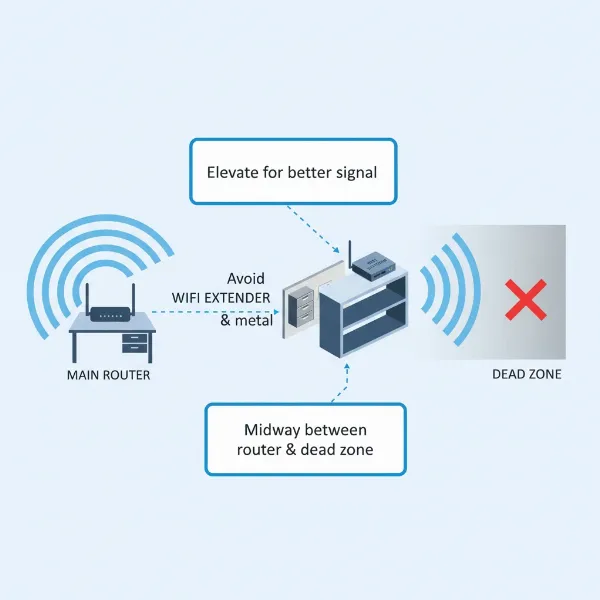
Proper installation and optimization are key to maximizing the performance of both Wi-Fi extenders and signal boosters. The most critical aspect for either device is placement. Do not place the device in the dead zone itself. Instead, position it roughly halfway between your main router and the area where you need improved Wi-Fi. It needs a strong enough signal from the router to effectively retransmit or amplify. Avoid placing it near large metal objects, microwaves, cordless phones, or other devices that can cause interference.
For configuration, most modern devices offer a simple setup process, often involving a mobile app or a web-based interface. Many extenders feature a WPS button; simply press it on your router, then on the extender, and they should pair automatically. Ensure your device’s firmware is always up-to-date, as manufacturers frequently release updates that improve performance and security. If you’re using an extender that creates a new SSID, consider renaming it to something easily distinguishable from your main network. For optimal performance, especially with extenders, if your device supports dual-band (2.4GHz and 5GHz), ensure it’s configured to utilize both bands appropriately.
Common troubleshooting tips include rebooting both the extender/booster and your main router, trying different placements, and ensuring there are no physical obstructions directly in front of the device. Sometimes, a simple relocation can drastically improve performance.
11. Where to Purchase Your Device
When you’re ready to purchase a Wi-Fi extender or signal booster, you have several reliable options. Online retailers such as Amazon, Best Buy, Walmart, and the official websites of manufacturers like TP-Link, Netgear, Linksys, and D-Link offer a wide selection, often with competitive pricing and detailed customer reviews. Shopping online provides the convenience of browsing many models and comparing specifications from the comfort of your home.
Alternatively, you can visit physical electronics stores like Best Buy or other local computer and networking shops. These stores allow you to see the devices firsthand, speak with sales associates for personalized advice, and sometimes even test out features. When purchasing online, pay close attention to the return policy and warranty information. Always look for products from reputable brands known for their quality and customer support. Be wary of unbranded devices with unusually low prices, as they might offer subpar performance or lack security features. Reading customer reviews, especially those from verified purchasers, can provide valuable insights into a product’s real-world performance and reliability.
12. Buying Guide: Making an Informed Decision
Navigating the options for Wi-Fi enhancement can seem daunting, but by focusing on a few key aspects, you can make an informed decision that perfectly matches your needs. First, clearly determine your budget. While both extenders and boosters are generally affordable, prices vary based on features, speed ratings, and brand reputation. Setting a budget helps narrow down your choices efficiently.
Next, pinpoint your exact Wi-Fi problem. Is it a complete dead zone with no signal at all? Or is it an area with a weak, inconsistent signal that frequently drops? This distinction is the most critical factor in choosing between an extender (for dead zones) and a booster (for weak signal amplification). Your existing router’s capabilities also play a role; ensure the new device is compatible with your router’s Wi-Fi standards (e.g., Wi-Fi 5/802.11ac or Wi-Fi 6/802.11ax) to avoid performance bottlenecks. Consider features like dual-band support (2.4GHz and 5GHz) for better flexibility and speed, especially if your current router is dual-band. For advanced users, look for features like Gigabit Ethernet ports, MU-MIMO, or Beamforming to further optimize performance.
Finally, always read reviews from other users. Real-world experiences can highlight aspects like ease of setup, reliability, and actual speed improvements, which might not be apparent from product specifications alone. By carefully evaluating these factors, you can confidently select the best Wi-Fi extender or signal booster to enhance your home network.
Conclusion
The journey to seamless home Wi-Fi often leads to devices like extenders and boosters, both promising to banish frustrating connectivity issues. While their names are often used interchangeably, understanding their fundamental differences—extenders expand coverage into dead zones by creating a new network, while boosters amplify an existing signal for greater strength and stability—is crucial. Your choice hinges entirely on the specific problem you’re trying to solve: do you need to push Wi-Fi into an entirely new area, or strengthen a weak signal within an already covered space?
By considering your home’s layout, internet usage habits, and budget, you can make an informed decision. Whether it’s the broad reach of an extender or the robust amplification of a booster, the right device will significantly enhance your online experience. So, what specific Wi-Fi challenge are you hoping to conquer in your home network?
Frequently Asked Questions
Do Wifi extenders or boosters slow down internet speed?
|
Our Picks for the Best Wifi extender in 2026
As an Amazon Associate I earn from qualifying purchases.
|
||
| Num | Product | Action |
|---|---|---|
| 1 | TP-Link WiFi Extender with Ethernet Port, Dual Band 5GHz/2.4GHz, Up to 44% More Bandwidth Than Single Band, Covers Up to 1200 Sq.ft and 30 Devices, Signal Booster Amplifier Supports OneMesh(RE220) |

|
| 2 | 2026 WiFi Extender Signal Booster - 2.4GHz 300Mbps WiFi Booster for Home, Covers Up to 9999 Sq. Ft, Easy Setup, Ethernet Port & Access Point, Stable Internet Performance with 60+ Devices(White) |
|
| 3 | TP-Link AX3000 WiFi 6 Range Extender | PCMag Editor's Choice | Dual-Band Wireless Repeater w/Ethernet Port | Up to 2400 Sq. Ft., 64 Devices | Internet Signal Booster | APP Setup | EasyMesh (RE715X) |
|
| 4 | WiFi Extender, WiFi Extenders Signal Booster for Home Up to 5000 sq.ft and 50 Devices, WiFi Range Extender, Wireless Repeater, Long Range Amplifier with Ethernet Port, 1-Tap Setup, Alexa Compatible |
|
| 5 | WiFi Extender Signal Booster, WiFi Booster Dual Band 5.8GHz&2.4GHz, Covers Up to 10000 Sq.ft, 1.2Gbps WiFi Repeater with One Ethernet Port, One-tap Setup |
|
| 6 | 1200Mbps WiFi Extender Signal Booster for Home, Dual Band 5GHz/2.4GHz Wireless Internet Repeater with 4 External Antennas, Covers Up to 3600 Sq.ft & Supports 80 Devices, AP Mode with Ethernet Port |
|
| 7 | WiFi Extender Signal Booster for Home 2026 Internet Repeater Long Range Up to 9995 Sq. Ft. Whole Home WiFi Coverage |
|
| 8 | WiFi Extender WiFi Booster 1200 Mbps Dual Band (5GHz/2.4GHz) WiFi Extenders Signal Booster for Home, Internet Extended Booster WiFi Repeater (White) |
|
| 9 | TP-Link AC1900 WiFi Range Extender RE550 | Dual-Band Wireless Repeater Amplifier w/Gigabit Ethernet Port | Up to 2200 Sq. Ft., 32 Devices | Internet Signal Booster | APP Setup | EasyMesh Compatible |
|
| 10 | TP-Link AC1200 WiFi Extender, 2023 Engadget Best Budget Pick, 1.2Gbps Signal Booster for Home, Dual Band 5GHz/2.4GHz, Covers Up to 1500 Sq.ft and 30 Devices,Support Onemesh, One Ethernet Port (RE315) |
|
Yes, Wi-Fi extenders can sometimes cause a slight reduction in internet speed because they receive and retransmit the signal, which adds an extra “hop” for data. This can also be due to operating in half-duplex mode. Boosters, when distinct from extenders, aim to amplify the existing signal, potentially improving effective speeds in weak areas by reducing signal loss, rather than creating new bottlenecks.
Can I use multiple Wi-Fi extenders or boosters in my home?
While technically possible, using multiple extenders or boosters can sometimes lead to more interference and complexity, potentially degrading overall network performance rather than improving it. For larger homes or more complex needs, a mesh Wi-Fi system is often a more effective and seamless solution than multiple individual extenders or boosters, providing broader, more consistent coverage with a single network name.
What is the best placement for a Wi-Fi extender or booster?
The best placement for either device is typically about halfway between your main Wi-Fi router and the area where you need improved coverage. The device needs to receive a strong enough signal from your router to effectively retransmit or amplify it. Avoid placing them in areas with no signal or near large metal objects, microwaves, or other electronics that can cause interference.
Are Wi-Fi extenders and boosters secure?
Yes, reputable Wi-Fi extenders and boosters offer standard Wi-Fi security protocols, such as WPA2 or WPA3 encryption, just like your main router. It’s important to set up a strong password and keep the device’s firmware updated to ensure optimal security. Always purchase from trusted brands to avoid potential vulnerabilities.
Is a mesh Wi-Fi system a better alternative than an extender or booster?
For larger homes or those seeking truly seamless, whole-home Wi-Fi coverage without the potential speed trade-offs or network switching issues of extenders, a mesh Wi-Fi system is often a superior alternative. Mesh systems use multiple nodes that communicate with each other to create a single, unified Wi-Fi network, offering excellent coverage, speed, and reliability. However, they are typically a more significant investment.