In today’s hyper-connected world, a robust and reliable home Wi-Fi network is no longer a luxury but a necessity. Yet, many of us still grapple with frustrating dead zones, sluggish speeds, and dropped connections that disrupt our streaming, gaming, and remote work. When your Wi-Fi signal struggles to reach every corner of your home, you’re faced with two primary solutions: a Wi-Fi extender or a mesh router system. Both aim to boost your home network coverage, but they achieve this through fundamentally different approaches, leading to distinct advantages and disadvantages. Understanding these differences is crucial to making an informed decision that perfectly aligns with your home’s layout, internet usage, and budget. This article will delve into the intricacies of each technology, comparing their functionalities, benefits, drawbacks, and ideal use cases to help you determine which solution is the ultimate upgrade for your Wi-Fi experience.
1. Understanding Wifi Extenders: How They Work
A Wi-Fi extender, also commonly known as a Wi-Fi repeater or range extender, is a device designed to expand the coverage of your existing wireless network. Its core function is relatively straightforward: it picks up the Wi-Fi signal from your main router and then rebroadcasts it, effectively stretching the network’s reach into areas previously plagued by weak or non-existent connectivity. Think of it as a signal booster that takes a fading signal and gives it a second wind.
The mechanism by which a Wi-Fi extender operates involves it connecting wirelessly to your main router. Once connected, it sets up its own network, often with a slightly different name (SSID), though some modern extenders offer a single SSID feature. This means that as you move around your home, your devices might need to manually switch between your main router’s network and the extender’s network to maintain the strongest connection. While extenders are an affordable and easy-to-set-up solution for localized dead zones, their performance can be a significant drawback. Because they often rebroadcast a signal they’ve already received, they can sometimes halve the available bandwidth, leading to reduced speeds, especially in scenarios with heavy internet usage.
[image-1|wifi-extender-working-diagram|Wifi Extender diagram showing how it extends a signal from a main router into a dead zone, illustrating a single connection point.|
An illustrative diagram showing a single Wi-Fi extender device positioned between a main Wi-Fi router and a ‘dead zone’ in a house. The router emits Wi-Fi waves, which are received by the extender, amplified, and then re-transmitted to cover the dead zone. The network names (SSIDs) are shown as potentially different. The style is clean, modern, and infographic-like, with clear lines and icons.]
2. Exploring Mesh Routers: A Seamless Solution
In contrast to a single Wi-Fi extender, a mesh router system represents a more comprehensive and sophisticated approach to whole-home Wi-Fi coverage. A mesh system comprises multiple devices, referred to as “nodes,” which work in unison to create a single, unified, and highly robust Wi-Fi network that blankets your entire living space. One node typically connects to your modem, acting as the main router, while the other satellite nodes are strategically placed throughout your home.
The magic of a mesh network lies in how these nodes communicate with each other. They form a collaborative network, constantly talking to each other through a dedicated wireless or wired “backhaul” connection. This intelligent communication ensures that your devices automatically connect to the nearest and strongest node as you move from room to room, without any manual switching or interruptions. This seamless roaming experience is a hallmark of mesh systems, providing consistent performance for activities like 4K streaming, online gaming, and video conferencing across all areas of your home. While mesh systems generally come with a higher upfront cost and a slightly more involved initial setup due to positioning multiple devices, they offer unparalleled reliability, speed consistency, and often feature intuitive app-based management for effortless control over your network.
[image-2|mesh-router-system-home-network|Mesh router system with multiple nodes covering a multi-floor home, depicting a unified and strong Wi-Fi signal.|
An architectural illustration of a multi-story home with Wi-Fi signal radiating from multiple mesh router nodes placed throughout the house. The signal is depicted as continuous and strong, with devices (laptop, smartphone, smart TV) seamlessly connected. The aesthetic is modern and clean, showcasing a unified network with one SSID visible across all nodes.]
3. Key Differences: Wifi Extender vs. Mesh Router
Understanding the fundamental operational disparities between Wi-Fi extenders and mesh router systems is paramount when deciding which solution is best suited for your home network. While both aim to eliminate dead zones and enhance coverage, their underlying architecture dictates significant differences in user experience, performance, and overall network efficiency.
| Feature | Wi-Fi Extender | Mesh Router System |
|---|---|---|
| Network Type | Creates a separate network (SSID), or sometimes dual. | Creates a single, unified network (SSID). |
| Roaming | Manual switching between networks often required. | Automatic, seamless switching between nodes. |
| Coverage | Localized improvement, spot-fixing dead zones. | Whole-home, wall-to-wall, consistent coverage. |
| Performance | Potential speed degradation due to retransmission. | Consistent, high-performance across all nodes. |
| Cost | Generally more affordable. | Higher upfront cost (multiple nodes, often replaces router). |
| Setup Complexity | Simpler, often plug-and-play for a single device. | More involved initial setup (multiple device placement) but app-managed. |
| Scalability | Limited; adding more can create network clutter. | Highly scalable; easily add more nodes for larger areas. |
| Ideal Use Case | Small homes, specific room dead zones, light use. | Large homes, multi-story, many devices, heavy use. |
4. When to Choose a Wifi Extender
Choosing a Wi-Fi extender can be a highly effective and economical solution under specific circumstances where its capabilities align perfectly with your networking needs. If you’re experiencing a single, isolated Wi-Fi dead spot, perhaps in a distant bedroom, a home office, or a basement corner, an extender can be a quick and easy fix. It’s particularly well-suited for smaller apartments or homes where the primary router already covers most areas adequately, but just one or two spots need a minor boost.
Extenders are also the preferred choice for those on a tight budget. They offer a significantly lower entry cost compared to a full mesh system, making them an attractive option for individuals who only require a modest improvement in signal strength and are not performing bandwidth-intensive activities like 4K streaming or competitive online gaming across multiple devices simultaneously. If your internet usage is primarily for browsing, email, and occasional video calls, and you don’t mind the possibility of manually switching networks or a slight dip in speed, a Wi-Fi extender provides a practical and straightforward solution to bridge those small coverage gaps.
[image-3|wifi-extender-small-home-solution|A small apartment floor plan showing a Wi-Fi router and a single Wi-Fi extender effectively covering a specific dead zone like a bedroom or home office.|
A top-down architectural diagram of a small, modern apartment. A central Wi-Fi router is shown, with signal lines extending. A single Wi-Fi extender is strategically placed to boost the signal into one specific room (e.g., a bedroom or a balcony), eliminating a localized dead zone. The overall style is clean and indicative of a practical solution for a targeted issue.]
5. When to Opt for a Mesh Router System
A mesh router system truly shines in environments where a Wi-Fi extender simply cannot deliver the required performance or seamless experience. If you reside in a large home, particularly one with multiple floors, thick walls, or an unusual layout that causes significant signal obstruction, a mesh system is unequivocally the superior choice. Its ability to create a blanket of consistent Wi-Fi coverage across vast spaces ensures that every device, from your smart thermostat to your living room smart TV, remains connected with optimal speed and reliability.
Moreover, mesh networks are designed for the modern, device-heavy household. If your home is bustling with numerous connected gadgets—smartphones, laptops, tablets, gaming consoles, smart home devices, and more—and multiple users are simultaneously engaging in high-bandwidth activities like 4K video streaming, online gaming, or video conferencing, a mesh system’s load-balancing capabilities are invaluable. It intelligently routes traffic to the strongest node, preventing congestion and maintaining high performance. For those who demand uninterrupted connectivity as they move throughout their home, without ever having to think about which network they’re connected to, a mesh router system offers the seamless, robust, and future-proof Wi-Fi solution.
[image-4|mesh-router-large-home-coverage|A diagram of a large, multi-story house illustrating widespread, seamless Wi-Fi coverage provided by a mesh router system with multiple nodes.|
A detailed, cross-section diagram of a large, multi-story house with multiple rooms and floors. Several mesh router nodes are strategically placed on different floors and in various rooms. Continuous, strong Wi-Fi signals emanate from each node, overlapping to show complete and seamless coverage throughout the entire residence, highlighting elimination of all dead zones. The style is technical yet user-friendly, with clear signal indicators.]
6. Factors to Consider Before Buying
Before investing in either a Wi-Fi extender or a mesh router system, several critical factors warrant careful consideration to ensure you select the solution that best meets your specific needs and provides the most value. Your decision should be a thoughtful balance of performance requirements, budget constraints, and the unique characteristics of your home environment.
Firstly, assess your home size and layout. A small apartment or single-story home with minimal obstructions might only require an extender for a specific problem area, whereas a large, multi-story house with thick walls will almost certainly benefit more from a mesh system’s comprehensive coverage. Next, consider your number of devices and usage habits. If you have many devices and frequently engage in bandwidth-intensive activities, a mesh system’s consistent performance is crucial. Budget is another significant factor; extenders are much cheaper, while mesh systems, though more expensive, offer superior long-term performance and scalability. Evaluate the ease of setup and management you desire. Extenders are generally simpler, while mesh systems, though initially more involved to set up multiple nodes, offer centralized, app-based control that simplifies ongoing management. Lastly, check for existing router compatibility. Some mesh systems can work alongside your current router, while others are designed to replace it entirely. “Considering these elements will guide you toward a network solution that genuinely enhances your connectivity, not just temporarily patches it.”
[image-5|factors-choosing-wifi-solution|An infographic showing various factors to consider when choosing between a Wi-Fi extender and a mesh router, such as home size, budget, and device usage.|
An infographic illustration depicting a balanced scale or decision tree. On one side are icons representing ‘Home Size’ (a house icon), ‘Budget’ (a money bag), and ‘Number of Devices’ (multiple gadgets). On the other side are text labels like ‘Wi-Fi Extender’ and ‘Mesh Router System’ with checkmarks or crosses, indicating which factors lean towards each solution. The design is clean, with contrasting colors to highlight decision points.]
7. Installation and Optimization Tips
Proper installation and strategic placement are crucial for maximizing the effectiveness of both Wi-Fi extenders and mesh router systems. A poorly positioned device, regardless of its technology, can significantly undermine its performance and leave you still struggling with connectivity issues.
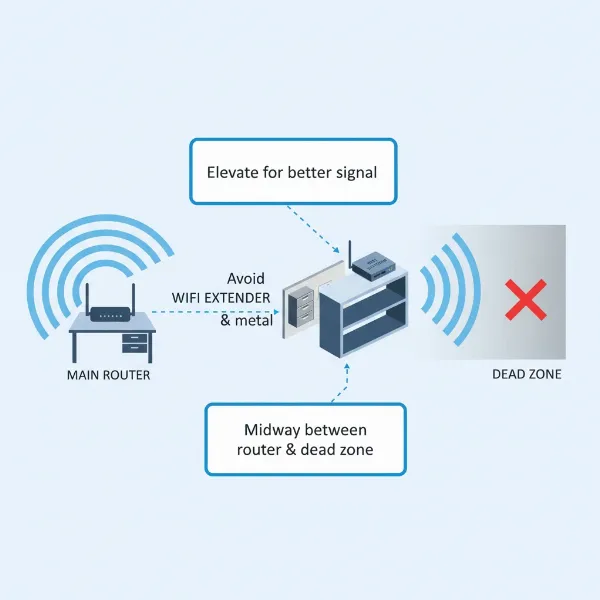
For Wi-Fi extenders, the golden rule is optimal placement. Avoid placing it too close to your main router (as it won’t extend far) or too far into a dead zone (where it won’t receive a strong enough signal to amplify effectively). The ideal spot is roughly halfway between your main router and the area needing coverage, where the extender can still receive a strong, stable signal. Ensure it’s away from large metal objects, thick walls, and other electronics that can cause interference. For mesh router systems, strategic node placement is equally vital for achieving even, whole-home coverage. The primary node should connect directly to your modem. Subsequent satellite nodes should be spread throughout your home, ensuring they are close enough to communicate effectively with each other and the main node. Visualizing a network “chain” or “web” can help, aiming for line-of-sight where possible, especially for wireless backhaul. Regardless of your choice, regularly updating firmware for both your router and extending devices is a simple yet powerful optimization tip. This ensures you have the latest security patches and performance enhancements. Also, consider the channel settings on your router; congested channels can impact performance, and switching to a less crowded one can often yield surprising improvements.
[image-6|wifi-extender-mesh-installation-tips|A split image showing ideal placement for a Wi-Fi extender (halfway between router and dead zone) and optimal node distribution for a mesh system in a home.|
A split-panel illustration. The left panel shows a home with a Wi-Fi router and a ‘dead zone’, with an arrow indicating the ideal placement of a Wi-Fi extender exactly halfway. The right panel shows a larger home with multiple mesh nodes strategically placed on different floors and in various rooms, connected by seamless signal lines. Both panels emphasize optimal positioning for maximum Wi-Fi coverage. The style is illustrative and instructional.]
8. Where to Purchase and Buying Guide
When you’re ready to buy a Wi-Fi extender or a mesh router system, knowing where to look and what to prioritize can make a significant difference in your overall satisfaction and value for money. Both online retailers and physical electronics stores offer a wide array of options, each with its own advantages.
Online marketplaces like Amazon, Best Buy, and Newegg often provide the widest selection, competitive pricing, and user reviews that can be invaluable for research. However, physical stores allow you to see the devices, ask questions of sales associates, and take the product home immediately. Regardless of where you shop, always prioritize reading user reviews and expert evaluations. These insights can highlight real-world performance, setup challenges, and long-term reliability. Focus on reputable brands known for networking hardware, such as Netgear, TP-Link, Linksys, Eero, and Google Wifi. When making your purchase, consider your budget carefully, but also think about future needs. While a Wi-Fi extender might solve an immediate problem cheaply, a mesh system offers better scalability and longevity for growing smart homes or increasing internet demands. Ensure the chosen device supports current Wi-Fi standards (e.g., Wi-Fi 6 or 6E for newer devices) to ensure compatibility and future-proofing. Lastly, check the return policy in case the chosen solution doesn’t meet your expectations.
Conclusion
Navigating the complexities of home Wi-Fi can be daunting, but choosing between a Wi-Fi extender and a mesh router system boils down to understanding your specific needs and priorities. While a Wi-Fi extender offers an accessible and budget-friendly solution for tackling isolated dead zones, often by simply boosting an existing signal, it can introduce separate network names and potential speed compromises. In contrast, a mesh router system, though a more significant investment, provides a truly seamless, whole-home Wi-Fi experience, eliminating dead zones with consistent speeds and effortless roaming through multiple interconnected nodes.
For smaller homes with minor signal issues or those on a strict budget, an extender might suffice. However, for larger multi-story residences, households teeming with smart devices, or users demanding uninterrupted high-performance connectivity for gaming and streaming, a mesh network is undeniably the superior choice. Ultimately, the best solution is one that perfectly aligns with your home’s architecture, your internet usage patterns, and your comfort with technology. By carefully evaluating these factors, you can empower your home with the robust and reliable Wi-Fi coverage it deserves. Which solution resonates most with your home’s current Wi-Fi challenges?
Frequently Asked Questions
Does a Wifi extender really work?
|
Our Picks for the Best Wifi extender in 2026
As an Amazon Associate I earn from qualifying purchases.
|
||
| Num | Product | Action |
|---|---|---|
| 1 | WiFi Extender, WiFi Extenders Signal Booster for Home Up to 5000 sq.ft and 50 Devices, WiFi Range Extender, Wireless Repeater, Long Range Amplifier with Ethernet Port, 1-Tap Setup, Alexa Compatible |

|
| 2 | 2026 WiFi Extender Signal Booster - 2.4GHz 300Mbps WiFi Booster for Home, Covers Up to 9999 Sq. Ft, Easy Setup, Ethernet Port & Access Point, Stable Internet Performance with 60+ Devices(White) |
|
| 3 | 1200Mbps WiFi Extender Signal Booster for Home, Dual Band 5GHz/2.4GHz Wireless Internet Repeater with 4 External Antennas, Covers Up to 3600 Sq.ft & Supports 80 Devices, AP Mode with Ethernet Port |
|
| 4 | WiFi Extender Signal Booster for Home 2026 Internet Repeater Long Range Up to 9995 Sq. Ft. Whole Home WiFi Coverage |
|
| 5 | TP-Link AC1900 WiFi Range Extender RE550 | Dual-Band Wireless Repeater Amplifier w/Gigabit Ethernet Port | Up to 2200 Sq. Ft., 32 Devices | Internet Signal Booster | APP Setup | EasyMesh Compatible |
|
| 6 | WiFi Extender Signal Booster, WiFi Booster Dual Band 5.8GHz&2.4GHz, Covers Up to 10000 Sq.ft, 1.2Gbps WiFi Repeater with One Ethernet Port, One-tap Setup |
|
| 7 | WiFi Extender WiFi Booster 1200 Mbps Dual Band (5GHz/2.4GHz) WiFi Extenders Signal Booster for Home, Internet Extended Booster WiFi Repeater (White) |
|
| 8 | TP-Link WiFi Extender with Ethernet Port, Dual Band 5GHz/2.4GHz, Up to 44% More Bandwidth Than Single Band, Covers Up to 1200 Sq.ft and 30 Devices, Signal Booster Amplifier Supports OneMesh(RE220) |
|
| 9 | TP-Link AC1200 WiFi Extender, 2023 Engadget Best Budget Pick, 1.2Gbps Signal Booster for Home, Dual Band 5GHz/2.4GHz, Covers Up to 1500 Sq.ft and 30 Devices,Support Onemesh, One Ethernet Port (RE315) |
|
| 10 | TP-Link AX3000 WiFi 6 Range Extender | PCMag Editor's Choice | Dual-Band Wireless Repeater w/Ethernet Port | Up to 2400 Sq. Ft., 64 Devices | Internet Signal Booster | APP Setup | EasyMesh (RE715X) |
|
Yes, a Wi-Fi extender absolutely works by taking your existing Wi-Fi signal and rebroadcasting it to cover a larger area. They are effective at solving localized dead spots or extending coverage to a specific room that’s just out of reach of your main router. However, they may not offer the same seamless experience or consistent speeds as a mesh system, often creating a separate network.
Can a Mesh Wifi replace my existing router?
Most mesh Wi-Fi systems are designed to replace your existing router entirely. The primary mesh node typically connects directly to your modem and then creates a new, unified Wi-Fi network for your entire home. Some systems can operate in “access point” mode, working alongside your existing router, but for optimal performance and a truly seamless experience, replacing your old router is often recommended.
Is a Wifi extender or Mesh Wifi better for gaming?
For gaming, a mesh Wi-Fi system is generally much better than a Wi-Fi extender. Mesh systems provide more consistent speeds, lower latency, and seamless roaming, ensuring your gaming device stays connected to the strongest signal without interruptions as you move. Wi-Fi extenders can introduce higher latency and reduce bandwidth, which are detrimental to a smooth online gaming experience.
How many Mesh nodes do I need?
The number of mesh nodes you need depends primarily on the size and layout of your home. A good rule of thumb is often one main node plus one satellite node per 1,500 to 2,000 square feet, or for each floor in a multi-story home. Homes with thick walls or unusual layouts may require more nodes. Most manufacturers provide coverage estimates to help you choose the right pack size.
Do Wifi extenders slow down internet speed?
Yes, Wi-Fi extenders can often slow down internet speed. This is because many extenders use a single wireless band to both receive the signal from the router and rebroadcast it, effectively halving the bandwidth. While newer dual-band or tri-band extenders can mitigate this somewhat by dedicating a band for communication with the router (backhaul), some speed degradation is still common, especially under heavy usage.