In an increasingly connected world, reliable internet access is no longer a luxury but a necessity. Whether you’re working from home, streaming your favorite shows, or traveling for business, maintaining a strong connection is paramount. However, achieving seamless connectivity everywhere can be challenging, leading many to consider devices like Wifi extenders and mobile hotspots. These two solutions aim to enhance your internet experience, but they operate on fundamentally different principles and cater to distinct needs. Understanding their differences is crucial for making the right purchasing decision for your specific situation. This comprehensive guide will break down each technology, compare their strengths and weaknesses, and help you determine whether a Wifi extender or a mobile hotspot is the optimal choice for you.
1. Understanding Wifi Extenders: How Do They Work?
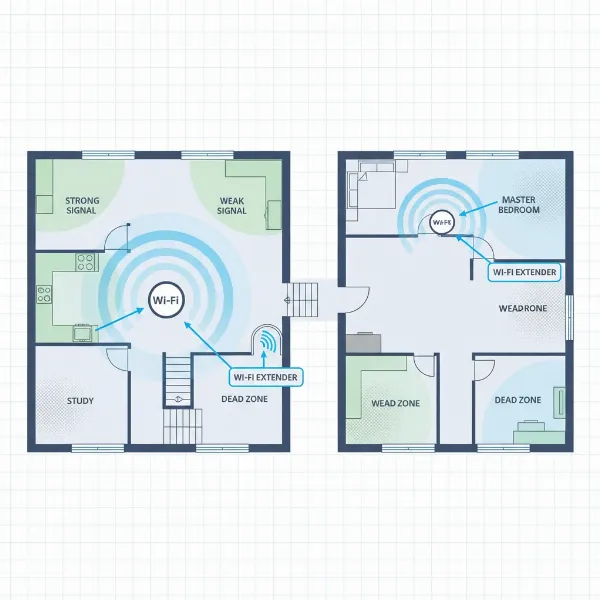
A Wifi extender, often referred to as a Wifi booster or repeater, is a networking device designed to expand the coverage area of an existing wireless network. It acts as a bridge, capturing the Wifi signal from your primary router, amplifying it, and then rebroadcasting it to reach areas of your home or office where the signal is weak or nonexistent – commonly known as “dead zones.” The extender essentially creates a secondary network, allowing devices to connect to whichever signal, the original or the extended one, is stronger in their location.
The technical process involves establishing two connections. First, the extender connects wirelessly (or sometimes via a wired connection like Powerline or MoCA) to your main router. Then, it creates its own network, often with a slightly different name (SSID), that extends the reach into previously uncovered areas. This amplification process helps mitigate the impact of physical barriers like walls, floors, and furniture that naturally obstruct Wifi signals. There are typically three main types: plug-in range extenders that connect directly to an outlet, powerline adapters that use your home’s electrical wiring, and mesh Wifi systems which consist of multiple nodes working together for seamless whole-home coverage.
2. The Advantages and Disadvantages of Using a Wifi Extender
Wifi extenders offer a practical solution for improving home network performance, but they come with their own set of pros and cons.
Advantages:
- Extended Coverage: The primary benefit is the ability to eliminate Wifi dead zones and provide internet access to every corner of your home or office, including basements, attics, or outdoor areas like patios.
- Cost-Effective: Compared to upgrading your entire router system or internet service plan, a Wifi extender is often a more affordable way to enhance your existing network.
- Easy Setup: Many modern extenders feature user-friendly setup processes, including one-touch WPS (Wifi Protected Setup) buttons or intuitive mobile apps that guide you through installation.
- Improved Signal Stability: By rebroadcasting a stronger signal, extenders can help devices maintain a more stable connection, reducing buffering and dropped connections in previously problematic areas.
- No Additional Data Plan: Wifi extenders utilize your existing internet service, meaning there are no extra monthly data charges.
Disadvantages:
- Potential Speed Reduction: Wireless extenders can sometimes halve the bandwidth because they dedicate part of their capacity to communicate with the main router and another part to communicate with your devices. This “double hop” can lead to slower speeds.
- Relies on Existing Signal: An extender can only amplify the signal it receives. If the signal from your main router is already very weak where the extender is placed, the extended signal will also be weak and slow.
- Does Not Create Internet: A Wifi extender requires an active internet connection from your primary router. It cannot generate internet access where none exists.
- Interference Issues: If multiple extenders are used or poorly placed, they can interfere with each other or with the main router, potentially worsening network performance.
- Management Complexity: Depending on the setup, some extenders create a separate network name, requiring devices to manually switch between networks for optimal connection.
[image-1|wifi-extender-home-network|A Wifi extender device plugged into a wall outlet, extending a home network signal to cover multiple rooms.|
A close-up shot of a sleek, white Wifi extender plugged into a standard wall outlet in a modern living room. The extender has a subtle LED indicator glowing, signifying an active connection. A soft, warm ambient light illuminates the scene, suggesting a cozy home environment. The image should convey simplicity and seamless integration with home decor. Focus on the device itself and its immediate surroundings.]
3. Understanding Mobile Hotspots: How Do They Work?
A mobile hotspot, also known as a portable Wifi router or MiFi device, is a technology that allows you to share your cellular data connection (4G LTE or 5G) with other devices, effectively creating a personal, portable Wifi network wherever you have cellular service. Unlike a Wifi extender that extends an existing fixed network, a mobile hotspot creates a new internet connection from scratch using mobile data.
There are two primary types of mobile hotspots:
- Smartphone Hotspot (Tethering): Most modern smartphones have a built-in feature that enables them to act as a mobile hotspot. By activating this setting, your phone uses its cellular data plan to broadcast a Wifi signal, allowing your laptop, tablet, or other phones to connect to the internet through your phone’s data. This is convenient as it requires no additional device.
- Dedicated Hotspot Device: These are standalone hardware devices specifically designed to provide mobile internet. They typically require their own SIM card and data plan. Dedicated devices often offer better performance, longer battery life, and support more simultaneous connections than a smartphone hotspot, making them suitable for heavier use or multiple users.
The way it works is straightforward: the hotspot device (or your phone) connects to your cellular provider’s network, just like it would for calls or texts. It then converts that cellular data signal into a local Wifi signal, broadcasting a network name (SSID) that your other devices can detect and connect to using a password.
4. The Advantages and Disadvantages of Using a Mobile Hotspot
Mobile hotspots are invaluable for internet access on the go, yet they come with specific trade-offs.
Advantages:
- Ultimate Portability: The most significant advantage is the ability to have internet access virtually anywhere you have a cellular signal, making it ideal for travel, remote work, or situations without traditional Wifi.
- Creates New Internet Access: Unlike an extender, a hotspot generates its own internet connection, independent of any fixed broadband service.
- Personal and Secure Connection: You get a private, password-protected network, which is generally more secure than connecting to public Wifi networks in cafes or airports.
- Multi-Device Connectivity: Both smartphone and dedicated hotspots allow several devices to connect simultaneously, enabling you to share your internet with colleagues or family.
- Flexibility: Dedicated devices often allow you to swap SIM cards for different carriers or international travel, offering flexibility in data plans.
Disadvantages:
- Data Caps and Costs: Most mobile hotspot plans come with data limits, and exceeding these can lead to throttled speeds or additional charges. The ongoing cost of a separate data plan can be significant.
- Reliance on Cellular Coverage: If you’re in an area with poor or no cellular signal, your mobile hotspot will not function.
- Battery Drain (Smartphone Hotspot): Using your smartphone as a hotspot can rapidly deplete its battery, especially with multiple connected devices or heavy usage, and can also cause the phone to overheat.
- Limited Range and Performance: Mobile hotspots generally offer a more limited Wifi range compared to a home router, and their performance can vary greatly depending on cellular network congestion and signal strength.
- Additional Device (Dedicated Hotspot): A dedicated hotspot is another device to purchase, charge, and carry.
[image-2|mobile-hotspot-on-the-go|A dedicated mobile hotspot device on a coffee shop table, connected to a laptop.|
A compact, modern mobile hotspot device, possibly a MiFi, rests on a wooden coffee shop table next to an open laptop. A cup of coffee and a notebook are also on the table, indicating a productive work environment. The lighting is bright and natural, suggesting daytime. The focus is on the hotspot device and its connection to the laptop, emphasizing portable internet for remote work.]
5. Wifi Extender vs. Mobile Hotspot: A Direct Comparison
To make the best decision, let’s look at a side-by-side comparison of Wifi extenders and mobile hotspots:
| Feature | Wifi Extender | Mobile Hotspot |
|---|---|---|
| Internet Source | Relies on an existing wired broadband connection (via a router) | Relies on cellular data (4G LTE or 5G) |
| Purpose | Extends existing Wifi coverage; eliminates dead zones | Creates a new, portable Wifi network |
| Portability | Generally stationary or semi-portable (within range of router) | Highly portable; internet on the go |
| Coverage Area | Expands the range of an existing home/office Wifi network | Creates a local Wifi bubble around the device (limited range) |
| Speed | Dependent on main router speed; can experience reduction due to re-broadcasting | Dependent on cellular network strength and plan; can be very fast (5G) |
| Data Usage | Uses data from your existing home internet plan (typically unlimited) | Uses data from a cellular data plan (often with caps) |
| Cost | One-time device purchase | Device purchase + ongoing monthly data plan cost |
| Ideal Use Case | Enhancing home Wifi, covering large spaces, eliminating indoor dead zones | Travel, remote work, temporary internet, events, anywhere without fixed Wifi |
| Security | Inherits security of main router, typically WPA2/WPA3 | Private, password-protected cellular connection (WPA2/WPA3) |
| Power Source | Plugs into wall outlet, some models battery-powered | Battery-powered (rechargeable) |
6. When to Choose a Wifi Extender
Choosing a Wifi extender is ideal when your primary goal is to improve the Wifi coverage within a fixed location that already has an internet connection. Consider a Wifi extender if:
- You have a large home or multi-story house: Wifi signals often struggle to penetrate multiple walls and floors, creating areas with poor reception. An extender can bridge these gaps.
- You experience “dead zones”: If certain rooms, corners, or even outdoor areas close to your home consistently show weak or no Wifi signal, an extender can bring connectivity to these spots.
- Your existing Wifi speed is sufficient near the router: If your internet speed is good where your router is located, but degrades significantly further away, an extender can help maintain that speed in wider areas.
- You want a cost-effective solution for better home coverage: Rather than upgrading to a more powerful (and expensive) router or a mesh system, an extender offers a budget-friendly way to expand your current network’s reach.
- You have wired devices in distant rooms: Some extenders come with Ethernet ports, allowing you to connect devices like smart TVs, gaming consoles, or PCs to a stable wired connection in areas far from your main router.
“A Wifi extender is an excellent solution for anyone struggling with inconsistent Wi-Fi signals in their home. It’s about optimizing what you already have.”
7. When to Choose a Mobile Hotspot
A mobile hotspot is your go-to solution when you need internet access outside the confines of your home or office Wifi network. This device offers unparalleled flexibility and is best suited for:
- Frequent Travelers: Whether you’re on a road trip, commuting, or flying, a mobile hotspot ensures you have internet access without relying on unreliable public Wifi or costly hotel networks.
- Remote Workers and Digital Nomads: For those who work from cafes, co-working spaces, or various temporary locations, a hotspot provides a consistent and secure internet connection.
- Backup Internet: If your home internet connection goes down, a mobile hotspot can serve as a reliable backup, keeping you connected during outages.
- Students or Field Workers: For individuals needing internet for school projects on the go or professionals who require connectivity in various outdoor or temporary work sites.
- International Travel: Dedicated mobile hotspots often allow you to use local or international SIM cards, avoiding expensive roaming charges.
- Secure Browsing on the Go: Using your personal hotspot is generally safer than connecting to unknown public Wifi networks, protecting your data from potential security threats.
[image-3|mobile-hotspot-travel-worker|A person using a laptop with a mobile hotspot outdoors, enjoying connectivity.|
A person sits on a park bench, comfortably working on a laptop. A sleek, black dedicated mobile hotspot device is visible next to the laptop. The background shows a blurry but pleasant outdoor environment with green trees and natural light, emphasizing the freedom of working remotely with portable internet. The overall tone is relaxed and productive.]
8. Key Factors to Consider Before Buying
Making the right choice involves evaluating your specific needs against the features each device offers.
For Wifi Extenders:
- Router Compatibility and Standards: Ensure the extender supports the same Wifi standards (e.g., Wi-Fi 5, Wi-Fi 6) as your main router for optimal performance. While an 802.11ac extender will work with older routers, matching standards helps.
- Dual-Band or Tri-Band: A dual-band extender supports both 2.4GHz (for wider range, older devices) and 5GHz (for faster speeds, newer devices) frequencies. Tri-band extenders offer an additional 5GHz band, further enhancing performance by dedicating one band to communicate with the router.
- Ethernet Ports: If you need to connect wired devices like gaming consoles or PCs to the extended network, look for models with Gigabit Ethernet ports.
- Setup Ease: Look for extenders with simple setup options, such as WPS buttons or a dedicated mobile app, to streamline the installation process.
- Security: Verify that the extender supports modern security protocols like WPA2 or WPA3 to protect your network.
- Placement Indicators: Some extenders feature LED indicators that help you find the optimal placement for maximum signal strength.
For Mobile Hotspots:
- Carrier Coverage and Compatibility: This is paramount. Choose a mobile hotspot and data plan from a carrier that offers strong cellular coverage in the areas where you intend to use it most.
- Data Plan and Cost: Carefully evaluate the available data plans. Consider your typical data consumption to avoid overage charges or throttled speeds. Factor in both the device cost and the recurring monthly data plan.
- Device Type (Smartphone vs. Dedicated): Decide if your smartphone’s tethering feature is sufficient for occasional, light use, or if a dedicated hotspot device is necessary for better performance, longer battery life, and more connections.
- Battery Life: For dedicated devices, consider how long the battery lasts on a single charge, especially if you plan to use it for extended periods away from power sources.
- Number of Supported Devices: Check the maximum number of devices that can connect simultaneously. Smartphone hotspots usually support fewer devices (3-5) compared to dedicated devices (up to 10-15 or more).
- Network Speed (4G LTE or 5G): Opt for a device and plan that support the fastest available cellular technology (e.g., 5G) if speed is a priority for your tasks.
- Security Features: Ensure the device offers robust encryption (WPA2/WPA3) and other security options to keep your connection private.
- Additional Features: Some dedicated hotspots offer features like external antenna ports (for boosting signal in weak areas) or Ethernet ports.
Conclusion
The choice between a Wifi extender and a mobile hotspot ultimately depends on where and how you need to stay connected. A Wifi extender is a powerful tool for enhancing your existing home or office network, eliminating dead zones, and ensuring consistent connectivity within a fixed environment. It’s a cost-effective way to get more out of your current internet service without incurring additional monthly data charges.
Conversely, a mobile hotspot provides the freedom of internet access on the move, transforming cellular data into a portable Wifi network. It’s the ideal companion for travelers, remote workers, or anyone needing a secure, independent connection away from traditional Wifi sources. While it comes with ongoing data plan costs and reliance on cellular coverage, its portability is unmatched.
Before making a purchase, assess your primary use cases: Are you looking to improve indoor coverage, or do you need internet while on the go? Once you clarify your needs, you can confidently choose the device that will best serve your connectivity requirements. How will you optimize your internet experience today?
Frequently Asked Questions
Does a Wifi extender reduce internet speed?
|
Our Picks for the Best Wifi extender in 2026
As an Amazon Associate I earn from qualifying purchases.
|
||
| Num | Product | Action |
|---|---|---|
| 1 | TP-Link AX3000 WiFi 6 Range Extender | PCMag Editor's Choice | Dual-Band Wireless Repeater w/Ethernet Port | Up to 2400 Sq. Ft., 64 Devices | Internet Signal Booster | APP Setup | EasyMesh (RE715X) |

|
| 2 | 1200Mbps WiFi Extender Signal Booster for Home, Dual Band 5GHz/2.4GHz Wireless Internet Repeater with 4 External Antennas, Covers Up to 3600 Sq.ft & Supports 80 Devices, AP Mode with Ethernet Port |
|
| 3 | 2026 WiFi Extender Signal Booster - 2.4GHz 300Mbps WiFi Booster for Home, Covers Up to 9999 Sq. Ft, Easy Setup, Ethernet Port & Access Point, Stable Internet Performance with 60+ Devices(White) |
|
| 4 | WiFi Extender Signal Booster for Home 2026 Internet Repeater Long Range Up to 9995 Sq. Ft. Whole Home WiFi Coverage |
|
| 5 | TP-Link WiFi Extender with Ethernet Port, Dual Band 5GHz/2.4GHz, Up to 44% More Bandwidth Than Single Band, Covers Up to 1200 Sq.ft and 30 Devices, Signal Booster Amplifier Supports OneMesh(RE220) |
|
| 6 | TP-Link AC1200 WiFi Extender, 2023 Engadget Best Budget Pick, 1.2Gbps Signal Booster for Home, Dual Band 5GHz/2.4GHz, Covers Up to 1500 Sq.ft and 30 Devices,Support Onemesh, One Ethernet Port (RE315) |
|
| 7 | WiFi Extender WiFi Booster 1200 Mbps Dual Band (5GHz/2.4GHz) WiFi Extenders Signal Booster for Home, Internet Extended Booster WiFi Repeater (White) |
|
| 8 | WiFi Extender Signal Booster, WiFi Booster Dual Band 5.8GHz&2.4GHz, Covers Up to 10000 Sq.ft, 1.2Gbps WiFi Repeater with One Ethernet Port, One-tap Setup |
|
| 9 | WiFi Extender, WiFi Extenders Signal Booster for Home Up to 5000 sq.ft and 50 Devices, WiFi Range Extender, Wireless Repeater, Long Range Amplifier with Ethernet Port, 1-Tap Setup, Alexa Compatible |
|
| 10 | TP-Link AC1900 WiFi Range Extender RE550 | Dual-Band Wireless Repeater Amplifier w/Gigabit Ethernet Port | Up to 2200 Sq. Ft., 32 Devices | Internet Signal Booster | APP Setup | EasyMesh Compatible |
|
Yes, a Wifi extender, especially a wireless repeater, can reduce internet speed. This often happens because the extender uses the same radio band to communicate with both your main router and your connected devices. This “double hop” means bandwidth is split, potentially cutting speeds by up to 50%. More advanced dual-band or tri-band extenders, or those using wired connections like Powerline, can mitigate this speed loss by dedicating separate bands or channels for router communication.
Can I use a Wifi extender with a mobile hotspot?
Technically, yes, a Wifi extender can connect to a mobile hotspot. An extender sees the mobile hotspot’s Wifi network as any other network it needs to extend. However, this setup is generally not recommended. Mobile hotspots typically have limited range and a restricted number of supported devices, and adding an extender will count as one of those devices. Furthermore, an extender will further reduce the already potentially limited speed of the mobile hotspot, making the overall experience slower and less efficient. It’s usually better to simply move the mobile hotspot closer to your devices or consider a dedicated mobile hotspot device with better range if you need more coverage on the go.
Are mobile hotspots secure?
Yes, mobile hotspots are generally considered secure, especially when compared to public Wifi networks. When you set up a mobile hotspot (either via your smartphone or a dedicated device), you create a private, password-protected network. As long as you use a strong, unique password and modern encryption protocols (like WPA2 or WPA3), your connection is protected from unauthorized access. However, like any network, it’s crucial to keep your software updated and be mindful of what information you transmit online.
Can a mobile hotspot replace home internet?
For most users with typical internet consumption, a mobile hotspot cannot fully replace home internet. Mobile hotspot plans often come with data caps, and exceeding these limits can lead to significantly slower speeds or additional charges, making it impractical for heavy streaming, gaming, or large downloads. Home broadband connections (fiber, cable, DSL) typically offer faster speeds, unlimited data, and greater stability for multiple users and devices. A mobile hotspot is best suited as a backup solution or for users with very light internet needs at home.
What’s the difference between a phone hotspot and a dedicated hotspot device?
A phone hotspot uses your smartphone’s built-in feature to share its cellular data connection. It’s convenient because it requires no extra device, but it drains your phone’s battery, can cause overheating, and typically supports fewer connected devices with a more limited range. A dedicated hotspot device is a standalone piece of hardware specifically designed for internet sharing. These devices generally offer better performance, longer battery life, can support more simultaneous connections, and often have stronger antennas for better signal reception, but they require a separate purchase and often their own data plan.