In today’s connected world, a robust Wi-Fi signal is no longer a luxury but a necessity, especially in expansive homes brimming with smart appliances. The frustration of buffering streams, dropped video calls, and unresponsive smart devices in certain areas is a common lament. While your main router works tirelessly, its signal often struggles to penetrate thick walls, multiple floors, and the interference generated by numerous connected gadgets and large household appliances. A high-quality Wi-Fi extender can be the hero your home network needs, intelligently boosting your signal to every corner and ensuring all your smart tech stays online and responsive. This guide will walk you through selecting the ideal Wi-Fi extender to conquer dead zones and create a seamless smart home experience.
What is a WiFi Extender and How Does It Work?
A Wi-Fi extender, also known as a Wi-Fi booster or signal repeater, is a device designed to expand the coverage of your existing wireless network. Its primary function is to eliminate dead zones and weak spots by taking the Wi-Fi signal from your main router, amplifying it, and then rebroadcasting it to areas where the original signal struggles to reach. This process effectively extends the range of your home network, allowing devices further away to connect with a stronger signal.
Extenders operate by acting as a middleman between your router and your devices. When a device tries to connect to the internet in a fringe area, the extender intercepts the weak signal from the router, strengthens it, and sends it to the device. Conversely, it receives the device’s signal, amplifies it, and forwards it back to the router. There are generally two types: wall-plug units that plug directly into an outlet and desktop models that resemble small routers.
A crucial distinction lies in their band configuration. Dual-band extenders use the same frequency band (either 2.4 GHz or 5 GHz) to communicate with both the router and your devices, which can sometimes lead to a halving of effective speed. Tri-band extenders, on the other hand, feature a dedicated third band, typically 5 GHz, to create a “backhaul” link solely for communication with the main router. This dedicated channel ensures that the other two bands remain open for your devices, significantly reducing speed degradation and providing a more efficient extension of your network.
The Challenge of WiFi in Large Homes and with Smart Appliances
Large homes present inherent challenges to Wi-Fi signals due to sheer distance and physical obstacles. Walls, floors, and even large pieces of furniture can absorb or reflect Wi-Fi radio waves, leading to “dead zones” where connectivity is weak or non-existent. Beyond structural impediments, the modern home’s reliance on smart appliances and other electronics adds another layer of complexity.
Many traditional large household appliances can be silent saboteurs of your Wi-Fi signal. Microwaves, for instance, operate on the same 2.4 GHz frequency band as many Wi-Fi routers and older smart devices. When in use, they emit electromagnetic interference that can disrupt your Wi-Fi signal, causing slowdowns or temporary disconnects. Similarly, large metal objects like refrigerators, ovens, and even water heaters act as significant barriers, reflecting and absorbing Wi-Fi signals rather than allowing them to pass through. Cordless phones and Bluetooth devices can also contribute to 2.4 GHz band congestion, forcing your Wi-Fi to compete for space on an already crowded channel.
The proliferation of smart home devices further compounds these issues. Smart light bulbs, voice assistant hubs, security cameras, smart plugs, and streaming devices all demand a slice of your network’s bandwidth. When too many of these devices are connected to a single router, they can overcrowd the network, competing for bandwidth, radio channels, and processor usage. Devices like security cameras that continuously upload video feeds or smart TVs streaming 4K content are particularly bandwidth-intensive, putting significant strain on your network and potentially affecting overall Wi-Fi speed and stability for all connected devices. Most smart home gadgets primarily utilize the 2.4 GHz band, which, while offering better range, is more susceptible to interference and congestion from neighboring networks and other electronics.
“Wi-Fi signals are radio waves. Every time that wave has to pass through a brick fireplace, a metal appliance, or a thick plaster wall, it loses energy.” – Lewis Henry, Network Installer and Consultant
Benefits of Using a High-Quality WiFi Extender
Investing in a high-quality Wi-Fi extender offers several compelling advantages, especially for large homes struggling with connectivity or those with a high density of smart appliances. These devices are purpose-built to tackle the common frustrations of modern wireless networks, bringing tangible improvements to your daily digital life.
Firstly, the most immediate benefit is the extended coverage of your Wi-Fi network. An extender can effectively push your signal into areas previously plagued by dead zones, such as basements, attics, outdoor spaces, or distant bedrooms. This means you can enjoy reliable internet access wherever you need it, without being tethered to a specific room. Secondly, it leads to improved speed and stability in those previously weak signal areas. By amplifying the signal, an extender reduces latency and packet loss, resulting in smoother streaming, faster downloads, and more consistent performance for gaming and video calls.
Moreover, Wi-Fi extenders can be a cost-effective solution compared to upgrading your entire internet plan or replacing a perfectly functional router. They target specific weak spots, providing a localized boost where it’s most needed without a hefty investment. Finally, modern Wi-Fi extenders are typically easy to install and set up. Many come with intuitive mobile apps or simple web interfaces that guide you through the process, often involving just a few taps or clicks to get your extended network up and running. This ease of use makes them an accessible option for homeowners who aren’t networking experts.
When Do You Need a WiFi Extender?
Deciding whether a Wi-Fi extender is the right solution for your home depends largely on your specific circumstances and the nature of your connectivity issues. While highly beneficial in many scenarios, there are also cases where an alternative might be more suitable.
You likely need a Wi-Fi extender if your home has multiple floors or a sprawling layout where the signal from your main router cannot reach effectively. Areas beyond 2,500 square feet often struggle with single-router coverage, leading to noticeable dead zones. Similarly, homes with thick internal walls, brick fireplaces, or numerous large metal objects (like extensive ductwork or kitchen appliances) will experience significant signal degradation, making an extender essential for bypassing these physical obstructions.
If you frequently desire Wi-Fi access in outdoor areas such as a backyard, patio, or garage, an extender can project your network beyond the confines of your main living space. Lastly, if you have many devices connected simultaneously, especially a high number of smart home gadgets, an extender can help distribute the network load and improve performance by providing a stronger, dedicated link to the router for devices in its range. However, for whole-home seamless coverage with no manual network switching and better performance for demanding applications across a very large, multi-story home, a mesh Wi-Fi system might be the superior choice, as it creates a unified network rather than extending an existing one. Extenders are best for addressing one or two specific weak spots rather than rebuilding network coverage across an entire expansive property.
Key Factors to Consider When Choosing a WiFi Extender
Selecting the best Wi-Fi extender for your large home with smart appliances requires careful consideration of several technical specifications and features. These factors will dictate the performance, coverage, and overall effectiveness of your extended network.
WiFi Speed and Standard
|
Our Picks for the Best Wifi extender in 2026
As an Amazon Associate I earn from qualifying purchases.
|
||
| Num | Product | Action |
|---|---|---|
| 1 | TP-Link AX3000 WiFi 6 Range Extender | PCMag Editor's Choice | Dual-Band Wireless Repeater w/Ethernet Port | Up to 2400 Sq. Ft., 64 Devices | Internet Signal Booster | APP Setup | EasyMesh (RE715X) |

|
| 2 | WiFi Extender WiFi Booster 1200 Mbps Dual Band (5GHz/2.4GHz) WiFi Extenders Signal Booster for Home, Internet Extended Booster WiFi Repeater (White) |
|
| 3 | WiFi Extender Signal Booster, WiFi Booster Dual Band 5.8GHz&2.4GHz, Covers Up to 10000 Sq.ft, 1.2Gbps WiFi Repeater with One Ethernet Port, One-tap Setup |
|
| 4 | TP-Link WiFi Extender with Ethernet Port, Dual Band 5GHz/2.4GHz, Up to 44% More Bandwidth Than Single Band, Covers Up to 1200 Sq.ft and 30 Devices, Signal Booster Amplifier Supports OneMesh(RE220) |
|
| 5 | WiFi Extender Signal Booster for Home 2026 Internet Repeater Long Range Up to 9995 Sq. Ft. Whole Home WiFi Coverage |
|
| 6 | TP-Link AC1200 WiFi Extender, 2023 Engadget Best Budget Pick, 1.2Gbps Signal Booster for Home, Dual Band 5GHz/2.4GHz, Covers Up to 1500 Sq.ft and 30 Devices,Support Onemesh, One Ethernet Port (RE315) |
|
| 7 | 1200Mbps WiFi Extender Signal Booster for Home, Dual Band 5GHz/2.4GHz Wireless Internet Repeater with 4 External Antennas, Covers Up to 3600 Sq.ft & Supports 80 Devices, AP Mode with Ethernet Port |
|
| 8 | 2026 WiFi Extender Signal Booster - 2.4GHz 300Mbps WiFi Booster for Home, Covers Up to 9999 Sq. Ft, Easy Setup, Ethernet Port & Access Point, Stable Internet Performance with 60+ Devices(White) |
|
| 9 | TP-Link AC1900 WiFi Range Extender RE550 | Dual-Band Wireless Repeater Amplifier w/Gigabit Ethernet Port | Up to 2200 Sq. Ft., 32 Devices | Internet Signal Booster | APP Setup | EasyMesh Compatible |
|
| 10 | WiFi Extender, WiFi Extenders Signal Booster for Home Up to 5000 sq.ft and 50 Devices, WiFi Range Extender, Wireless Repeater, Long Range Amplifier with Ethernet Port, 1-Tap Setup, Alexa Compatible |
|
Look for extenders that support the latest Wi-Fi standards, such as Wi-Fi 6 (802.11ax), Wi-Fi 6E, or even Wi-Fi 7. These newer standards offer significant improvements in speed, efficiency, and capacity compared to older Wi-Fi 5 (802.11ac) devices. Matching or exceeding the speed of your primary router is crucial to avoid creating a bottleneck in your extended network. Higher speeds are particularly important for streaming 4K content, online gaming, and handling multiple bandwidth-hungry smart devices simultaneously.
Bands: Tri-Band vs. Dual-Band
As discussed, this is a critical differentiator. Tri-band extenders are generally superior for large homes and numerous devices because they offer a dedicated wireless backhaul channel (often a 5 GHz or 6 GHz band) to communicate with your router. This means your devices can connect to the other two bands (2.4 GHz and 5 GHz) without competing for bandwidth with the extender’s connection to the router, thus maintaining higher speeds. While more expensive, the performance gain is often worth it for high-demand environments. Dual-band extenders are more budget-friendly but may experience a speed reduction as they use the same bands for both router communication and client connections.
Coverage Area
Assess the square footage and layout of the area you need to cover. Extenders are rated for specific coverage ranges (e.g., 1,500 sq ft, 2,800 sq ft, 4,000+ sq ft). Choose an extender whose stated range is appropriate for the size of your dead zone or the furthest reaches of your home. Keep in mind that real-world performance can be affected by physical obstacles.
Ethernet Ports
Many extenders include one or more Gigabit Ethernet ports. These are invaluable for connecting wired devices like smart TVs, gaming consoles, desktop PCs, or network-attached storage (NAS) directly to the extender. A wired connection bypasses wireless interference and offers the most stable and fastest possible speed, which is ideal for stationary devices that demand high bandwidth.
Additional Features
Modern extenders come with various features that enhance performance and user experience:
- MU-MIMO (Multi-User, Multiple-Input, Multiple-Output): Allows the extender to communicate with multiple devices simultaneously, improving efficiency in busy networks.
- Beamforming: Directs Wi-Fi signals directly to connected devices, rather than broadcasting in all directions, resulting in stronger and more focused connections.
- App Control: Many extenders offer intuitive mobile apps for easy setup, management, and monitoring of your extended network.
- Smart Home Hub Integration: Some advanced extenders, like the Amazon eero Pro 6E, can double as a Zigbee smart home hub, simplifying your smart device ecosystem.
Brand and Price
Opt for extenders from reputable networking brands known for their reliability and performance, such as Netgear, TP-Link, Linksys, and Asus. While budget is always a consideration, remember that investing in a higher-quality extender, especially a tri-band or Wi-Fi 6/6E/7 model, will provide a more satisfying and stable experience in the long run, particularly with a demanding smart home setup.
Top WiFi Extenders for Large Homes and Smart Appliances
Choosing the right Wi-Fi extender can significantly improve your home network. Here’s a look at some of the top-rated models that excel in large households with numerous smart devices, along with a comparison table to help you decide.
Netgear Nighthawk X6S (EX8000) Tri-Band Extender
This extender is often recommended for “power users” with demanding networks, including gamers and 4K streamers. The X6S stands out with its tri-band technology, offering a dedicated 5 GHz band for communication with the router, preventing speed reduction for connected devices. It delivers robust performance and is designed to handle a high volume of traffic.
TP-Link RE715X AX3000 Wi-Fi 6 Range Extender
BroadbandNow has praised the RE715X as a top pick, citing its dual-band Wi-Fi 6 frequencies, extensive coverage, and combined speeds up to 3 Gbps. It offers a significant speed boost over older Wi-Fi 5 models and integrates seamlessly with the TP-Link Tether app for easy management and optimization.
Asus RP-AX58 AX3000 Dual-Band Wi-Fi 6 AiMesh Range Extender
The Asus RP-AX58 combines competitive performance with Wi-Fi 6 speeds and broad compatibility with any router. Its AiMesh technology allows it to integrate with compatible Asus routers to form a mesh-like network, offering more seamless roaming. It provides strong performance, particularly at 5 GHz frequencies.
Amazon eero Pro 6E
While primarily a mesh system node, the eero Pro 6E can function effectively as an extender in a larger eero network and is excellent for very large homes (over 4,000 square feet). It supports the new 6GHz band, which is less congested and offers faster speeds, ideal for smart homes. Its setup is notoriously simple via the eero app, and it doubles as a Zigbee smart home hub.
Netgear EXS27 BE5000 Wi-Fi 7 Extender
For those seeking cutting-edge performance and future-proofing, the Netgear EXS27 supports the nascent Wi-Fi 7 standard. This makes it suitable for extremely heavy use and networks with many connected devices, offering the highest potential speeds and efficiency.
Comparison Table: Top WiFi Extenders for Large Homes & Smart Appliances
| Feature | Netgear Nighthawk X6S (EX8000) | TP-Link RE715X AX3000 | Asus RP-AX58 AX3000 | Amazon eero Pro 6E | Netgear EXS27 BE5000 |
|---|---|---|---|---|---|
| WiFi Standard | Wi-Fi 5 (AC3000) / Tri-Band | Wi-Fi 6 (AX3000) | Wi-Fi 6 (AX3000) | Wi-Fi 6E (AXE5400) | Wi-Fi 7 (BE5000) |
| Bands | Tri-Band (2.4GHz, 2x5GHz) | Dual-Band (2.4GHz, 5GHz) | Dual-Band (2.4GHz, 5GHz) | Tri-Band (2.4GHz, 5GHz, 6GHz) | Tri-Band (2.4GHz, 5GHz, 6GHz) |
| Max Combined Speed | AC3000 Mbps | AX3000 Mbps | AX3000 Mbps | AXE5400 Mbps | BE5000 Mbps |
| Coverage Area | Very Large Homes (e.g., 2,500+ sq ft) | Large Homes (e.g., 2,500+ sq ft) | Large Homes (e.g., 2,800 sq ft) | Very Large (4,000+ sq ft) | Very Large / Future-proof |
| Ethernet Ports | 4 x Gigabit Ethernet | 1 x Gigabit Ethernet | 1 x Gigabit Ethernet | 2 x Gigabit Ethernet | 1 x 2.5 Gigabit Ethernet |
| Key Features | Dedicated Backhaul, MU-MIMO | 160MHz channel, Tether App | AiMesh compatible, MU-MIMO | Zigbee Hub, Easy Setup | Cutting-edge Wi-Fi 7 |
| Pros | Excellent performance, dedicated backhaul, multiple Ethernet ports | Strong Wi-Fi 6 performance, good coverage, app control | AiMesh for seamless roaming, strong 5 GHz performance | Simple setup, 6GHz band, smart home hub | Future-proof, highest speeds |
| Cons | Bulkier design, higher price, Wi-Fi 5 | Dual-band (potential speed reduction for backhaul) | Dual-band (potential speed reduction for backhaul) | More of a mesh node, higher price | Very new, potentially high cost |
Installation Tips and Optimizing Your WiFi Extender
Proper installation and optimization are key to maximizing the performance of your Wi-Fi extender and ensuring a reliable connection for all your devices, including smart appliances. A well-placed extender can make a significant difference.
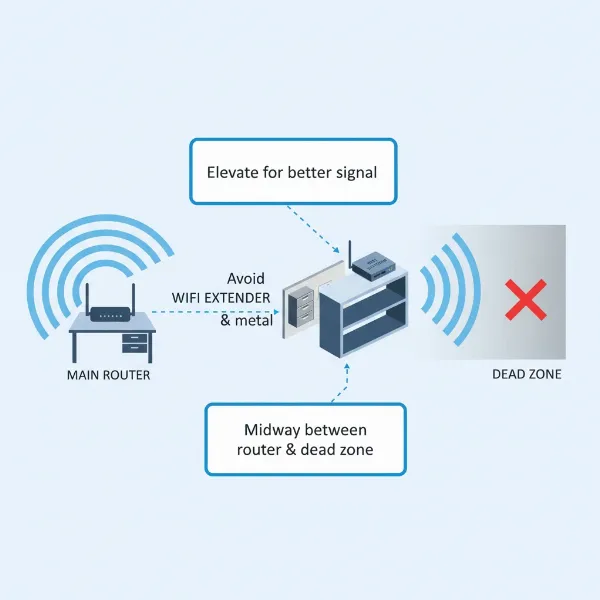
The most crucial step is optimal placement. The extender should be positioned roughly midway between your main router and the Wi-Fi dead zone you want to eliminate. It needs to receive a strong enough signal from the router to effectively amplify and rebroadcast it. Placing it too far from the router will result in it repeating a weak signal, offering little benefit. Many modern extenders come with signal indicator lights or companion mobile apps (like TP-Link Tether) that help you find the perfect spot, showing you the strength of the signal it’s receiving from your router. Always try to keep the extender in an open area, away from large metal objects, thick concrete walls, and interfering appliances like microwaves or cordless phones.
Another effective optimization tip is to switch compatible smart devices to the 5 GHz band if your extender supports it. The 5 GHz band offers faster speeds and is less susceptible to interference from common household items and older smart devices that primarily use the 2.4 GHz band. This frees up the 2.4 GHz band for devices that only support it or require its greater range. Regularly updating your extender’s firmware is also vital, as manufacturers often release updates that improve performance, add new features, and patch security vulnerabilities. Finally, if your extender has Ethernet ports, consider using wired connections for stationary bandwidth-intensive devices like smart TVs or gaming consoles, as this provides the most stable and fastest connection possible.
Buying Guide: Making the Right Choice
Navigating the array of Wi-Fi extenders can feel daunting, but a systematic approach will help you pinpoint the perfect device for your large home and smart appliance ecosystem. Consider these steps before making your final purchase.
First, establish your budget. Wi-Fi extenders range widely in price, from budget-friendly dual-band options to premium tri-band or Wi-Fi 6E/7 models. While it’s tempting to opt for the cheapest, remember that performance often scales with cost. For large homes with many smart devices, a slightly higher investment typically translates to a more stable and satisfying experience.
Next, clearly define your specific needs. Are you primarily trying to eliminate a single dead spot in a distant room, or do you need to extend coverage across multiple floors and into outdoor areas? Do you have numerous bandwidth-hungry devices like 4K streamers, online gamers, or multiple security cameras? If so, prioritize extenders with higher speeds, tri-band technology, and potentially more Ethernet ports. If your smart home relies heavily on protocols like Zigbee, an extender with an integrated hub (like the eero Pro 6E) could simplify your setup.
Ensure compatibility with your existing router. While most extenders are designed to work with any standard router, checking manufacturer specifications can prevent unexpected issues. Also, consider the Wi-Fi standard of your current router; a Wi-Fi 6 extender will work with a Wi-Fi 5 router, but you won’t get full Wi-Fi 6 speeds unless both devices support it.
Finally, always read user reviews and expert recommendations. Real-world feedback can provide invaluable insights into an extender’s actual performance, ease of use, and reliability. Look for reviews from users with similar home sizes and device counts to yours. Websites like TechGearLab and BroadbandNow offer detailed testing and comparisons that can guide your decision. By thoughtfully considering these factors, you can make an informed choice that brings robust and reliable Wi-Fi to every corner of your smart home.
Conclusion
Achieving consistent and powerful Wi-Fi throughout a large home, especially one filled with an array of smart appliances, is entirely within reach with the right Wi-Fi extender. We’ve explored how these clever devices extend your network, overcome signal barriers like thick walls and metal appliances, and combat interference from the ever-growing number of connected gadgets. By focusing on key factors such as tri-band technology, Wi-Fi 6/6E/7 standards, and optimal placement, homeowners can transform frustrating dead zones into areas of seamless connectivity. A high-quality Wi-Fi extender is not just a signal booster; it’s an essential component for a truly intelligent and connected living space. Are you ready to unlock the full potential of your smart home network?
Frequently Asked Questions
Do WiFi extenders reduce internet speed?
Many traditional dual-band Wi-Fi extenders can effectively halve your internet speed because they use the same wireless band to communicate with both your main router and your connected devices. This creates a bottleneck as data has to travel back and forth on the same channel. However, tri-band extenders mitigate this by using a dedicated third band for communication with the router, allowing the other two bands to serve your devices without significant speed degradation. Newer Wi-Fi 6/6E/7 standards also improve efficiency.
Can large appliances interfere with WiFi?
Yes, large household appliances can significantly interfere with your Wi-Fi signal. Microwaves, for example, operate on the 2.4 GHz frequency, which is shared by many Wi-Fi networks and smart devices, causing electromagnetic interference. Large metal objects like refrigerators, ovens, and metal furniture also block and reflect Wi-Fi signals, creating dead zones and weak spots. Placing your router and extender away from these appliances can help minimize disruption.
Is a WiFi extender or a mesh system better for a large house?
For very large homes, especially multi-story ones with widespread dead zones and a high demand for seamless, consistent coverage, a mesh Wi-Fi system is generally considered superior. Mesh systems create a single, unified network with seamless roaming between nodes. Wi-Fi extenders are more cost-effective for addressing one or two specific weak spots or extending coverage to a limited area. If you need whole-home, high-performance coverage without manual network switching, mesh is often the better investment.
How many WiFi extenders do I need for a large home?
The number of Wi-Fi extenders needed depends on the size and layout of your home, as well as the specific areas experiencing weak signals. For most large homes, one strategically placed high-quality extender can often cover a significant dead zone. However, if you have multiple isolated weak spots or a particularly sprawling, multi-story layout with many obstacles, you might need two extenders or could benefit more from a mesh Wi-Fi system, which is designed for broader, more consistent coverage.