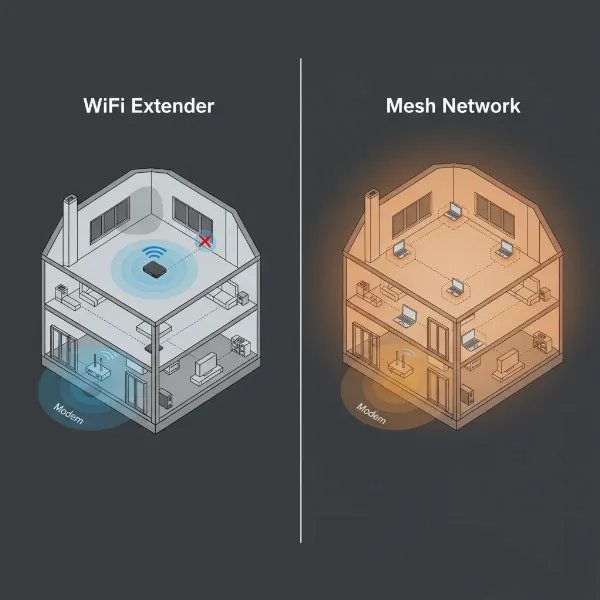
For traveling freelancers, a reliable internet connection isn’t just a convenience; it’s the lifeline of their business. Whether you’re working from a bustling coffee shop, a serene Airbnb, or a hotel room, inconsistent Wi-Fi can derail productivity and cause unnecessary stress. While public Wi-Fi is often available, it frequently comes with frustrating limitations: weak signals, sluggish speeds, and significant security risks. This is where a dedicated Wi-Fi extender or a versatile travel router becomes an indispensable tool. Designed to amplify existing signals and create more stable, secure connections, these devices empower digital nomads to maintain peak efficiency regardless of their location. Let’s delve into how the right Wi-Fi extender can transform your remote work experience, ensuring you stay connected, productive, and secure on the go.
1. What is a Wi-Fi Extender and How Does It Work?
A Wi-Fi extender, also known as a Wi-Fi booster or repeater, is a device engineered to broaden the coverage area of an existing wireless network. Its primary function is to eliminate “dead zones”—areas where the original Wi-Fi signal from your main router is weak or nonexistent. It achieves this by receiving the current Wi-Fi signal, amplifying its strength, and then rebroadcasting this boosted signal to extend its reach further into previously uncovered spaces.
The operational mechanism of a Wi-Fi extender is quite straightforward: it essentially acts as a bridge. The extender captures the Wi-Fi signal from your primary router, processes it, and then re-transmits it on a different channel or with increased power. This process effectively expands the footprint of your Wi-Fi network. While traditional extenders are plug-and-play devices that simply repeat a signal, for traveling freelancers, portable travel routers often serve a similar function, acting as versatile multi-mode devices that can extend a public Wi-Fi signal, create a private hotspot, or even function as a full router from a wired connection. These multi-functional devices offer greater adaptability for diverse travel scenarios.
2. Benefits of Using a Wi-Fi Extender for Freelancers
Utilizing a Wi-Fi extender or a travel router offers a multitude of benefits crucial for the success of traveling freelancers, ensuring consistent connectivity and enhanced productivity. Foremost, these devices effectively extend Wi-Fi coverage to areas with weak signals, eliminating frustrating “dead zones” that can exist in hotel rooms, rental apartments, or even across different floors of a building. This means you can work comfortably from any corner of your temporary workspace.
Beyond just extending range, a good Wi-Fi extender or travel router can significantly improve the stability and speed of your internet connection. By amplifying weak signals, it helps in maintaining a more consistent and potentially faster connection, which is vital for bandwidth-intensive tasks like video calls, large file transfers, and streaming. For digital nomads, this also means strengthening a personal portable Wi-Fi connection, reducing the reliance on often-insecure public networks and offering a more reliable and private internet experience. Moreover, travel routers allow you to centralize your network management, providing consistent network settings, including passwords and security protocols, across different locations without the need for repeated manual configuration for each device.
3. When Do You Need a Wi-Fi Extender as a Traveling Freelancer?
As a traveling freelancer, recognizing the signs that you need a Wi-Fi extender or travel router can save you from significant connectivity headaches. You most likely need one when your primary Wi-Fi device—be it a hotel router, a coffee shop hotspot, or your own mobile hotspot—has limited reach, leaving parts of your temporary living or working space without a strong signal. This is common in various travel environments, from spacious Airbnbs to multi-room hotel suites, or even when working outdoors in a garden or balcony.
Consider a Wi-Fi extender essential if you consistently find yourself with only “two bars” of Wi-Fi signal, indicating a weak but extendable connection. Such devices are particularly useful when physical obstructions like thick walls or distant routers weaken the signal, making reliable internet access a challenge. If you frequently work in diverse environments such as cafes, co-working spaces, or airports, a portable extender can ensure a stable connection even in crowded networks. Furthermore, if you connect multiple devices simultaneously—your laptop, tablet, smartphone, and smart watch—an extender helps distribute the signal more effectively, preventing slowdowns and ensuring every device maintains a robust connection for seamless productivity.
4. Key Factors When Choosing a Wi-Fi Extender for Travel
Selecting the ideal Wi-Fi extender for your nomadic lifestyle requires careful consideration of several critical factors beyond just basic functionality. Prioritizing these features will ensure your chosen device truly meets the demands of constant travel and diverse working environments.
-
Wi-Fi Speed: Opt for an extender that supports the latest Wi-Fi standards, such as Wi-Fi 5 (802.11ac) or Wi-Fi 6 (802.11ax), to ensure speeds comparable to or higher than your main router. This is crucial for handling demanding tasks like video conferencing and large file uploads.
-
Frequency Bands: Dual-band Wi-Fi extenders (2.4GHz and 5GHz) offer superior performance. The 5GHz band provides faster speeds for high-bandwidth activities but has a shorter range, while the 2.4GHz band offers wider coverage, albeit at slower speeds. Having both options allows for greater flexibility based on your current needs and environment.
-
Coverage Range: While “range” for a traveler is about amplifying a signal in a specific temporary location, ensure the extender can effectively boost the signal across your hotel room, apartment, or a small co-working space. Specific models can cover up to 1,500 to 2,500 square feet, which is generally more than sufficient for travel needs.
-
Ethernet Ports: A Gigabit Ethernet port can be invaluable for connecting devices that benefit from a stable wired connection, such as your laptop for critical tasks, or for turning the extender into an access point using a hotel’s wired internet.
-
Portability and Power: For traveling freelancers, size and weight are paramount. Look for compact, lightweight models that easily fit into your bag. USB-powered travel routers are particularly convenient as they can be powered by your laptop or a portable power bank, eliminating the need for bulky power adapters.
-
Security Features: Public Wi-Fi networks are notorious for security vulnerabilities. Prioritize extenders or travel routers that offer robust security protocols like WPA3 encryption. Travel routers often include advanced features like VPN compatibility, allowing you to create a secure, private network over any public Wi-Fi, protecting your sensitive data from prying eyes.
-
Ease of Setup and Management: A complex setup process is the last thing you need when you’re on the move. Look for devices with intuitive setup processes, ideally via a dedicated mobile app (like TP-Link Tether) or a straightforward web interface. This simplifies connecting to new networks in different locations.
-
Brand and Price: Stick to reputable brands known for network reliability, such as TP-Link, Netgear, Linksys, and GL.iNet. Prices can range from under $30 for basic extenders to over $100 for feature-rich travel routers, so balance your budget with your specific needs.
5. Comparing Popular Wi-Fi Extension Solutions for Travel
When considering Wi-Fi extension for travel, freelancers often choose between traditional plug-in Wi-Fi extenders and more versatile travel routers. Each has its strengths, depending on your primary needs for speed, security, and portability.
| Feature | NETGEAR EX6120 (Wi-Fi Extender) | TP-Link RE715X (Wi-Fi 6 Extender) | GL.iNet GL-AR300M (Travel Router) |
|---|---|---|---|
| Type | Wall-Plug Wi-Fi Extender | Wall-Plug Wi-Fi Extender | Portable Travel Router |
| Wi-Fi Standard | Wi-Fi 5 (AC1200) | Wi-Fi 6 (AX3000) | Wi-Fi 4 (N300) / Wi-Fi 5 (AC750/AC1200 for higher models) |
| Bands | Dual-band (2.4GHz/5GHz) | Dual-band (2.4GHz/5GHz) | Dual-band (2.4GHz/5GHz for higher models) |
| Max Speed | Up to 1200 Mbps | Up to 3000 Mbps (574 Mbps 2.4GHz, 2402 Mbps 5GHz) | Up to 300 Mbps (N300 model) / 750 Mbps (AC750 model) |
| Ethernet Ports | 1 x Fast Ethernet | 1 x Gigabit Ethernet | 2 x Fast Ethernet (WAN/LAN) |
| Power Source | AC Wall Plug | AC Wall Plug | USB-C (5V/2A) |
| Key Features | Compact, auto-updates, FastLane technology, good for travel. | Wi-Fi 6, OneMesh, Smart Roaming, High-Gain Antennas. | VPN support, OpenWRT, multi-mode (router/AP/extender), secure. |
| Portability | Very Good (Compact) | Good (Standard wall-plug) | Excellent (Pocket-sized, USB powered) |
| Security | WPA/WPA2 | WPA3 | VPN Client/Server, WPA2/WPA3, Firewall, DNS over TLS |
| Ideal For | Basic Wi-Fi extension in hotel rooms, coffee shops. | Extending Wi-Fi 6 networks, demanding tasks if speed is paramount. | Secure public Wi-Fi, creating private networks, VPN. |
| Pros | Portable, easy setup, reliable signal extension. | Latest Wi-Fi 6 speeds, mesh compatible, high performance. | Highly secure, extremely portable, flexible operating modes. |
| Cons | Speed might be reduced, fewer advanced features. | Larger form factor than some travel routers, relies on existing Wi-Fi 6. | Lower raw speed compared to AX extenders, may require some tech savvy. |
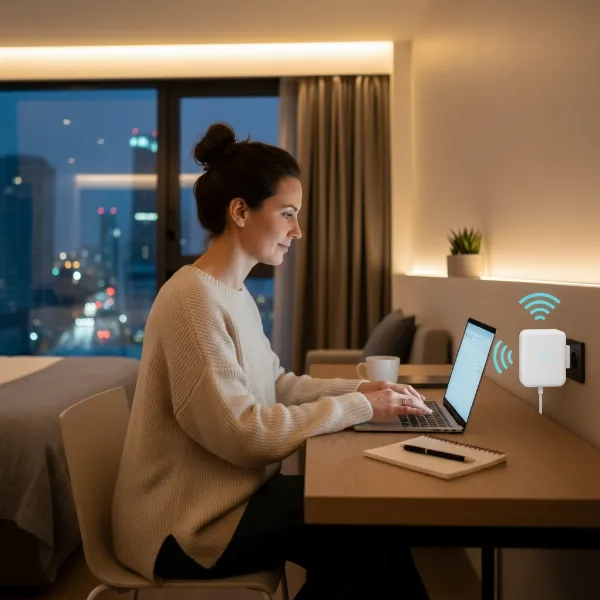 A traveling freelancer working on a laptop in a hotel room, with a small, portable Wi-Fi extender plugged into an outlet nearby, illustrating seamless connectivity while on the go.
6. Guide to Setting Up and Optimizing Your Travel Wi-Fi Extender
Setting up a Wi-Fi extender for your travels typically involves a few simple steps, but optimizing its performance requires a bit more thought.
Step-by-Step Setup:
|
Our Picks for the Best Wifi extender in 2026
As an Amazon Associate I earn from qualifying purchases.
|
||
| Num | Product | Action |
|---|---|---|
| 1 | TP-Link AX3000 WiFi 6 Range Extender | PCMag Editor's Choice | Dual-Band Wireless Repeater w/Ethernet Port | Up to 2400 Sq. Ft., 64 Devices | Internet Signal Booster | APP Setup | EasyMesh (RE715X) |

|
| 2 | WiFi Extender Signal Booster, WiFi Booster Dual Band 5.8GHz&2.4GHz, Covers Up to 10000 Sq.ft, 1.2Gbps WiFi Repeater with One Ethernet Port, One-tap Setup |
|
| 3 | TP-Link WiFi Extender with Ethernet Port, Dual Band 5GHz/2.4GHz, Up to 44% More Bandwidth Than Single Band, Covers Up to 1200 Sq.ft and 30 Devices, Signal Booster Amplifier Supports OneMesh(RE220) |
|
| 4 | WiFi Extender Signal Booster for Home 2026 Internet Repeater Long Range Up to 9995 Sq. Ft. Whole Home WiFi Coverage |
|
| 5 | TP-Link AC1900 WiFi Range Extender RE550 | Dual-Band Wireless Repeater Amplifier w/Gigabit Ethernet Port | Up to 2200 Sq. Ft., 32 Devices | Internet Signal Booster | APP Setup | EasyMesh Compatible |
|
| 6 | WiFi Extender, WiFi Extenders Signal Booster for Home Up to 5000 sq.ft and 50 Devices, WiFi Range Extender, Wireless Repeater, Long Range Amplifier with Ethernet Port, 1-Tap Setup, Alexa Compatible |
|
| 7 | 2026 WiFi Extender Signal Booster - 2.4GHz 300Mbps WiFi Booster for Home, Covers Up to 9999 Sq. Ft, Easy Setup, Ethernet Port & Access Point, Stable Internet Performance with 60+ Devices(White) |
|
| 8 | 1200Mbps WiFi Extender Signal Booster for Home, Dual Band 5GHz/2.4GHz Wireless Internet Repeater with 4 External Antennas, Covers Up to 3600 Sq.ft & Supports 80 Devices, AP Mode with Ethernet Port |
|
| 9 | TP-Link AC1200 WiFi Extender, 2023 Engadget Best Budget Pick, 1.2Gbps Signal Booster for Home, Dual Band 5GHz/2.4GHz, Covers Up to 1500 Sq.ft and 30 Devices,Support Onemesh, One Ethernet Port (RE315) |
|
| 10 | WiFi Extender WiFi Booster 1200 Mbps Dual Band (5GHz/2.4GHz) WiFi Extenders Signal Booster for Home, Internet Extended Booster WiFi Repeater (White) |
|
- Power On: Plug your Wi-Fi extender or travel router into a power outlet near your main Wi-Fi source (e.g., the hotel router, public hotspot).
- Connect to Extender: On your laptop or smartphone, connect to the extender’s temporary Wi-Fi network, which usually has a name like “TP-Link_Extender” or “GL.iNet_XXXX”.
- Access Setup Page: Open a web browser and navigate to the default setup address (often printed on the device or in the manual, like
tplinkrepeater.netor192.168.0.254). Many modern devices also offer setup via a dedicated mobile app. - Select Network: Follow the on-screen instructions to select the existing Wi-Fi network you wish to extend (e.g., “Hotel_Guest_Wi-Fi”). You’ll need to enter its password.
- Configure Extended Network: Give your extended network a new name (SSID) or choose to keep it the same as the original network for seamless roaming. Set a strong password for your new network.
- Relocate and Connect: Once configured, you can unplug the extender and move it to an optimal location. Reconnect your devices to the newly created extended network.
Tips for Optimizing Performance:
- Optimal Placement: The extender should be placed roughly halfway between your main Wi-Fi source and the “dead zone” you want to cover. It needs to receive a strong signal from the main router to effectively rebroadcast it. Placing it too far from the source will result in extending a weak signal.
- Avoid Interference: Keep the extender away from other electronics that can cause interference, such as microwaves, cordless phones, and large metal objects.
- Firmware Updates: Regularly check for and install firmware updates. Manufacturers often release updates that improve performance, security, and stability.
- Dual-Band Utilization: If you have a dual-band extender, try connecting to the 5GHz band for faster speeds if you’re close to the extender, and switch to the 2.4GHz band for better range when further away.
- Security: Always use strong WPA2 or WPA3 encryption for your extended network, especially when dealing with public Wi-Fi. If your device supports VPN, enable it for an extra layer of security.
- Consider Wired Connections: For critical tasks, use the Ethernet port on your extender or travel router to connect your laptop directly. This provides the most stable and fastest connection possible.
Troubleshooting Common Issues:
- Slow Speeds: This is an inherent limitation of some extenders, as they might halve bandwidth. Ensure optimal placement, use for lower-demand activities if necessary, and consider a more powerful dual-band model or a travel router with better processing power.
- Dropped Connections: Ensure the extender is receiving a stable signal from the main router. Reboot both the main router and the extender. Check for signal interference.
- Failure to Connect: Double-check the Wi-Fi password for the main network during setup. Some hotel captive portals may require you to connect directly to the main network first before configuring the extender. Travel routers often handle captive portals more gracefully in “hotspot mode.”
7. Where to Purchase a Wi-Fi Extender
For traveling freelancers, acquiring a reliable Wi-Fi extender or travel router is crucial, and several avenues offer convenient purchasing options. Online retailers like Amazon are often the go-to choice due to their extensive selection, competitive pricing, and user reviews that can help inform your decision. Websites like Lifehacker and TechRadar frequently link directly to Amazon listings for their recommended models, making it easy to find specific products like the TP-Link AX3000 or Netgear EX7300.
Additionally, major electronics retailers, both online and brick-and-mortar stores such as Best Buy or Walmart, carry a variety of Wi-Fi extenders and travel routers from popular brands like TP-Link, Netgear, and Linksys. While local stores might have slightly higher prices compared to online giants, they offer the advantage of immediate purchase and the ability to physically inspect the product for portability. When purchasing, especially abroad, be mindful that prices can vary significantly; for instance, a Linksys extender that might cost $50 on Amazon could be more expensive at an international office supply store. It’s always advisable to purchase your device before embarking on international travels to ensure you get the best price and have it ready for immediate use.
 A split image showing a digital nomad working efficiently in two different locations—a cozy cafe and a beachside villa—seamlessly connected by a portable Wi-Fi extender, highlighting productivity and freedom.
8. Buying Guide: Finding Your Perfect Travel Wi-Fi Extender
Navigating the market for a travel-friendly Wi-Fi extender requires a strategic approach to ensure you invest in a device that truly meets your unique nomadic working needs.
- Define Your Budget: Wi-Fi extenders and travel routers come in a wide price range. Basic extenders can be found for under $30, offering essential signal boosting. More advanced travel routers with VPN capabilities, multiple modes, and stronger processing power can cost upwards of $100-$150. Determine how much you’re willing to spend, keeping in mind that a slightly higher investment can yield significantly better security and performance.
- Assess Your Usage Needs: Clearly identify your primary requirements. Are you mostly looking to extend a weak hotel Wi-Fi signal for basic browsing and email? Or do you need a robust, secure connection for video calls, large file transfers, and protecting sensitive client data on public networks? If security and creating a private network are paramount, a travel router with VPN support is likely a better fit than a simple extender.
- Check Compatibility: Ensure the Wi-Fi extender or travel router you choose is compatible with the Wi-Fi standards of the networks you typically encounter (e.g., Wi-Fi 5, Wi-Fi 6). While most devices are backward compatible, getting a Wi-Fi 6 extender will future-proof your setup. Also, if you plan to use it at home, ensure it works seamlessly with your home router.
- Read Reviews and Expert Opinions: Before making a final decision, consult reviews from other traveling freelancers and tech experts. Websites like Lifehacker and TechRadar offer valuable insights and performance comparisons. Pay attention to feedback regarding real-world performance, ease of setup while traveling, and device portability. User experiences often highlight practical strengths and weaknesses not always obvious from product specifications. This due diligence helps you pick a reliable device that stands up to the rigors of travel.
Conclusion
For the modern traveling freelancer, a dependable internet connection is non-negotiable, and a well-chosen Wi-Fi extender or travel router serves as an essential tool in achieving this. These compact devices excel at transforming patchy hotel Wi-Fi and insecure public hotspots into reliable, private networks, ensuring uninterrupted productivity no matter where your work takes you. By understanding the core functions, key benefits, and critical factors like portability, speed, and advanced security features, freelancers can confidently select a solution that maintains seamless connectivity. Whether extending an existing signal or creating a secure private network, the right device empowers you to navigate the digital landscape with confidence and efficiency. What connectivity challenges have you faced on the road, and how has a portable Wi-Fi solution helped you overcome them?
Frequently Asked Questions
Does a Wi-Fi extender reduce internet speed?
A common concern with Wi-Fi extenders is a potential reduction in internet speed. While it’s true that traditional extenders, especially single-band models, can sometimes halve bandwidth because they use the same radio to both receive and transmit data, modern dual-band and Wi-Fi 6 extenders are designed to minimize this impact. Proper placement, ensuring the extender receives a strong signal from the main router, and using an extender with adequate processing power can help maintain optimal speeds. Travel routers, when creating their own private network, can also offer more stable speeds by better managing connected devices.
Are travel routers more secure than Wi-Fi extenders?
Generally, yes, travel routers offer enhanced security features compared to basic Wi-Fi extenders, making them a preferred choice for freelancers dealing with sensitive data. Many travel routers include built-in VPN client support, allowing you to encrypt all your internet traffic over public Wi-Fi networks, which is crucial for protecting your privacy and data. They also typically feature firewalls and robust WPA3 encryption, creating a secure private network that isolates your devices from other users on public hotspots. While extenders boost a signal, travel routers go a step further by actively securing it.