In today’s fast-paced business world, a reliable and robust internet connection is no longer a luxury but a fundamental necessity. Lagging video calls, dropped connections during critical presentations, or slow loading times can severely impact productivity and efficiency within a professional office environment. If you’ve encountered frustrating Wi-Fi dead zones or inconsistent signal strength in certain areas of your workspace, a quality Wi-Fi extender could be the practical solution to bridge these gaps. This comprehensive guide will delve into everything you need to know about choosing the best Wi-Fi extender to ensure seamless connectivity and optimal performance for your professional office work.
1. What is a Wifi Extender and How Does It Work?
A Wi-Fi extender, also commonly referred to as a Wi-Fi repeater or range extender, is a device designed to expand the coverage area of your existing wireless network. Its primary function is to capture the Wi-Fi signal from your main router, amplify it, and then rebroadcast this boosted signal to areas where the original signal is weak or non-existent. This process effectively extends the reach of your Wi-Fi, eliminating “dead zones” and providing a stronger connection in previously problematic areas.
The operation of a Wi-Fi extender is relatively straightforward. It typically connects wirelessly to your main router, acting as an intermediary. It listens for the incoming Wi-Fi signal on one frequency band, processes it, and then transmits it back out on the same or a different frequency band. Most modern extenders are dual-band, meaning they can operate on both the 2.4GHz and 5GHz frequencies simultaneously. This dual-band capability is crucial for office settings, as it allows for more efficient data transfer by dedicating one band to communicate with the router and the other to connect with client devices, or by offering two distinct networks for different needs. Unlike mesh Wi-Fi systems that create a single, unified network, an extender typically creates a separate network name (SSID), which means devices may need to be manually switched to connect to the stronger extender signal when moving around the office.
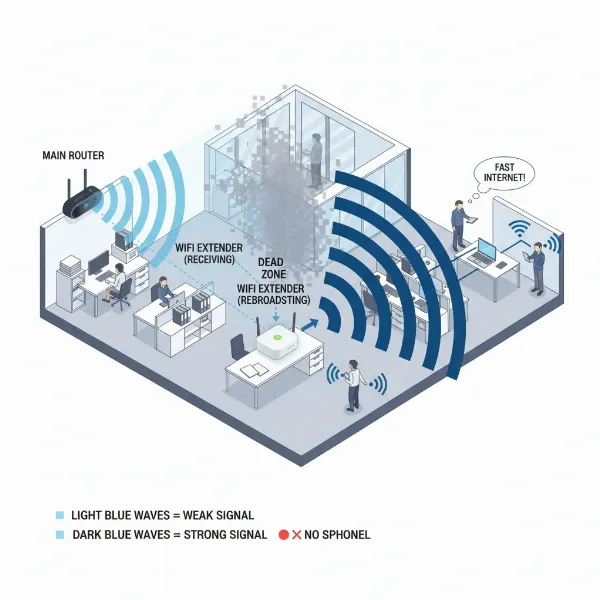 Illustration showing how a WiFi extender receives and rebroadcasts a signal in an office setting, extending coverage zones.
2. Benefits of Using a Wifi Extender for Office Work
Integrating a Wi-Fi extender into your office network can yield several tangible benefits, significantly improving the connectivity experience for your team and clients. The most immediate advantage is the ability to expand your Wi-Fi coverage to previously unreachable or under-served areas within your workspace. This means no more struggling for a signal in a remote conference room, a basement storage area, or even an outdoor break space.
Beyond simply extending reach, Wi-Fi extenders can also enhance the speed and stability of your internet connection in those fringe areas. While they don’t increase your overall internet bandwidth, they ensure that the available bandwidth is delivered more reliably to devices located further from the main router, reducing lag and buffering. From a cost perspective, Wi-Fi extenders are often a far more economical solution compared to purchasing a new, more powerful router or implementing a full mesh Wi-Fi system, especially if your connectivity issues are confined to specific spots. Their plug-and-play nature often allows for easy installation and repositioning, offering flexibility as office layouts evolve. This ease of use and affordability make them an attractive option for businesses looking to resolve localized connectivity problems without a significant investment in time or money.
3. When Do You Need a Wifi Extender in a Professional Office?
Deciding whether a Wi-Fi extender is the right solution for your professional office environment hinges on understanding the nature and scale of your connectivity challenges. Wi-Fi extenders are particularly well-suited for smaller office spaces, home offices, or specific scenarios within a larger setup. If your office is experiencing a single, localized Wi-Fi dead zone—perhaps in a particular corner, a specific office room, or a break area that’s just out of your router’s reach—an extender can be an ideal and cost-effective fix.
They are also beneficial when physical obstructions, such as thick concrete walls or multiple floors, significantly weaken your Wi-Fi signal in certain spots. In these cases, strategically placing an extender can help the signal bypass or penetrate these barriers. When budget constraints are a primary concern, and replacing your entire router or installing a more expensive mesh system isn’t feasible, an extender offers a quick and affordable way to improve connectivity. However, it’s crucial to acknowledge that for very large offices, multi-story buildings with numerous dead zones, or environments requiring seamless roaming and high bandwidth for many concurrent users, a mesh Wi-Fi system generally provides a more robust and scalable solution, avoiding the potential speed degradation and separate network management often associated with extenders.
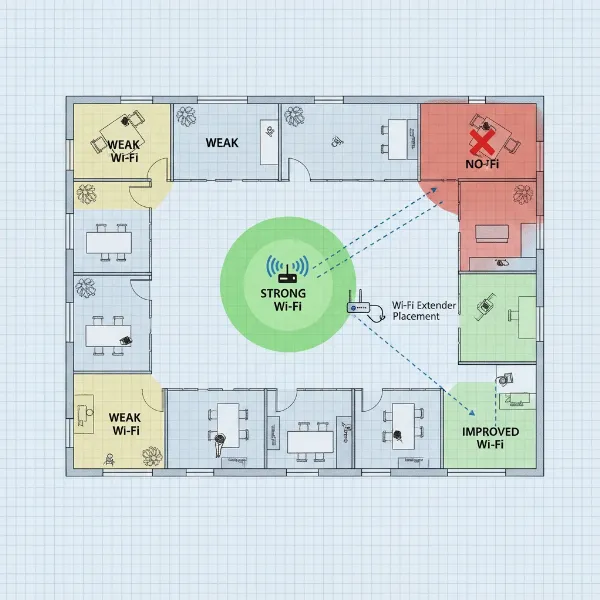 An overhead view illustration of a small to medium-sized office floor plan, highlighting areas with strong, weak, and no Wi-Fi signal, indicating where a WiFi extender would be beneficial to fill dead zones for office work. Style is clean, professional, and infographic-like.
4. Factors to Consider When Choosing a Wifi Extender for Your Office
Selecting the optimal Wi-Fi extender for your professional office requires careful consideration of several key factors to ensure it effectively addresses your connectivity needs without creating new bottlenecks. Evaluating these elements will help you make an informed decision for reliable office Wi-Fi.
- Wi-Fi Speed and Standard: Match the extender’s speed and Wi-Fi standard (e.g., Wi-Fi 5/802.11ac, Wi-Fi 6/802.11ax, or Wi-Fi 7/802.11be) with your main router’s capabilities. A faster extender won’t improve speeds beyond what your router or internet plan offers, but a slower one will create a bottleneck. For professional office work involving frequent video conferencing, large file transfers, and multiple connected devices, Wi-Fi 6 (AX) or even Wi-Fi 7 (BE) extenders, such as the TP-Link RE715X AX3000 or Netgear EXS27 BE5000, offer superior performance and future-proofing.
- Bands (Dual-Band vs. Tri-Band): A dual-band extender (2.4GHz and 5GHz) is essential for effective performance, allowing it to communicate with the router on one band and with devices on the other, or offer two distinct networks. Some premium extenders are tri-band, providing an additional 5GHz band for even greater dedicated backhaul or device capacity, which can be beneficial in busy offices with many users.
- Coverage Range: Assess the size of the area you need to cover. Extenders have varying ranges, so choose one that can comfortably extend the signal to your specific dead zones without overshooting and potentially interfering with neighboring networks.
- Ethernet Ports: For devices that require a stable wired connection, such as desktop computers, VoIP phones, network printers, or security cameras, look for an extender with one or more Gigabit Ethernet ports. The Linksys RE7000, for instance, offers multiple Gigabit Ethernet ports, providing flexibility for wired connections in remote office areas.
- Compatibility: While most extenders are designed to work with any router, using an extender from the same brand as your main router can sometimes offer enhanced features, like seamless roaming (OneMesh for TP-Link, AiMesh for ASUS) or easier setup. Netgear EAX17 AX3000 is noted for its high compatibility with various routers.
- Security Features: Ensure the extender supports current Wi-Fi security protocols like WPA2 and WPA3 to protect your office network from unauthorized access. Wi-Fi extenders typically inherit the security settings of your main router, so no additional security measures are usually required on the extender itself beyond configuring it correctly.
- Ease of Setup and Management: For a professional office, a quick and hassle-free setup is crucial. Many modern extenders feature WPS (Wi-Fi Protected Setup) buttons for one-touch connection or offer intuitive mobile apps for guided installation and network management.
- Brand and Price: Opt for reputable brands known for network reliability, such as TP-Link, Netgear, Linksys, ASUS, or D-Link. Prices vary significantly based on features and performance, so balance your budget with your office’s specific needs.
5. Comparison of Popular Wifi Extenders for Office Use
Choosing the right Wi-Fi extender can significantly impact your office’s connectivity. Here’s a comparison of some popular models that are well-suited for professional office environments, highlighting their key specifications and ideal use cases.
| Product Name | Brand | Wi-Fi Standard/Speed | Bands | Ethernet Ports | Key Features | Best For | Pros | Cons |
|---|---|---|---|---|---|---|---|---|
| TP-Link RE715X AX3000 | TP-Link | Wi-Fi 6 (AX3000) | Dual-Band | 1 Gigabit | OneMesh, 160MHz Channel, High Throughput | Offices with many devices, demanding tasks | Excellent speeds, good for congested areas, OneMesh compatibility | Higher cost |
| Netgear EAX17 AX1800 | Netgear | Wi-Fi 6 (AX1800) | Dual-Band | 1 Gigabit | Universal Compatibility, Smart Roaming | Versatile use with any router | Broad compatibility, reliable performance, easy setup | Not the fastest option for extreme bandwidth needs |
| ASUS RP-AX58 AX3000 | ASUS | Wi-Fi 6 (AX3000) | Dual-Band | 1 Gigabit | AiMesh compatible, 160MHz Channel | Offices with ASUS AiMesh routers | Strong connection speeds, great with ASUS ecosystem | Can struggle with non-ASUS routers for seamless experience |
| Linksys RE7000 AC1900+ | Linksys | Wi-Fi 5 (AC1900+) | Dual-Band | 4 Gigabit | Cross-Band Technology, MU-MIMO | Wired device connectivity, stable transfers | Multiple Ethernet ports, good stability, Cross-Band tech | Wi-Fi 5 standard (not latest AX/BE), potentially slower wireless |
| TP-Link RE315 AC1200 | TP-Link | Wi-Fi 5 (AC1200) | Dual-Band | 1 Ethernet | Smart Signal Indicator, OneMesh compatible | Budget-conscious, extending to one room | Affordable, easy setup, decent for small extensions | Lower speeds, less suitable for heavy office workloads |
| Netgear EXS27 BE5000 | Netgear | Wi-Fi 7 (BE5000) | Tri-Band | 1 Gigabit | Wi-Fi 7, Multi-Gig Speeds, Heavy Use | Future-proofing, extremely high bandwidth | Ultra-fast, ideal for many connected devices, future-proof | Very expensive, requires Wi-Fi 7 router to maximize benefits |
This table provides a snapshot, but always refer to the latest product specifications and reviews to make the best decision for your specific office needs.
6. How to Install and Optimize Your Office Wifi Extender
Installing and optimizing your Wi-Fi extender for a professional office setting doesn’t have to be a daunting task. Most modern extenders are designed for user-friendly setup, but a few strategic steps can ensure you get the best possible performance.
Step-by-Step Installation:
- Unbox and Power On: Take your extender out of the box and plug it into a power outlet in the same room as your main router. Wait for the indicator lights to show it’s ready.
- Connect to Your Router: Most extenders offer two primary methods:
- WPS Button: Press the WPS button on your extender, then immediately press the WPS button on your main Wi-Fi router. The devices should connect automatically within a couple of minutes.
- Manual Setup (via App or Web Browser): If your router doesn’t have a WPS button, or you prefer more control, use the manufacturer’s mobile app or connect to the extender’s default Wi-Fi network (usually printed on the device) with a computer or phone. Open a web browser, navigate to the setup page (e.g.,
tplinkrepeater.net,extender.linksys.com), and follow the on-screen instructions to select your main Wi-Fi network and enter its password.
- Reposition the Extender: Once connected, unplug the extender and move it to a strategic location.
Tips for Optimizing Performance:
- Optimal Placement: This is perhaps the most critical factor. Place the extender roughly halfway between your main router and the Wi-Fi dead zone you want to eliminate. It needs to receive a strong enough signal from the main router to rebroadcast effectively. Avoid placing it too close to the dead zone, as it might only be extending an already weak signal. Also, elevate the extender and ensure it has a clear line of sight, avoiding thick walls, metal objects, or large appliances that can cause interference.
- Firmware Updates: Regularly check for and install firmware updates for both your router and extender. Manufacturers frequently release updates that improve performance, add features, and patch security vulnerabilities.
- Channel Optimization: Wi-Fi networks operate on different channels. If many networks in your office building (including your neighbors’) are using the same channel, it can cause interference and slow speeds. Use a Wi-Fi analyzer tool (available as apps for smartphones or desktop software) to identify less congested channels on both 2.4GHz and 5GHz bands and manually switch your router and extender to those.
- Avoid Interference: Keep your extender away from other electronics that emit radio frequencies, such as microwaves, cordless phones, Bluetooth devices, and even fluorescent lighting, as these can interfere with your Wi-Fi signal.
- Utilize Ethernet Backhaul (if available): Some extenders can connect to your main router via an Ethernet cable. This “Ethernet backhaul” creates a dedicated, high-speed connection between the router and extender, significantly improving performance and reliability, especially for bandwidth-intensive tasks in the extended area.
Troubleshooting Common Issues:
- Slow Speeds: Ensure optimal placement. Check for firmware updates. If using a single-band extender, consider upgrading to dual-band or tri-band to prevent bandwidth splitting.
- Frequent Disconnections: Your extender might be too far from the main router. Try moving it closer. Check for interference.
- Devices Not Switching Networks: If your extender creates a separate SSID, your devices may not automatically switch. Manually connect to the stronger network or consider extenders with “seamless roaming” features (like TP-Link OneMesh or ASUS AiMesh) if compatible with your router.
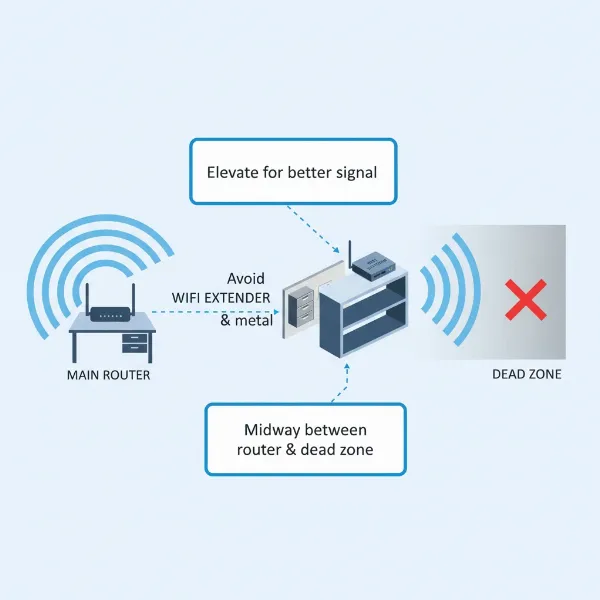 An infographic-style image demonstrating the ideal placement of a WiFi extender in an office to optimize signal, showing the router, dead zones, and the extender's strategic position for best performance, with tips like elevation and avoiding obstacles.
7. Where to Buy a Wifi Extender for Your Office?
When you’re ready to invest in a Wi-Fi extender for your professional office, you have several reliable purchasing avenues available. Opting for reputable retailers and brands is crucial to ensure you acquire a quality product that offers dependable performance and good customer support.
Online Retailers:
Major online marketplaces like Amazon, Best Buy (online), Walmart (online), and Newegg offer an extensive selection of Wi-Fi extenders from various brands. These platforms often provide competitive pricing, detailed product descriptions, customer reviews, and comparative tools, allowing you to thoroughly research models before making a purchase. Manufacturer websites, such as TP-Link, Netgear, Linksys, and ASUS, also sell their products directly and can be a good source for the latest models and specific bundles.
Electronics Stores:
Physical electronics retailers like Best Buy or Micro Center allow you to see the products firsthand, discuss options with sales associates, and sometimes benefit from in-store setup assistance. While the selection might be smaller than online, the immediate availability and personal service can be advantageous.
Business IT Suppliers:
For larger office setups or businesses that prefer managed IT solutions, specialized business IT suppliers or telecommunications providers might offer Wi-Fi extenders as part of a broader network package. These suppliers can often provide expert consultation, installation services, and ongoing support tailored to business needs.
Important Considerations When Buying:
- Authenticity: Purchase from authorized dealers or the manufacturer directly to avoid counterfeit products, which may lack performance, reliability, and security.
- Return Policy: Check the return policy before purchasing, especially if you’re unsure about compatibility or performance in your specific office environment.
- Warranty and Support: Ensure the extender comes with a manufacturer’s warranty and accessible customer support in case you encounter any issues during setup or operation.
- Reviews: Always consult recent customer and expert reviews for insights into real-world performance and reliability, paying close attention to feedback from other business users.
8. Buying Guide: Selecting the Right Wifi Extender for Your Business
Navigating the array of Wi-Fi extenders available can be simplified by focusing on your business’s unique requirements and existing network infrastructure. A thoughtful approach ensures you choose a solution that genuinely enhances connectivity without unnecessary expense or complication.
- Determine Your Budget: Wi-Fi extenders range from budget-friendly options to high-performance, premium devices. Clearly define how much you’re willing to invest. Remember that while cheaper models can solve basic dead zones, a slightly higher investment in a Wi-Fi 6 or tri-band extender can offer significantly better performance and longevity for a professional office environment.
- Assess Your Office Size and Layout: For a single-room office, a small home office, or to extend coverage to a specific difficult-to-reach area, a standard dual-band extender is likely sufficient. If your office has multiple floors, thick walls, or numerous rooms needing improved coverage, carefully weigh the extender’s limitations. In such cases, a mesh Wi-Fi system might be a more effective long-term solution, offering more comprehensive and seamless coverage across a larger area.
- Evaluate Your Current Router and Internet Plan: Your Wi-Fi extender cannot perform better than your main router or your internet service plan. Ensure the extender’s Wi-Fi standard (e.g., Wi-Fi 6) and maximum speed are compatible with or equal to your router’s capabilities to avoid creating a bottleneck. Upgrading an older router might also be a more impactful first step if your existing router is outdated.
- Consider Your Usage Needs: How many devices will connect to the extended network? Will employees be engaging in bandwidth-intensive activities like 4K video conferencing, large file uploads/downloads, or cloud-based applications? High usage demands reliable, high-speed performance, making extenders with Wi-Fi 6, 160MHz channel support, and Gigabit Ethernet ports more valuable. If only a few devices need basic connectivity in an isolated area, a simpler model might suffice.
- Read Reviews and Expert Opinions: Before finalizing your purchase, consult professional reviews and user feedback from other business owners. Pay attention to comments regarding ease of setup, actual speed performance, stability, and customer support for specific models. This real-world insight can be invaluable in making an informed decision.
By systematically evaluating these factors, you can confidently select a Wi-Fi extender that effectively meets the demands of your professional office work, ensuring consistent and reliable internet access where it’s needed most.
Conclusion
Ensuring robust and reliable Wi-Fi connectivity is paramount for any professional office aiming to maintain high productivity and efficiency. Wi-Fi extenders offer a practical and often cost-effective solution for addressing localized signal weaknesses and dead zones that can disrupt daily operations. By understanding how these devices work and carefully considering factors such as Wi-Fi speed standards, dual-band capabilities, the presence of Ethernet ports, and compatibility with your existing network, businesses can make an informed choice. Models like the TP-Link RE715X AX3000 or Netgear EAX17 AX1800 provide excellent performance for professional use, especially when needing to connect multiple devices in demanding environments. While mesh systems excel in very large or multi-story offices for seamless whole-space coverage, a well-chosen Wi-Fi extender remains a highly effective tool for targeted signal enhancement in smaller to medium-sized professional settings.
By following the installation and optimization tips, you can transform frustrating dead zones into productive work areas, ensuring that your team remains connected and efficient. Don’t let spotty Wi-Fi hinder your business’s potential.
Frequently Asked Questions
Do WiFi extenders slow down internet speed?
|
Our Picks for the Best Wifi extender in 2026
As an Amazon Associate I earn from qualifying purchases.
|
||
| Num | Product | Action |
|---|---|---|
| 1 | TP-Link AX3000 WiFi 6 Range Extender | PCMag Editor's Choice | Dual-Band Wireless Repeater w/Ethernet Port | Up to 2400 Sq. Ft., 64 Devices | Internet Signal Booster | APP Setup | EasyMesh (RE715X) |

|
| 2 | TP-Link AC1900 WiFi Range Extender RE550 | Dual-Band Wireless Repeater Amplifier w/Gigabit Ethernet Port | Up to 2200 Sq. Ft., 32 Devices | Internet Signal Booster | APP Setup | EasyMesh Compatible |
|
| 3 | 1200Mbps WiFi Extender Signal Booster for Home, Dual Band 5GHz/2.4GHz Wireless Internet Repeater with 4 External Antennas, Covers Up to 3600 Sq.ft & Supports 80 Devices, AP Mode with Ethernet Port |
|
| 4 | 2026 WiFi Extender Signal Booster - 2.4GHz 300Mbps WiFi Booster for Home, Covers Up to 9999 Sq. Ft, Easy Setup, Ethernet Port & Access Point, Stable Internet Performance with 60+ Devices(White) |
|
| 5 | WiFi Extender, WiFi Extenders Signal Booster for Home Up to 5000 sq.ft and 50 Devices, WiFi Range Extender, Wireless Repeater, Long Range Amplifier with Ethernet Port, 1-Tap Setup, Alexa Compatible |
|
| 6 | TP-Link AC1200 WiFi Extender, 2023 Engadget Best Budget Pick, 1.2Gbps Signal Booster for Home, Dual Band 5GHz/2.4GHz, Covers Up to 1500 Sq.ft and 30 Devices,Support Onemesh, One Ethernet Port (RE315) |
|
| 7 | WiFi Extender Signal Booster, WiFi Booster Dual Band 5.8GHz&2.4GHz, Covers Up to 10000 Sq.ft, 1.2Gbps WiFi Repeater with One Ethernet Port, One-tap Setup |
|
| 8 | WiFi Extender WiFi Booster 1200 Mbps Dual Band (5GHz/2.4GHz) WiFi Extenders Signal Booster for Home, Internet Extended Booster WiFi Repeater (White) |
|
| 9 | WiFi Extender Signal Booster for Home 2026 Internet Repeater Long Range Up to 9995 Sq. Ft. Whole Home WiFi Coverage |
|
| 10 | TP-Link WiFi Extender with Ethernet Port, Dual Band 5GHz/2.4GHz, Up to 44% More Bandwidth Than Single Band, Covers Up to 1200 Sq.ft and 30 Devices, Signal Booster Amplifier Supports OneMesh(RE220) |
|
Yes, Wi-Fi extenders can sometimes lead to a reduction in internet speed. This is primarily because they operate by capturing and rebroadcasting an existing signal, which can inherently introduce some latency and bandwidth splitting. Dual-band extenders help mitigate this by potentially using one band for communication with the router and another for devices, but a slight speed reduction, particularly further from the extender, is possible.
Can I use multiple WiFi extenders in an office?
While technically possible, using multiple traditional Wi-Fi extenders in an office can lead to network congestion and interference, potentially degrading overall performance rather than improving it. If you have multiple significant dead zones across a large office, a mesh Wi-Fi system with multiple nodes is generally a more effective and seamless solution, providing unified coverage without manual network switching or performance bottlenecks.
Are WiFi extenders secure for business use?
Yes, Wi-Fi extenders are generally secure for business use as they typically inherit the security protocols (such as WPA2 or WPA3) from your main Wi-Fi router. As long as your primary network is secure with a strong password and up-to-date encryption, your extended network will maintain the same level of protection. Always purchase from reputable brands to ensure reliable security features.
What’s the difference between a WiFi extender and a mesh system?
A Wi-Fi extender boosts your existing router’s signal to expand coverage to specific dead zones, often creating a separate network name (SSID) that requires manual switching. A mesh Wi-Fi system, conversely, uses multiple interconnected nodes to create a single, unified, and seamless network across a large area, with devices automatically connecting to the strongest signal without interruption. Extenders are simpler and more cost-effective for targeted areas, while mesh systems are designed for comprehensive, whole-space coverage.
How far can a WiFi extender reach?
The range of a Wi-Fi extender varies significantly depending on the model, its power, your environment (e.g., walls, interference), and your main router’s signal strength. Generally, an extender can extend a Wi-Fi signal by several hundred square feet, effectively covering an additional room, a floor, or a specific problematic area. For optimal performance, it should be placed where it receives a strong signal from the main router to rebroadcast effectively.