Are you constantly battling against frustrating Wi-Fi dead zones, dropped connections, or sluggish internet speeds in certain parts of your home? You are not alone. Many households struggle with inconsistent wireless coverage, especially in larger spaces, multi-story buildings, or homes with thick walls. A Wi-Fi extender promises to be a simple and affordable solution to blanket your entire home with reliable internet. But does it truly deliver on that promise, or is it just a temporary fix? This comprehensive guide will delve into what Wi-Fi extenders are, how they work, their benefits and drawbacks, and help you determine if a Wi-Fi extender is the right investment to optimize your home network.
1. What is a Wifi Extender and How Does It Work?
A Wi-Fi extender, often interchangeably called a Wi-Fi repeater or range extender, is a device designed to expand the coverage area of your existing wireless network. Its primary function is to capture the Wi-Fi signal from your main router and then rebroadcast it, effectively extending the reach of your internet connection to areas where the signal is weak or non-existent. This process allows devices further away from your main router to connect to the internet with improved signal strength.
Wi-Fi extenders typically connect wirelessly to your primary router. Once connected, they act as an intermediary, receiving the router’s signal, amplifying it, and then sending it out again. This method helps to bridge the gap between your router and your devices in distant rooms or floors. While some advanced models might offer more sophisticated features, the core principle remains the same: to relay and extend the existing Wi-Fi signal.
2. Benefits of Using a Wifi Extender
The appeal of Wi-Fi extenders lies in their ability to offer straightforward solutions to common connectivity problems. One of the most significant advantages is the extension of Wi-Fi coverage to previously unreachable “dead zones” within your home. These are areas where the router’s signal struggles to penetrate due to distance, physical obstructions, or structural interference. By strategically placing an extender, you can bring these areas online.
Furthermore, a Wi-Fi extender can improve the stability and speed of your connection in spots with a weak signal. Instead of experiencing frustratingly slow loading times or frequent disconnections, devices in extended areas can enjoy a more robust and consistent internet experience. Compared to upgrading your entire internet service plan or investing in a new, more powerful router, extenders are typically a more affordable solution, making them an attractive option for budget-conscious users. Most models are also remarkably easy to set up, often involving a simple plug-and-play process or a quick guided setup via a smartphone app. They are also generally compatible with almost any existing router, eliminating the need for a complete network overhaul.
3. When You Need a Wifi Extender
Understanding when a Wi-Fi extender is the most appropriate solution is crucial for maximizing its effectiveness. You likely need a Wi-Fi extender if your home has multiple floors or a large footprint where the router’s signal cannot reach every corner. Similarly, thick walls, heavy furniture, or other physical obstructions can significantly weaken Wi-Fi signals, creating isolated areas of poor connectivity that an extender can help overcome.
If you enjoy using Wi-Fi outdoors in your garden, patio, or garage, an extender can project the signal beyond the confines of your home. While not a primary solution for severe congestion, an extender can also help if you have many devices connected simultaneously, provided the core issue is range rather than bandwidth saturation at the router. Ultimately, if the problem is that your router’s physical reach is insufficient rather than a lack of overall internet speed, a Wi-Fi extender can be a highly effective and targeted fix.
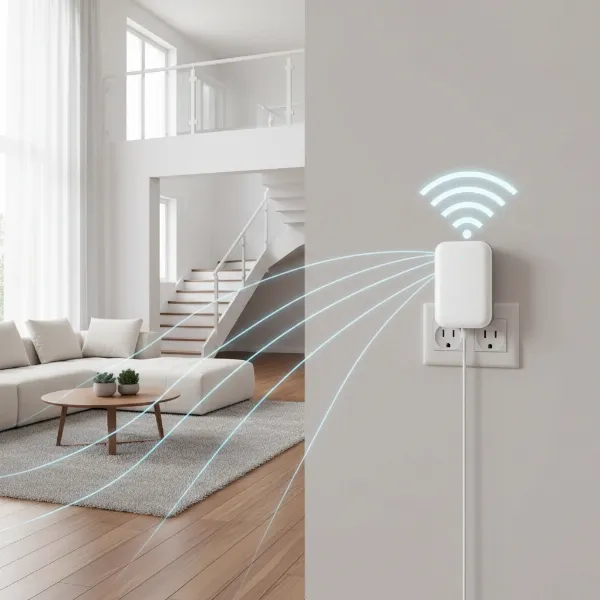 A Wi-Fi extender plugged into a wall outlet in a modern home, showing extended wireless signal radiating outwards to cover more rooms.
4. Factors to Consider When Choosing a Wifi Extender
Selecting the right Wi-Fi extender involves evaluating several technical specifications and features to ensure it meets your specific needs. The Wi-Fi speed is paramount; ideally, choose an extender that matches or exceeds your main router’s speed capabilities to avoid creating a bottleneck. Considering the frequency bands is also essential. Dual-band (2.4GHz and 5GHz) extenders offer better performance and reduced interference compared to single-band models, while tri-band extenders can dedicate a band for communication with the router, significantly improving throughput.
The coverage area specified by the manufacturer should align with the size of the space you need to cover. If you plan to connect wired devices like gaming consoles, PCs, or smart TVs in the extended area, ensure the extender includes Ethernet ports. Advanced features such as MU-MIMO (Multi-User, Multiple-Input, Multiple-Output) for efficient data handling with multiple devices, Beamforming for directing signals to connected devices, or compatibility with Wi-Fi 6 or Wi-Fi 7 standards can offer substantial performance improvements. Lastly, research reputable brands known for network equipment and consider the price to find a balance between performance and your budget.
5. Comparing Popular Wifi Extenders
The market offers a range of Wi-Fi extenders, each catering to different needs and budgets. Understanding the general categories can help you make an informed decision:
| Feature | Basic Single-Band Extenders | Dual-Band Extenders | Mesh-Enabled Extenders/Access Points |
|---|---|---|---|
| Typical Speed | Up to N300 (2.4GHz only) | AC750 – AC2200 (2.4GHz & 5GHz) | AX1800 – AX6000+ (Wi-Fi 6/7, 2.4GHz & 5GHz) |
| Bands | Single-band (2.4GHz) | Dual-band | Dual-band or Tri-band |
| Coverage | Small areas, single room | Medium to large homes | Larger homes, multi-story |
| Ethernet Ports | Often none, or one basic port | Usually one or more Gigabit Ethernet ports | Multiple Gigabit Ethernet ports, often WAN/LAN |
| Key Features | Simple repeater | WPS setup, Fast Ethernet | OneMesh/Mesh compatibility, Beamforming, MU-MIMO, Dedicated backhaul (tri-band) |
| Price | Very low (e.g., $20-$40) | Mid-range (e.g., $40-$100) | Higher-end (e.g., $100-$300+) |
| Pros | Extremely affordable, very easy setup | Better speed and less interference than single-band, good value | Seamless roaming, higher speeds, better for many devices, smart path optimization |
| Cons | Slowest speeds, high interference, bandwidth often halved, creates separate network name | Can still halve bandwidth, may create separate network name (SSID), not ideal for very large areas | More expensive, not a full mesh system (unless part of a compatible ecosystem), setup can be more involved |
Basic single-band extenders are the most budget-friendly and simplest to deploy, suitable for extending coverage to a single adjacent room for light internet use. Dual-band extenders offer a significant performance boost, using both 2.4GHz and 5GHz frequencies to provide faster and more stable connections, making them a popular choice for most homes with moderate dead zones. For those seeking advanced performance and more seamless integration with a modern network, mesh-enabled extenders (which often function as access points within a manufacturer’s ecosystem like TP-Link OneMesh) provide superior speed, greater coverage, and intelligent signal optimization. They often support newer Wi-Fi standards like Wi-Fi 6 or 7, ensuring compatibility with the latest routers and devices for demanding tasks like 4K streaming and online gaming.
6. How to Set Up and Optimize Your Wifi Extender
Setting up a Wi-Fi extender is generally a straightforward process designed to be user-friendly. Most extenders offer two primary setup methods:
- WPS (Wi-Fi Protected Setup) Button: This is the quickest method. You simply press the WPS button on your main router, then within two minutes, press the WPS button on your extender. The devices will automatically connect.
- Web Browser/App Setup: For more control, you can connect to the extender’s temporary Wi-Fi network using a computer or smartphone. Then, open a web browser and navigate to the extender’s default IP address or use the manufacturer’s dedicated app to follow the on-screen instructions for connecting it to your home network.
Once installed, optimal placement is key to maximizing performance. The ideal location for your extender is roughly halfway between your main router and the Wi-Fi dead zone. It needs to receive a strong enough signal from the router to rebroadcast effectively, but also be close enough to the problem area to make a difference. Avoid placing it behind large appliances, thick walls, or near other electronic devices that can cause interference (like microwaves or cordless phones). Many extenders feature indicator lights that help you determine the best placement by showing the signal strength from your router.
To optimize performance, regularly check for and install firmware updates, as these often contain bug fixes and performance improvements. If your extender supports it, consider using a dedicated backhaul (often found in tri-band models) to prevent the usual halving of bandwidth. If you encounter issues like frequent disconnections or slow speeds, try troubleshooting by power cycling both your router and extender, repositioning the extender, or performing a factory reset and reconfiguring it. Adjusting the Wi-Fi channel settings on your router or extender to a less congested one can also help mitigate interference.
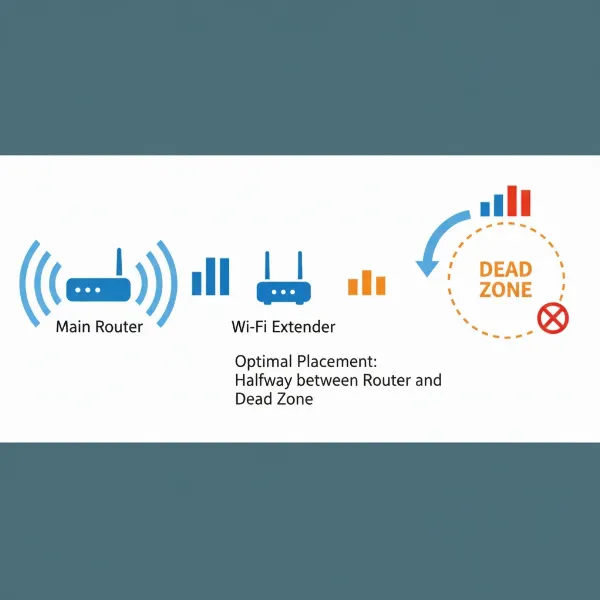 A diagram showing optimal placement of a Wi-Fi extender between a main router and a dead zone in a house, with signal strength indicators.
7. Where to Buy a Wifi Extender
Wi-Fi extenders are widely available through various retail channels, making them easy to acquire. For convenience and a broad selection, online retailers like Amazon, Best Buy, or the official websites of manufacturers such as TP-Link, Netgear, and Linksys are excellent places to start. These platforms often provide competitive pricing, customer reviews, and detailed product specifications to help you compare options.
If you prefer to see the product in person or need immediate assistance, major electronics stores are another viable option. When purchasing, whether online or in-store, always check the return policy and warranty information. A good return policy allows you to try the extender in your specific home environment and return it if it doesn’t meet your expectations.
8. Buying Guide: Choosing the Right Wifi Extender
Deciding whether a Wi-Fi extender is worth it ultimately boils down to your specific needs and expectations. Here’s a practical buying guide to help you make an informed choice:
- Define Your Budget: Wi-Fi extenders vary significantly in price. Basic models are very affordable, while high-performance, mesh-compatible extenders can be considerably more expensive. Determine how much you’re willing to invest to solve your Wi-Fi problem.
- Identify Your Specific Needs: Are you looking to eliminate a small dead zone in one room, or do you need to cover a larger area like a backyard? Do you primarily browse the internet, or do you require high-speed connectivity for gaming and 4K streaming? Clearly defining your needs will guide your choice towards a basic or more advanced model. If you need consistent, high-speed coverage across a very large or complex home, a full mesh Wi-Fi system might be a better, albeit more costly, alternative.
- Check Compatibility: Ensure the Wi-Fi extender you choose is compatible with your existing router, especially regarding Wi-Fi standards (e.g., Wi-Fi 5, Wi-Fi 6) and any proprietary mesh features (like TP-Link OneMesh). While most extenders are universally compatible, matching standards can maximize performance.
- Read Reviews and Expert Opinions: Before making a final decision, take the time to read user reviews and expert assessments. Real-world experiences can provide invaluable insights into a product’s actual performance, reliability, and ease of use in diverse home environments.
“A Wi-Fi extender can be a game-changer for homes plagued by inconsistent wireless coverage, offering a cost-effective way to bridge those frustrating dead zones and provide a more stable connection where it matters most.”
Conclusion
Wi-Fi extenders serve as a valuable and often cost-effective solution for addressing localized Wi-Fi dead zones and extending network coverage in homes and offices. They are particularly beneficial when dealing with physical obstructions, larger spaces, or simply pushing your router’s signal a bit further. While they may not offer the seamless performance or advanced features of a full mesh Wi-Fi system, their ease of installation and affordability make them a compelling option for many users. By carefully considering factors such as speed, frequency bands, and placement, you can significantly improve your wireless experience. Ultimately, a Wi-Fi extender is worth it if you understand its strengths and limitations, and if it aligns perfectly with your specific needs for enhanced connectivity. Are you ready to banish those dead zones and enjoy uninterrupted internet across your entire space?
Frequently Asked Questions
Do Wifi extenders really work?
|
Our Picks for the Best Wifi extender in 2026
As an Amazon Associate I earn from qualifying purchases.
|
||
| Num | Product | Action |
|---|---|---|
| 1 | WiFi Extender Signal Booster, WiFi Booster Dual Band 5.8GHz&2.4GHz, Covers Up to 10000 Sq.ft, 1.2Gbps WiFi Repeater with One Ethernet Port, One-tap Setup |

|
| 2 | 2026 WiFi Extender Signal Booster - 2.4GHz 300Mbps WiFi Booster for Home, Covers Up to 9999 Sq. Ft, Easy Setup, Ethernet Port & Access Point, Stable Internet Performance with 60+ Devices(White) |
|
| 3 | WiFi Extender, WiFi Extenders Signal Booster for Home Up to 5000 sq.ft and 50 Devices, WiFi Range Extender, Wireless Repeater, Long Range Amplifier with Ethernet Port, 1-Tap Setup, Alexa Compatible |
|
| 4 | WiFi Extender Signal Booster for Home 2026 Internet Repeater Long Range Up to 9995 Sq. Ft. Whole Home WiFi Coverage |
|
| 5 | 1200Mbps WiFi Extender Signal Booster for Home, Dual Band 5GHz/2.4GHz Wireless Internet Repeater with 4 External Antennas, Covers Up to 3600 Sq.ft & Supports 80 Devices, AP Mode with Ethernet Port |
|
| 6 | TP-Link WiFi Extender with Ethernet Port, Dual Band 5GHz/2.4GHz, Up to 44% More Bandwidth Than Single Band, Covers Up to 1200 Sq.ft and 30 Devices, Signal Booster Amplifier Supports OneMesh(RE220) |
|
| 7 | TP-Link AX3000 WiFi 6 Range Extender | PCMag Editor's Choice | Dual-Band Wireless Repeater w/Ethernet Port | Up to 2400 Sq. Ft., 64 Devices | Internet Signal Booster | APP Setup | EasyMesh (RE715X) |
|
| 8 | WiFi Extender WiFi Booster 1200 Mbps Dual Band (5GHz/2.4GHz) WiFi Extenders Signal Booster for Home, Internet Extended Booster WiFi Repeater (White) |
|
| 9 | TP-Link AC1900 WiFi Range Extender RE550 | Dual-Band Wireless Repeater Amplifier w/Gigabit Ethernet Port | Up to 2200 Sq. Ft., 32 Devices | Internet Signal Booster | APP Setup | EasyMesh Compatible |
|
| 10 | TP-Link AC1200 WiFi Extender, 2023 Engadget Best Budget Pick, 1.2Gbps Signal Booster for Home, Dual Band 5GHz/2.4GHz, Covers Up to 1500 Sq.ft and 30 Devices,Support Onemesh, One Ethernet Port (RE315) |
|
Yes, Wi-Fi extenders can effectively expand the coverage of your existing Wi-Fi network, eliminating dead zones and providing a stronger signal in previously weak areas. Their effectiveness depends on proper placement, the quality of the extender, and the initial signal strength from your main router.
Do Wifi extenders slow down internet speed?
Wi-Fi extenders can potentially reduce internet speed, especially traditional repeaters that use a single radio to receive and rebroadcast the signal, which can halve the available bandwidth. Dual-band or tri-band extenders with dedicated backhaul or mesh capabilities can minimize this speed reduction.
Is a Wifi extender the same as a Wifi booster?
The terms “Wi-Fi extender” and “Wi-Fi booster” are often used interchangeably to describe devices that enhance Wi-Fi coverage. While “booster” is a broader term, both generally refer to range extenders or repeaters that capture and rebroadcast your router’s signal to expand its reach.
Where is the best place to put a Wifi extender?
The ideal placement for a Wi-Fi extender is roughly halfway between your main router and the Wi-Fi dead zone. It needs to receive a strong signal from the router while also being close enough to the area that needs coverage. Indicator lights on the extender can often help guide optimal placement.
Can I use multiple Wifi extenders?
While technically possible, using multiple Wi-Fi extenders can lead to network congestion and reduced performance due to signal overlap and increased interference. For larger areas or multi-story homes requiring extensive coverage, a mesh Wi-Fi system is generally a more scalable and effective solution than multiple extenders.
Wifi extender vs Mesh Wifi system?
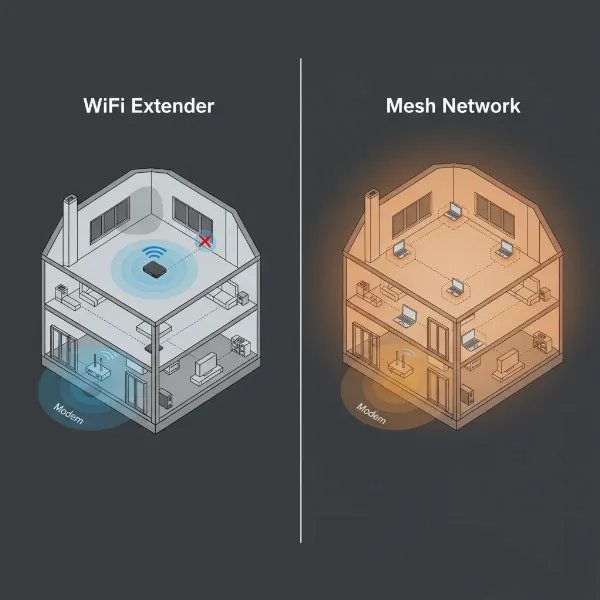
Wi-Fi extenders extend an existing single network, often creating a separate network name and potentially reducing speed. Mesh Wi-Fi systems, on the other hand, create a unified, seamless network with multiple nodes that communicate intelligently, providing more consistent speed and coverage over larger areas without requiring manual switching between networks.