Frustrated with Wi-Fi dead zones, sluggish speeds, or dropped connections in certain areas of your home? You’re not alone. Many households grapple with inconsistent wireless coverage, turning what should be a seamless internet experience into a constant battle against buffering and lost signals. A Wi-Fi extender could be the solution you’re looking for, promising to banish those frustrating gaps in your network. But before you buy, it’s crucial to understand what these devices are, how they work, and if they truly align with your specific connectivity needs and home environment. This comprehensive guide will help you navigate the world of Wi-Fi extenders, ensuring you make an informed decision for a consistently strong and reliable internet connection.
1. What is a Wi-Fi Extender and How Does It Work?
A Wi-Fi extender, also commonly known as a Wi-Fi range extender or wireless repeater, is a device designed to expand the coverage area of your existing wireless network. It acts as a bridge, picking up your router’s Wi-Fi signal, amplifying it, and then re-broadcasting it to reach areas of your home or office that your main router struggles to cover. Essentially, it extends the reach of your Wi-Fi, eliminating “dead zones” where connectivity is weak or non-existent.
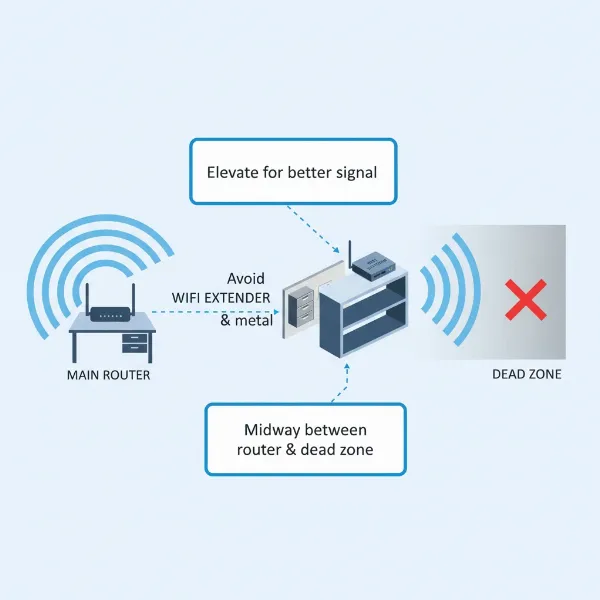
The operational principle of a Wi-Fi extender is quite straightforward. When positioned optimally, typically halfway between your main router and the area you want to cover, it receives the wireless data. It then processes this data, strengthens the signal, and sends it back out, effectively creating a larger network footprint. Some extenders create a separate network name (SSID), while others use the same SSID as your main router, allowing for seamless roaming. There are generally two main types: plug-in wall units, which are compact and easy to deploy, and desktop units, which often offer more antennas and advanced features for greater range and performance.
[image-1|wifi-extender-concept-explained|Wi-Fi Extender amplifying signal from router to cover dead zone in a home|
A clear, illustrative infographic showing a Wi-Fi router in one part of a house, emitting a signal that weakens over distance. A Wi-Fi extender is strategically placed halfway, receiving the weak signal and re-broadcasting a strong signal to a previously dead zone (e.g., a bedroom or patio). Use line art style with wireless signal waves, showing a green strong signal and red weak signal. Bright, clean background.]
2. Benefits of Using a Wi-Fi Extender
Deploying a Wi-Fi extender offers several compelling advantages, especially for users grappling with inconsistent wireless coverage. The primary benefit is undoubtedly the expansion of your Wi-Fi coverage, transforming previously unreachable areas into functional network zones. This means you can enjoy seamless internet access in every corner of your home, from the basement to the attic, and even in outdoor spaces like your patio or garden.
Beyond just extending reach, a good Wi-Fi extender can significantly improve the speed and stability of your connection in these extended areas. By boosting the signal strength, it helps devices maintain a more robust connection to the network, leading to less buffering during streaming, quicker downloads, and more reliable video calls. This enhancement can be a cost-effective alternative to upgrading your entire internet plan or replacing an otherwise perfectly functional router, saving you money while addressing your connectivity woes. Furthermore, most modern Wi-Fi extenders are designed for user-friendly setup, often featuring simple push-button WPS (Wi-Fi Protected Setup) pairing or intuitive web-based configuration, making them accessible even for those with limited technical expertise.
3. When Do You Need a Wi-Fi Extender?
Deciding whether a Wi-Fi extender is the right solution for your home depends largely on the specific challenges you face with your current network. You likely need a Wi-Fi extender if your home has multiple stories or a large overall footprint, as Wi-Fi signals struggle to penetrate floors and cover vast distances effectively. These physical barriers often create areas where the signal weakens considerably or drops out entirely.
Thick walls, concrete, or even large appliances can act as significant deterrents to Wi-Fi signals, absorbing or reflecting them and leading to “dead zones.” If you find your signal quality degrading rapidly as you move away from your main router, an extender could help bridge those gaps. Furthermore, if you wish to use Wi-Fi in outdoor areas such as a backyard, patio, or balcony, an extender positioned correctly can broaden your network’s reach beyond the confines of your indoor space. Lastly, in homes with numerous Wi-Fi-connected devices—laptops, smartphones, smart TVs, gaming consoles, and smart home gadgets—an extender can help distribute the load and ensure each device maintains a stable connection, reducing overall network congestion in remote areas.
“A Wi-Fi extender is an excellent solution to extend Wi-Fi coverage without the need to replace your primary router, especially when dealing with isolated dead zones or structural interference.”
4. Factors to Consider When Choosing a Wi-Fi Extender
Selecting the right Wi-Fi extender involves evaluating several key factors to ensure it meets your specific network requirements and delivers optimal performance. Ignoring these aspects can lead to continued frustration, so a thoughtful approach is recommended before making a purchase.
First and foremost, Wi-Fi Speed is paramount. Aim for an extender that offers speeds comparable to or higher than your main router to avoid creating a bottleneck in your extended network. Check the Wi-Fi standard (e.g., Wi-Fi 5/802.11ac or Wi-Fi 6/802.11ax) to ensure compatibility and future-proofing. Next, consider the Frequency Bands. Dual-band extenders (2.4GHz and 5GHz) are generally preferred as they offer greater flexibility and performance. The 2.4GHz band provides wider coverage but lower speeds, while the 5GHz band offers higher speeds over a shorter range. Some advanced extenders are tri-band, using a dedicated third band for communication between the router and extender, minimizing speed loss.
Coverage Range is another critical factor; choose an extender with a stated range that aligns with the size of the area you need to cover. Overestimating or underestimating this can result in suboptimal performance. Number of Ethernet Ports is important if you plan to connect wired devices like gaming consoles, smart TVs, or desktop PCs in the extended area, as these connections offer superior stability and speed. Look for extenders with at least one Gigabit Ethernet port for high-speed wired connectivity. Finally, Additional Features like MU-MIMO (for handling multiple devices simultaneously), Beamforming (to direct signal towards devices), Access Point mode (to create a new Wi-Fi hotspot from a wired connection), or a USB port for file sharing can enhance functionality. Always consider reputable Brands and Price; established manufacturers often offer better reliability and support, and the cost should fit within your budget while providing the necessary features.
5. Comparison of Popular Wi-Fi Extender Types on the Market
To help you make an informed decision, here’s a comparison of some popular Wi-Fi extender models and their key specifications. This table highlights their general capabilities and typical use cases. Please note that prices are approximate and can vary.
| Product Name | Brand | Wi-Fi Speed (Max Theoretical) | Frequency Bands | Range (Approx.) | Ethernet Ports | Additional Features | Price (USD) | Pros | Cons |
|---|---|---|---|---|---|---|---|---|---|
| RE605X | TP-Link | AX1800 (Wi-Fi 6) | Dual-band | Medium to Large Home | 1 Gigabit | OneMesh, Access Point Mode, Adaptive Path Selection | $70-90 | Wi-Fi 6 support, excellent value, easy setup, OneMesh | Limited to 1 Gigabit Ethernet port |
| Nighthawk X4S (EX7500) | Netgear | AC2200 (Wi-Fi 5) | Tri-band | Large Home | 1 Gigabit | FastLane3 (dedicated backhaul), Access Point Mode | $100-130 | Dedicated backhaul reduces speed loss, good for multiple devices | Wi-Fi 5 only, higher price point |
| RE7000 | Linksys | AC1900 (Wi-Fi 5) | Dual-band | Medium to Large Home | 1 Gigabit | Spot Finder Technology, Beamforming, Access Point Mode | $80-100 | Compact design, seamless roaming, easy setup | Wi-Fi 5 only, range might be less than bulkier competitors |
| DAP-1720 | D-Link | AC1750 (Wi-Fi 5) | Dual-band | Medium Home | 1 Gigabit | Smart Signal Indicator, Access Point Mode, Easy Setup App | $60-80 | Affordable, good performance for the price, intuitive mobile app | Lacks Wi-Fi 6, basic features compared to premium models |
| RE650 | TP-Link | AC2600 (Wi-Fi 5) | Dual-band | Large Home | 1 Gigabit | 4 External Antennas, MU-MIMO, Beamforming, Access Point | $80-100 | Strong signal, good range, MU-MIMO for multiple devices, affordable | Wi-Fi 5 only, relatively large size |
This comparison provides a snapshot. It’s always advisable to check current reviews and specific features as models evolve.
6. How to Install and Use a Wi-Fi Extender
Installing a Wi-Fi extender is generally a straightforward process, often completed in a few simple steps. The most common methods involve using the WPS (Wi-Fi Protected Setup) button or a web-based setup wizard. For WPS, simply plug in your extender near your router, wait for its power light to stabilize, then press the WPS button on your extender and within two minutes, press the WPS button on your router. The extender’s indicator lights will usually confirm a successful connection.
If your router doesn’t have WPS or you prefer more control, you can typically use a web browser. Plug the extender into an outlet, then connect to its default Wi-Fi network (usually printed on the device or in the manual) from your computer or smartphone. Open a web browser, navigate to the extender’s default IP address (e.g., 192.168.0.254 or tplinkrepeater.net), and follow the on-screen instructions to select your home network and enter its password.
Once set up, optimal placement is key to maximizing performance. A common mistake is placing the extender in the dead zone itself, where it receives a weak signal to begin with. Instead, place it roughly halfway between your main router and the area you want to cover. Ensure the extender receives at least two to three bars of signal from the router. Many extenders have LED indicators that help you find the best spot. To optimize performance, ensure your router’s firmware is up to date, and consider potential sources of interference like microwaves, cordless phones, or thick walls. If you experience issues, try repositioning the extender slightly or restarting both your router and extender.
[image-2|setting-up-wifi-extender-optimal-placement|A user installing a Wi-Fi extender, showing the optimal placement between the router and the dead zone.|
A realistic, clean image of a person plugging in a Wi-Fi extender into an electrical outlet. In the background, subtly illustrate a home layout with a Wi-Fi router on one side and a “dead zone” on the other. A dotted line shows the signal path from the router, through the extender, to the dead zone. The person is focused on the extender. Use a bright, modern indoor setting, focus on clarity and simplicity. Editorial photography style.]
7. Where to Buy a Wi-Fi Extender?
When you’re ready to purchase a Wi-Fi extender, you have a variety of reliable retail channels to choose from, both online and in physical stores. Major electronics retailers are often the first stop for many consumers. Stores like Best Buy, Walmart, and Target in the United States, or Curry’s PC World in the UK, typically stock a wide range of Wi-Fi extenders from leading brands. Shopping in person allows you to see the products, compare sizes, and sometimes speak with sales associates for advice.
Online marketplaces offer an even broader selection, competitive pricing, and the convenience of home delivery. Amazon, Newegg, and eBay are excellent platforms where you can find countless models, read extensive user reviews, and compare specifications across different brands side-by-side. Additionally, many Wi-Fi extender manufacturers, such as TP-Link, Netgear, D-Link, and Linksys, sell their products directly through their official websites. Buying directly can sometimes offer exclusive deals, detailed product information, and direct customer support. When purchasing online, always pay attention to the seller’s reputation, read recent reviews, and verify the return policy to ensure a smooth transaction.
8. Buying Guide: How to Choose the Right Wi-Fi Extender
Navigating the options for Wi-Fi extenders can feel overwhelming, but a systematic approach based on your specific needs will simplify the process. Start by clearly defining your Budget. Wi-Fi extenders range from affordable entry-level models to premium, feature-rich devices. Knowing your spending limit upfront will help narrow down the choices and prevent overspending on features you may not need.
Next, identify your precise Usage Needs. Are you merely trying to eliminate a small dead zone in a single room, or do you need to extend coverage across multiple floors or into a large outdoor area? Understanding the scope of your problem will guide your choices regarding range, speed, and features like multiple Ethernet ports or Wi-Fi 6 support. Always ensure Compatibility with your existing router. While most modern extenders are universally compatible, checking the Wi-Fi standards (e.g., Wi-Fi 5 or Wi-Fi 6) and ensuring the extender can seamlessly integrate with your current setup is crucial for optimal performance and effortless installation. Finally, make it a habit to Read Reviews. User reviews on retail websites or expert reviews from tech publications can offer invaluable real-world insights into a device’s performance, reliability, ease of use, and any common issues. These perspectives can highlight strengths and weaknesses that product specifications alone might not reveal, ultimately helping you make a confident decision.
Conclusion
Wi-Fi extenders serve as a valuable and often cost-effective solution for combating the common problem of inconsistent Wi-Fi coverage in homes and offices. By understanding how these devices amplify and re-broadcast your wireless signal, you can effectively eliminate dead zones and significantly improve network stability and speed in previously underserved areas. While they may not be a perfect replacement for a robust mesh system in very large or complex environments, a well-chosen Wi-Fi extender offers an accessible path to a more reliable internet experience.
When considering a purchase, prioritize factors such as speed, frequency bands, and your specific coverage requirements, and don’t forget to weigh reputable brands against your budget. With careful selection and proper placement, a Wi-Fi extender can truly transform your connectivity. Are you ready to say goodbye to Wi-Fi dead zones and enjoy seamless internet throughout your entire home?
Frequently Asked Questions
Does a Wi-Fi extender slow down internet speed?
|
Our Picks for the Best Wifi extender in 2026
As an Amazon Associate I earn from qualifying purchases.
|
||
| Num | Product | Action |
|---|---|---|
| 1 | TP-Link AC1200 WiFi Extender, 2023 Engadget Best Budget Pick, 1.2Gbps Signal Booster for Home, Dual Band 5GHz/2.4GHz, Covers Up to 1500 Sq.ft and 30 Devices,Support Onemesh, One Ethernet Port (RE315) |

|
| 2 | WiFi Extender Signal Booster for Home 2026 Internet Repeater Long Range Up to 9995 Sq. Ft. Whole Home WiFi Coverage |
|
| 3 | WiFi Extender Signal Booster, WiFi Booster Dual Band 5.8GHz&2.4GHz, Covers Up to 10000 Sq.ft, 1.2Gbps WiFi Repeater with One Ethernet Port, One-tap Setup |
|
| 4 | WiFi Extender, WiFi Extenders Signal Booster for Home Up to 5000 sq.ft and 50 Devices, WiFi Range Extender, Wireless Repeater, Long Range Amplifier with Ethernet Port, 1-Tap Setup, Alexa Compatible |
|
| 5 | TP-Link AC1900 WiFi Range Extender RE550 | Dual-Band Wireless Repeater Amplifier w/Gigabit Ethernet Port | Up to 2200 Sq. Ft., 32 Devices | Internet Signal Booster | APP Setup | EasyMesh Compatible |
|
| 6 | 2026 WiFi Extender Signal Booster - 2.4GHz 300Mbps WiFi Booster for Home, Covers Up to 9999 Sq. Ft, Easy Setup, Ethernet Port & Access Point, Stable Internet Performance with 60+ Devices(White) |
|
| 7 | TP-Link AX3000 WiFi 6 Range Extender | PCMag Editor's Choice | Dual-Band Wireless Repeater w/Ethernet Port | Up to 2400 Sq. Ft., 64 Devices | Internet Signal Booster | APP Setup | EasyMesh (RE715X) |
|
| 8 | 1200Mbps WiFi Extender Signal Booster for Home, Dual Band 5GHz/2.4GHz Wireless Internet Repeater with 4 External Antennas, Covers Up to 3600 Sq.ft & Supports 80 Devices, AP Mode with Ethernet Port |
|
| 9 | TP-Link WiFi Extender with Ethernet Port, Dual Band 5GHz/2.4GHz, Up to 44% More Bandwidth Than Single Band, Covers Up to 1200 Sq.ft and 30 Devices, Signal Booster Amplifier Supports OneMesh(RE220) |
|
| 10 | WiFi Extender WiFi Booster 1200 Mbps Dual Band (5GHz/2.4GHz) WiFi Extenders Signal Booster for Home, Internet Extended Booster WiFi Repeater (White) |
|
Yes, a Wi-Fi extender can potentially reduce internet speed to some extent. This typically happens because single-band extenders use the same radio to both receive and re-broadcast the signal, creating a half-duplex communication bottleneck that can effectively halve the bandwidth. Dual-band or tri-band extenders mitigate this by using a separate band for the link between the router and the extender (known as dedicated backhaul), but some overhead and increased latency can still occur.
What is the difference between a Wi-Fi extender and a Wi-Fi repeater?
The terms “Wi-Fi extender” and “Wi-Fi repeater” are often used interchangeably, and for most practical purposes, they refer to the same type of device. Both devices work by receiving an existing Wi-Fi signal, amplifying it, and then re-broadcasting it to extend the wireless coverage area. Sometimes, “repeater” might imply a simpler, more basic device, while “extender” might be used for devices with additional features like Ethernet ports or advanced modes, but this distinction is not universally applied.
Where is the best place to put a Wi-Fi extender?
The best place to put a Wi-Fi extender is roughly halfway between your main Wi-Fi router and the area where you experience a weak or non-existent signal (the dead zone). It needs to be close enough to your router to receive a strong, stable signal to re-broadcast effectively, but also close enough to the dead zone to provide improved coverage. Many extenders have LED indicators that help you pinpoint the optimal location by showing the signal strength it’s receiving from your router.
Can a Wi-Fi extender connect to another Wi-Fi extender?
While it is technically possible to daisy-chain Wi-Fi extenders (connect one extender to another), it is generally not recommended. Doing so can significantly degrade network performance, leading to substantial speed loss and increased latency. Each extender in the chain will halve the effective bandwidth, resulting in a very slow connection at the end of the chain. It’s usually better to use a single extender optimally placed or consider a mesh Wi-Fi system for extensive coverage needs.
Do Wi-Fi extenders require a separate subscription?
No, Wi-Fi extenders do not require a separate internet subscription. They work by extending the existing Wi-Fi signal from your current router and internet service provider (ISP). Once you purchase the extender, there are no additional monthly fees or subscriptions required to use it. It simply utilizes your existing internet connection to broadcast a stronger signal to hard-to-reach areas of your home.