If you’re a serious gamer, you know the frustration: frame drops, lag spikes, and disconnections that can turn a winning streak into a rage-quit moment. Often, the culprit isn’t your internet service provider, but a weak Wi-Fi signal struggling to reach your heavy-duty gaming setup in a distant room, basement, or attic. While direct Ethernet connections are always king, they aren’t always feasible. This is where a robust Wi-Fi extender for gaming can be a game-changer, transforming dead zones into vibrant battlegrounds by boosting your existing signal and ensuring your critical gaming data gets through with minimal disruption.
1. What is a Wifi Extender and How Does It Work?
A Wi-Fi extender, also known as a Wi-Fi repeater or range extender, is a device designed to expand the coverage area of your existing Wi-Fi network. It essentially captures the Wi-Fi signal from your main router and then re-broadcasts it, creating a secondary network that covers areas where the original signal was weak or non-existent. Think of it as a signal relay station for your home network.
The core function involves two primary steps: receiving the wireless signal from your router and then transmitting that boosted signal to your devices. This process can happen on the same frequency band, which might halve the effective bandwidth, or on different bands (like in dual-band or tri-band extenders) to minimize speed degradation. Common types include compact wall-plug extenders, more powerful desktop units with external antennas, and powerline adapters that use your home’s electrical wiring to transmit data, often offering integrated Wi-Fi extension. For heavy-duty gaming, extenders featuring Ethernet ports are particularly valuable as they allow for a stable, wired connection to your gaming machine or console.
2. Benefits of Using a Wifi Extender for Gaming
For gamers, the advantages of integrating a Wi-Fi extender into their setup can be substantial. The primary benefit is the elimination of frustrating Wi-Fi dead zones, ensuring you have a strong, reliable connection precisely where you game, regardless of your distance from the main router. This means fewer disconnections and a more consistent online experience.
Beyond just extending reach, a good gaming Wi-Fi extender can significantly improve signal strength and overall network stability in critical areas. Many modern extenders come with features like Gigabit Ethernet ports, allowing you to connect your gaming PC or console directly via a cable. This bypasses the inherent latency and potential packet loss of a wireless connection, delivering near-wired performance and drastically reducing ping. While not a substitute for a full mesh system for whole-home coverage, a well-placed extender is a cost-effective solution for targeting specific problem areas. Furthermore, its straightforward installation process means you can often set it up and start enjoying improved connectivity within minutes, making it an accessible upgrade for any gamer seeking better performance without a major network overhaul.
[image-1|wifi-extender-gaming-setup|A gamer’s setup with a visible Wi-Fi extender extending signal to a PC and console.|
A high-resolution, realistic image of a modern gaming setup with a PC, multiple monitors, and a console. A sleek, black Wi-Fi extender is prominently placed on a shelf nearby, emanating a visible, strong Wi-Fi signal (represented subtly with blue light or subtle waves) towards the gaming gear, signifying improved connectivity. The gamer is focused, headset on, bathed in ambient RGB lighting, implying an uninterrupted gaming experience.]
3. When Do You Need a Wifi Extender for Your Gaming Setup?
Recognizing when a Wi-Fi extender is a necessary addition to your gaming arsenal is key to solving persistent connectivity issues. If you consistently experience lag spikes, dropped connections, or sluggish download speeds specifically in your gaming room, chances are your Wi-Fi signal is struggling to reach that area effectively. This is especially true in multi-story homes, houses with thick walls, or properties with large footprints where the main router’s signal simply cannot penetrate or cover adequately.
Consider an extender if your gaming setup is located far from your main router, perhaps in a basement, an upstairs bedroom, or even a detached garage. Also, if your household has numerous devices simultaneously consuming bandwidth—streaming 4K videos, smart home devices, other family members browsing—your gaming device might not get the priority it needs. While a wired connection directly to your main router is always the gold standard for gaming, if running a long Ethernet cable across your home is impractical or impossible, a Wi-Fi extender with a dedicated Ethernet port offers the next best solution, providing a stable, low-latency link right where you need it.
4. Key Factors When Choosing a Wifi Extender for Gaming
Selecting the optimal Wi-Fi extender for a heavy-duty gaming setup requires careful consideration of several technical aspects to ensure maximum performance and minimal frustration.
Tốc độ Wifi: The Need for Speed and Latest Standards
|
Our Picks for the Best Wifi extender in 2026
As an Amazon Associate I earn from qualifying purchases.
|
||
| Num | Product | Action |
|---|---|---|
| 1 | 2026 WiFi Extender Signal Booster - 2.4GHz 300Mbps WiFi Booster for Home, Covers Up to 9999 Sq. Ft, Easy Setup, Ethernet Port & Access Point, Stable Internet Performance with 60+ Devices(White) |

|
| 2 | 1200Mbps WiFi Extender Signal Booster for Home, Dual Band 5GHz/2.4GHz Wireless Internet Repeater with 4 External Antennas, Covers Up to 3600 Sq.ft & Supports 80 Devices, AP Mode with Ethernet Port |
|
| 3 | WiFi Extender Signal Booster, WiFi Booster Dual Band 5.8GHz&2.4GHz, Covers Up to 10000 Sq.ft, 1.2Gbps WiFi Repeater with One Ethernet Port, One-tap Setup |
|
| 4 | TP-Link AX3000 WiFi 6 Range Extender | PCMag Editor's Choice | Dual-Band Wireless Repeater w/Ethernet Port | Up to 2400 Sq. Ft., 64 Devices | Internet Signal Booster | APP Setup | EasyMesh (RE715X) |
|
| 5 | TP-Link AC1200 WiFi Extender, 2023 Engadget Best Budget Pick, 1.2Gbps Signal Booster for Home, Dual Band 5GHz/2.4GHz, Covers Up to 1500 Sq.ft and 30 Devices,Support Onemesh, One Ethernet Port (RE315) |
|
| 6 | WiFi Extender, WiFi Extenders Signal Booster for Home Up to 5000 sq.ft and 50 Devices, WiFi Range Extender, Wireless Repeater, Long Range Amplifier with Ethernet Port, 1-Tap Setup, Alexa Compatible |
|
| 7 | TP-Link AC1900 WiFi Range Extender RE550 | Dual-Band Wireless Repeater Amplifier w/Gigabit Ethernet Port | Up to 2200 Sq. Ft., 32 Devices | Internet Signal Booster | APP Setup | EasyMesh Compatible |
|
| 8 | WiFi Extender WiFi Booster 1200 Mbps Dual Band (5GHz/2.4GHz) WiFi Extenders Signal Booster for Home, Internet Extended Booster WiFi Repeater (White) |
|
| 9 | WiFi Extender Signal Booster for Home 2026 Internet Repeater Long Range Up to 9995 Sq. Ft. Whole Home WiFi Coverage |
|
| 10 | TP-Link WiFi Extender with Ethernet Port, Dual Band 5GHz/2.4GHz, Up to 44% More Bandwidth Than Single Band, Covers Up to 1200 Sq.ft and 30 Devices, Signal Booster Amplifier Supports OneMesh(RE220) |
|
For gaming, speed is paramount. Look for extenders that support the latest Wi-Fi standards, such as Wi-Fi 6 (802.11ax) or even Wi-Fi 7 (802.11be), as these offer significantly higher throughput and better efficiency than older standards like Wi-Fi 5 (802.11ac). An extender’s advertised speed (e.g., AX3000, AC2600) indicates its theoretical maximum combined bandwidth across all bands. While you won’t get your router’s full speed, choosing an extender with higher capabilities ensures less speed degradation during signal retransmission.
Băng tần: Dual-Band and Tri-Band Advantage
Modern gaming extenders typically come with dual-band (2.4GHz and 5GHz) or tri-band capabilities. The 2.4GHz band offers wider coverage but is slower and more prone to interference from other devices. The 5GHz band provides faster speeds and lower latency, making it ideal for gaming, though its range is shorter. For serious gamers, a dual-band extender allows you to dedicate the 5GHz band exclusively to your gaming devices. Tri-band extenders take this a step further, often featuring a dedicated third band that acts as a “backhaul” connection to your router, preventing the extender from halving its bandwidth when simultaneously communicating with the router and your devices.
Số lượng cổng Ethernet: Your Wired Gaming Lifeline
Perhaps the single most critical feature for heavy-duty gaming setups is the presence of Gigabit Ethernet ports. Connecting your gaming PC, console, or streaming device directly to the extender via an Ethernet cable can significantly reduce latency and eliminate wireless interference, providing a connection that is as close to wired-to-router performance as possible. Look for extenders with at least one Gigabit Ethernet port; some high-end models offer multiple ports or even 2.5GbE ports for future-proofing your setup.
Phạm vi phủ sóng: Covering Your Gaming Domain
Evaluate the area you need to cover. Extenders are rated for various coverage distances, from extending signal to a single adjacent room to covering up to 2,500 square feet or more. Consider your home’s layout, including the number of walls and floors between your router and gaming setup, as these can significantly impact signal strength.
Khả năng tương thích: Seamless Integration
Ensure the extender is compatible with your existing Wi-Fi router. Most extenders are universally compatible, but some brands offer extenders optimized for their own routers (e.g., Netgear Nighthawk extenders with Nighthawk routers). Compatibility with mesh-capable systems (like TP-Link OneMesh or ASUS AiMesh) can also be a bonus if you plan to expand your network later.
Tính năng bổ sung: Enhancing Your Experience
Look for advanced features that can further optimize your gaming experience:
- MU-MIMO (Multi-User, Multiple-Input, Multiple-Output): Allows the extender to communicate with multiple devices simultaneously, reducing wait times for each device.
- Beamforming: Directs Wi-Fi signals directly towards connected devices rather than broadcasting them generally, improving signal strength and range.
- Smart Roaming/OneMesh: Some extenders can work with compatible routers to create a unified network name, allowing your devices to seamlessly switch between the router and extender without manual intervention.
Thương hiệu và giá cả: Balancing Performance and Budget
Stick to reputable brands known for networking equipment, such as TP-Link, Netgear, and ASUS. While budget-friendly options exist, investing in a slightly higher-priced model often yields better performance and reliability for demanding gaming.
[image-2|gaming-wifi-extender-features|An infographic illustrating key features of a Wi-Fi extender beneficial for gaming.|
An illustrative infographic in a modern, clean style showcasing a Wi-Fi extender. Around it are icons and text bubbles highlighting “Wi-Fi 6/7”, “Dual/Tri-Band”, “Gigabit Ethernet Ports”, “MU-MIMO”, and “Beamforming”, each with a small, relevant graphic (e.g., speed dial, multiple bands, Ethernet cable, multiple devices, directed signal waves). The color palette is tech-inspired with blues, greens, and grays.]
5. Comparison of Top Wifi Extenders for Gaming
Choosing the right Wi-Fi extender for your gaming setup means weighing speed, band technology, and crucial gaming-centric features. Here’s a comparison of some of the best options on the market that cater to heavy-duty gaming needs:
| Feature | TP-Link RE715X AX3000 | Netgear Nighthawk AX12 EAX80 | Netgear Nighthawk X6S EX8000 | TP-Link AC1750 (RE450) | Netgear EX7700 (Nighthawk X4) |
|---|---|---|---|---|---|
| Brand | TP-Link | Netgear | Netgear | TP-Link | Netgear |
| Wi-Fi Standard | Wi-Fi 6 (AX3000) | Wi-Fi 6 (AX6000) | Wi-Fi 5 (AC3000) | Wi-Fi 5 (AC1750) | Wi-Fi 5 (AC2200) |
| Bands | Dual-Band | Dual-Band | Tri-Band | Dual-Band | Tri-Band |
| Max Speed | 3000 Mbps | 6000 Mbps | 3000 Mbps | 1750 Mbps | 2200 Mbps |
| Ethernet Ports | 1 x Gigabit | 4 x Gigabit | 4 x Gigabit | 1 x Gigabit | 2 x Gigabit |
| Key Features | OneMesh, 160MHz Channel, AP Mode | Smart Roaming, OFDMA, AP Mode | Dedicated 5GHz backhaul, Smart Roaming, AP Mode | External Antennas, AP Mode | Smart Roaming, Mesh Extender, AP Mode |
| Pros for Gaming | Excellent value, Wi-Fi 6 for lower latency, good coverage. | Top-tier speed, multiple wired connections, robust for multiple gamers. | Dedicated backhaul minimizes speed loss, strong for large homes. | Budget-friendly, decent speed for casual to moderate gaming, reliable. | Seamless mesh integration, good for multiple devices, dual wired connections. |
| Cons | Only one Gigabit port. | Higher price point. | Older Wi-Fi standard. | Lower speed, can be limited for very heavy users. | Not full Wi-Fi 6/7, may be overkill for single dead zone. |
Note: “Max Speed” represents the theoretical combined bandwidth. Real-world speeds will vary based on your router, internet plan, and environment.
6. How to Set Up and Optimize Your Wifi Extender for Gaming
Proper setup and optimization are crucial to getting the best performance from your Wi-Fi extender, especially for demanding gaming.
Hướng dẫn cài đặt và sử dụng Wifi Extender
Most modern Wi-Fi extenders offer a remarkably simple setup process.
- Plug In: Plug the extender into a power outlet. It’s often best to plug it in close to your main router initially for the first-time setup.
- Connect:
- WPS Button: The easiest method is to press the WPS button on your main router, then within two minutes, press the WPS button on your extender. The devices will automatically connect.
- Web Interface/App: Alternatively, connect your computer or phone to the extender’s default Wi-Fi network (usually printed on the extender itself). Open a web browser and go to the extender’s setup page (e.g.,
tplinkrepeater.netormywifiext.net). Follow the on-screen instructions to select your main Wi-Fi network and enter its password.
- Relocate: Once configured, unplug the extender and move it to its optimal location.
Mẹo tối ưu hóa hiệu suất Wifi extender
- Optimal Placement: This is paramount. The best spot is typically about halfway between your main router and your gaming area. The extender needs a strong signal from the router to re-broadcast effectively. Avoid placing it too close to the dead zone, as it might receive an already weak signal. Also, ensure it’s in an open space, away from large metal objects, thick walls, and other electronics that could cause interference.
- Utilize Ethernet Ports: For the best gaming experience, connect your gaming PC or console directly to the extender’s Gigabit Ethernet port using a high-quality Ethernet cable. This creates a wired connection, minimizing latency and maximizing bandwidth.
- Dedicated Band for Gaming: If you have a dual-band or tri-band extender, configure your gaming devices to connect exclusively to the 5GHz (or higher) band. Leave the 2.4GHz band for less demanding devices.
- Firmware Updates: Always keep your extender’s firmware updated. Manufacturers frequently release updates that improve performance, stability, and security.
Khắc phục các sự cố thường gặp khi sử dụng Wifi extender
- Slow Speeds: Re-evaluate placement. If the extender is too far from the router, it receives a weak signal, resulting in poor extension.
- Frequent Disconnections: Ensure no other devices are causing interference near the extender. Check for firmware updates. If issues persist, consider a different location or a higher-end extender.
- Can’t Connect: Double-check your Wi-Fi password during setup. If using WPS, retry the process or use the web interface/app setup instead.
[image-3|wifi-extender-setup-guide|Hands demonstrating the easy setup of a Wi-Fi extender for a gaming setup.|
Close-up shot of hands interacting with a sleek Wi-Fi extender, performing a setup. One hand is plugging the extender into a wall outlet, while another hand is pointing to a WPS button on the extender, or navigating a setup app on a tablet in the foreground. The background is a slightly blurred, modern living room or gaming area. The lighting is bright and clear, emphasizing the ease of installation.]
7. Mua Wifi Extender ở đâu?
Finding the right Wi-Fi extender for your gaming needs is easier than ever, with numerous options available both online and in physical retail stores.
Giới thiệu các cửa hàng bán Wifi extender uy tín
- Online Retailers: Major e-commerce platforms like Amazon, Best Buy (online), Newegg, and the official stores of brands like TP-Link, Netgear, and ASUS are excellent places to start. They offer a wide selection, competitive pricing, and often detailed customer reviews that can help inform your decision.
- Electronics Stores: Brick-and-mortar stores such as Best Buy, Micro Center, and other local electronics retailers allow you to see the products firsthand, compare sizes, and sometimes get immediate advice from sales associates. While the selection might be narrower than online, the instant gratification of purchase and return policy convenience can be a plus.
Lưu ý khi mua Wifi extender online
When purchasing online, always:
- Verify Seller Reputation: Buy from reputable sellers or directly from the brand’s official store to ensure you receive genuine products and proper warranty support.
- Read Reviews: Pay close attention to user reviews, particularly those from other gamers, which can offer real-world insights into performance, reliability, and ease of use in gaming scenarios.
- Check Return Policies: Understand the return and exchange policies before purchasing, in case the extender doesn’t meet your expectations or isn’t compatible with your setup.
- Compare Specifications: Thoroughly compare specifications like Wi-Fi standard, bands, Ethernet ports, and coverage area across different models and brands.
8. Buying Guide: Hướng dẫn mua Wifi Extender
Navigating the market for a gaming Wi-Fi extender can be daunting, but by focusing on your specific needs, you can make an informed decision that elevates your gaming experience.
Ngân sách: Striking a Balance
Before diving into features, set a realistic budget. While entry-level extenders are affordable, heavy-duty gaming may benefit from mid-range to high-end models that offer better speed, stability, and crucial features like Gigabit Ethernet ports. Investing a bit more upfront can prevent future frustrations and the need for another upgrade soon after.
Nhu cầu sử dụng: Defining Your Gaming Needs
Consider your gaming habits:
- Competitive Gamer: If every millisecond of latency counts, prioritize extenders with Wi-Fi 6/7, tri-band capabilities, and multiple Gigabit Ethernet ports for wired connections.
- Casual Gamer/Streamer: A solid dual-band Wi-Fi 5 or Wi-Fi 6 extender with at least one Gigabit Ethernet port might suffice.
- Home Size & Layout: For larger homes or those with significant signal obstructions, consider extenders with higher coverage ratings and features like Beamforming.
Khả năng tương thích: Ensuring Seamless Operation
While most extenders are universally compatible, some brands offer enhanced performance or features (like OneMesh or AiMesh) when paired with their own routers. Check your router’s specifications and consider an extender from the same brand if you want a more integrated experience. Ensure the extender supports the same or a newer Wi-Fi standard as your main router to leverage its full capabilities.
Đọc đánh giá: Learning from Others’ Experiences
Always dedicate time to reading both expert reviews and user testimonials. Pay particular attention to feedback related to gaming performance, latency, connection stability, and ease of setup. Real-world experiences from other gamers can provide invaluable insights that specifications alone cannot convey.
Extender vs. Mesh System: Knowing the Difference
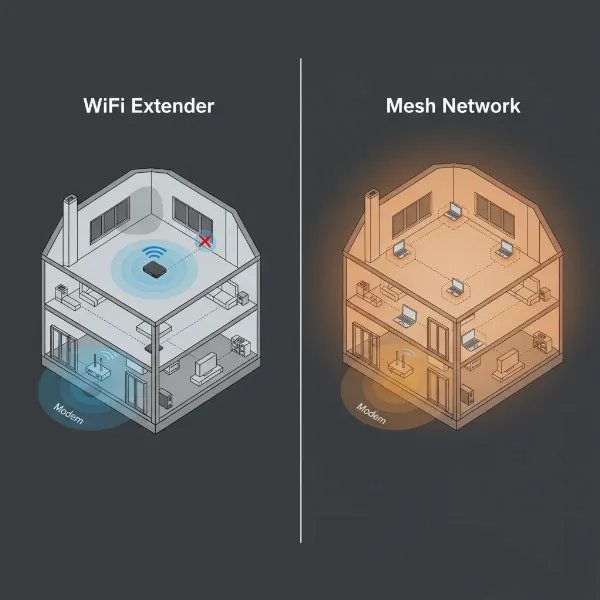
It’s important to understand that while Wi-Fi extenders are excellent for addressing specific dead zones, a mesh Wi-Fi system is generally recommended for whole-home coverage in very large houses or multi-story environments where consistent, seamless Wi-Fi is needed everywhere. Mesh systems create a single, unified network and typically offer better roaming and performance for multiple devices and demanding applications like 4K streaming and online gaming across a wide area, though they come at a higher cost. An extender remains the most cost-effective and straightforward solution for targeting one or two specific areas.
Conclusion
For serious gamers battling inconsistent Wi-Fi, a well-chosen Wi-Fi extender can be the upgrade that brings stability and speed back to your heavy-duty gaming setup. By understanding factors like Wi-Fi standards, crucial Ethernet ports, and optimal placement, you can effectively eliminate dead zones and dramatically improve your online experience. While not a complete replacement for a mesh system, the right extender is a cost-effective solution to bridge the gap between your router and your gaming haven, offering near-wired performance without the hassle of long cable runs. Ready to transform your lag-ridden experiences into smooth, responsive gameplay?
What key feature are you looking for most in your next gaming Wi-Fi extender?
Câu Hỏi Thường Gặp
Does a Wifi extender slow down internet speed?
Yes, Wi-Fi extenders can potentially reduce internet speeds, especially single-band models that use the same band to communicate with both the router and your devices. However, dual-band or tri-band extenders minimize this by using separate bands, and connecting devices via an Ethernet cable to the extender can largely mitigate speed loss and provide a stable, high-speed connection.
Is a Wifi extender good for gaming?
A Wi-Fi extender can be very good for gaming, particularly if your gaming setup is in a Wi-Fi dead zone. For optimal performance, choose an extender with the latest Wi-Fi standards (Wi-Fi 6/7), dual-band or tri-band capabilities, and crucially, Gigabit Ethernet ports to connect your gaming device directly for a stable, low-latency wired experience.
What’s the difference between a Wifi extender and a mesh system for gaming?
A Wi-Fi extender primarily boosts the signal from your existing router to a specific area. A mesh Wi-Fi system replaces your router with multiple interconnected nodes, creating a single, seamless network across a large area with better roaming and consistent performance. For a few specific dead zones, an extender is more cost-effective for gaming.
Should I use a wired connection to my extender for gaming?
Absolutely. For heavy-duty gaming, connecting your PC or console to the Wi-Fi extender via an Ethernet cable is highly recommended. This provides a stable, low-latency connection, bypassing the inherent inconsistencies of wireless signals and offering a gaming experience that is as close to a direct router connection as possible.
Can a Wifi extender eliminate all lag?
A Wi-Fi extender can significantly reduce lag caused by weak Wi-Fi signals and dead zones. However, it cannot eliminate lag stemming from other issues like a slow internet service provider, network congestion at the source, or game server problems. It improves the local network connection, but overall internet performance depends on many factors.