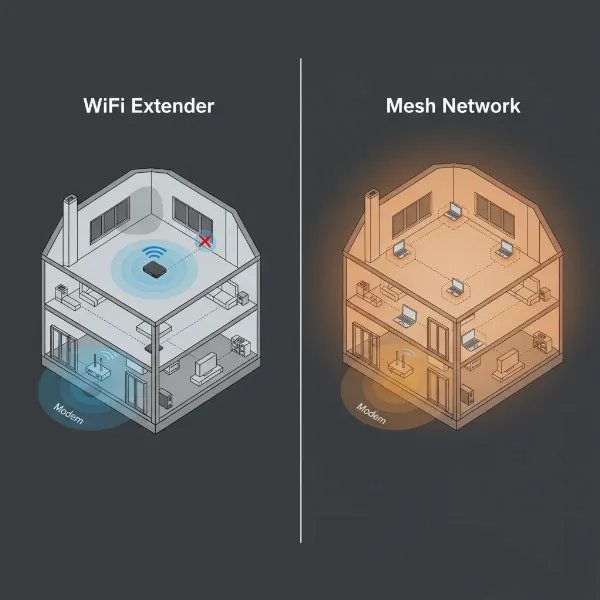
Are you tired of sluggish internet speeds and frustrating dead zones in certain areas of your home? You’re not alone. Many households struggle with patchy Wi-Fi coverage, leading to disruptions in streaming, gaming, and even everyday browsing. Fortunately, devices like Wi-Fi extenders and Wi-Fi repeaters promise to banish these connectivity woes. While these terms are often used interchangeably, understanding their underlying mechanics and distinct operational modes is crucial for making an informed choice that truly enhances your home network. This article will delve into the differences and similarities, helping you decide which solution is the optimal fit for your specific needs and budget.
1. Deciphering the Jargon: Are Wifi Extenders and Wifi Repeaters the Same?
The terms “Wi-Fi extender,” “Wi-Fi repeater,” and “Wi-Fi booster” are frequently used synonymously in the market, leading to considerable confusion among consumers. However, while they all aim to expand your Wi-Fi coverage, a subtle yet significant technical distinction often exists in how they achieve this. The primary difference often lies in the method they use to connect to your main router and how they manage bandwidth.
A Wi-Fi Repeater typically operates by receiving your existing wireless signal and then simply rebroadcasting it wirelessly. It functions like a middleman, catching the signal from your router and sending it further along. Crucially, a traditional Wi-Fi repeater uses a single radio to communicate with both the main router and your devices, which can effectively halve your available bandwidth because data is transmitted and received on the same channel simultaneously. These devices are generally plug-and-play, easy to set up, and often create a new network name (SSID) for the extended coverage area.
In contrast, a Wi-Fi Extender (or a more advanced “range extender”) often employs more sophisticated methods to extend coverage, aiming to mitigate the speed reduction commonly associated with repeaters. High-performance Wi-Fi extenders can connect to your router via a direct wired link, such as an Ethernet cable (known as “wired backhaul”), and then broadcast a new Wi-Fi signal. This wired connection ensures a more robust and stable data flow, bypassing the wireless congestion that plagues traditional repeaters. Some wireless extenders also use dual-band technology to dedicate one band (e.g., 5GHz) for communicating with the router and the other (e.g., 2.4GHz) for client devices, thereby reducing bandwidth loss [cite: 2 – How Does A WiFi Repeater Work? – Waveform]. Modern extenders, especially those integrated with mesh technology, can even maintain a single network name (SSID) across your home, allowing devices to seamlessly roam without reconnecting.
2. How These Signal Boosters Work in Practice
Understanding the operational mechanisms of Wi-Fi extenders and repeaters can clarify why their performance characteristics vary significantly. Each type employs a distinct approach to propagate your Wi-Fi signal, influencing everything from speed to network stability.
Wifi Repeater Mechanics
|
Our Picks for the Best Wifi extender in 2026
As an Amazon Associate I earn from qualifying purchases.
|
||
| Num | Product | Action |
|---|---|---|
| 1 | WiFi Extender Signal Booster for Home 2026 Internet Repeater Long Range Up to 9995 Sq. Ft. Whole Home WiFi Coverage |

|
| 2 | WiFi Extender, WiFi Extenders Signal Booster for Home Up to 5000 sq.ft and 50 Devices, WiFi Range Extender, Wireless Repeater, Long Range Amplifier with Ethernet Port, 1-Tap Setup, Alexa Compatible |
|
| 3 | TP-Link AC1200 WiFi Extender, 2023 Engadget Best Budget Pick, 1.2Gbps Signal Booster for Home, Dual Band 5GHz/2.4GHz, Covers Up to 1500 Sq.ft and 30 Devices,Support Onemesh, One Ethernet Port (RE315) |
|
| 4 | TP-Link AX3000 WiFi 6 Range Extender | PCMag Editor's Choice | Dual-Band Wireless Repeater w/Ethernet Port | Up to 2400 Sq. Ft., 64 Devices | Internet Signal Booster | APP Setup | EasyMesh (RE715X) |
|
| 5 | WiFi Extender Signal Booster, WiFi Booster Dual Band 5.8GHz&2.4GHz, Covers Up to 10000 Sq.ft, 1.2Gbps WiFi Repeater with One Ethernet Port, One-tap Setup |
|
| 6 | TP-Link AC1900 WiFi Range Extender RE550 | Dual-Band Wireless Repeater Amplifier w/Gigabit Ethernet Port | Up to 2200 Sq. Ft., 32 Devices | Internet Signal Booster | APP Setup | EasyMesh Compatible |
|
| 7 | 1200Mbps WiFi Extender Signal Booster for Home, Dual Band 5GHz/2.4GHz Wireless Internet Repeater with 4 External Antennas, Covers Up to 3600 Sq.ft & Supports 80 Devices, AP Mode with Ethernet Port |
|
| 8 | TP-Link WiFi Extender with Ethernet Port, Dual Band 5GHz/2.4GHz, Up to 44% More Bandwidth Than Single Band, Covers Up to 1200 Sq.ft and 30 Devices, Signal Booster Amplifier Supports OneMesh(RE220) |
|
| 9 | WiFi Extender WiFi Booster 1200 Mbps Dual Band (5GHz/2.4GHz) WiFi Extenders Signal Booster for Home, Internet Extended Booster WiFi Repeater (White) |
|
| 10 | 2026 WiFi Extender Signal Booster - 2.4GHz 300Mbps WiFi Booster for Home, Covers Up to 9999 Sq. Ft, Easy Setup, Ethernet Port & Access Point, Stable Internet Performance with 60+ Devices(White) |
|
A traditional Wi-Fi repeater works by acting as a wireless relay point. It receives the Wi-Fi signal from your main router and then amplifies and retransmits it. Think of it as a speaker repeating an announcement to a larger crowd. The repeater must be placed within the range of your primary router to pick up a usable signal. However, because most basic repeaters use a single radio transceiver to both listen for the router’s signal and broadcast to client devices, they create a bottleneck. This “listen-then-talk” process, often on the same wireless channel, means that each packet of data has to be transmitted twice—once from the router to the repeater, and again from the repeater to your device—effectively cutting the available bandwidth by up to 50%. This inherent limitation makes them less ideal for bandwidth-intensive activities like 4K streaming or online gaming.
Wifi Extender Mechanics
Wi-Fi extenders, particularly modern ones, are designed to overcome the bandwidth limitations of traditional repeaters through several mechanisms:
- Wireless Extender Mode: Many dual-band extenders utilize both 2.4GHz and 5GHz frequencies more intelligently. They might use one band (e.g., the faster 5GHz) to communicate with the main router and the other band (e.g., 2.4GHz) to connect to your devices. This dedicated backhaul channel minimizes the “halving” effect seen in single-band repeaters, providing better speeds to the connected devices.
- Wired Extender (Access Point Mode): This is often the most effective method for extending Wi-Fi coverage with minimal speed loss. In this mode, the extender connects to your main router via an Ethernet cable. This wired connection, known as “wired backhaul,” provides a direct, high-speed data link that is far more stable and faster than a wireless connection. The extender then acts as a new wireless access point (AP), broadcasting a strong Wi-Fi signal in the area where it’s placed. This setup is ideal for larger homes or offices where running an Ethernet cable is feasible, ensuring maximum performance for connected devices. Some extenders can also use existing home wiring, such as powerline or MoCA, for their wired backhaul.
[image-1|wifi-extender-vs-repeater-diagram|A diagram illustrating the difference between a Wi-Fi repeater (wireless relay, halving bandwidth) and a Wi-Fi extender (wired backhaul to router, creating a new access point, no bandwidth halving). A repeater shows a single arrow from router to repeater and then from repeater to device. An extender shows a wired line from router to extender, and then a wireless signal from extender to device. Clear, illustrative, digital art style.|
A conceptual diagram comparing Wi-Fi Repeater and Wi-Fi Extender functionality. On the left, a Wi-Fi Repeater wirelessly connects to the main router and then wirelessly to a device, illustrating a single radio path for both. On the right, a Wi-Fi Extender connects to the main router via an Ethernet cable (wired backhaul) and then wirelessly broadcasts a strong signal to a device. The diagram should visually represent the potential for bandwidth reduction in the repeater versus the stable connection of the extender. Use a clean, infographic-style digital illustration.]
3. Key Differences: Speed, Setup, and Network Management
The choice between a Wi-Fi extender and a Wi-Fi repeater often boils down to a trade-off between simplicity and performance. While both aim to eliminate dead zones, their core operational differences lead to distinct user experiences and suitability for various network demands.
| Feature | Traditional Wi-Fi Repeater | Advanced Wi-Fi Extender (or in AP Mode) |
|---|---|---|
| Connection Method to Router | Primarily wireless | Wireless (often dedicated band) or wired (Ethernet, powerline, MoCA) |
| Impact on Speed | Can reduce bandwidth by up to 50% | Minimal speed loss, especially with wired backhaul or dedicated band |
| Network Name (SSID) | Often creates a new, separate SSID | Can create a new SSID or seamlessly extend existing SSID (e.g., Mesh) |
| Ideal Use Case | Basic internet use (browsing, email) in small dead zones | Streaming, gaming, video calls in larger homes or critical areas |
| Setup Complexity | Generally simple (often WPS button) | Simple (WPS) to moderately complex (running Ethernet, advanced settings) |
| Cost | Typically lower | Generally higher, especially for Wi-Fi 6 or mesh-enabled models |
A key takeaway is that devices marketed simply as “repeaters” are best suited for minor signal boosts in areas where high speed isn’t critical. “Extenders,” particularly those supporting wired connections or advanced wireless technologies like Wi-Fi 6 and mesh, offer a superior experience for demanding network environments.
4. Benefits of Expanding Your Wifi Coverage
Regardless of whether you choose a Wi-Fi repeater or an extender, the overarching goal remains the same: to enhance your wireless network. These devices offer several compelling advantages that can significantly improve your internet experience throughout your home or office.
One of the most immediate benefits is the elimination of Wi-Fi dead zones. These are areas where your main router’s signal simply cannot reach, leaving devices disconnected or with extremely weak signals. A strategically placed extender or repeater can bridge this gap, ensuring consistent connectivity. By extending your network, you also improve signal strength and reliability for devices further away from your main router. This means fewer dropped connections, faster loading times, and a smoother overall internet experience, especially for activities that demand a stable connection.
Moreover, these devices enable better device connectivity. In larger homes, you might have devices spread across multiple rooms or floors. An extender or repeater ensures that all your smartphones, tablets, smart TVs, and IoT devices receive a strong enough signal to operate efficiently. This broadens the utility of your network without the need for expensive overhauls. Finally, opting for a Wi-Fi extender or repeater is often a cost-effective solution compared to upgrading your entire internet service package or replacing your primary router. It allows you to leverage your existing equipment while addressing coverage gaps at a fraction of the cost.
5. When a Wifi Signal Booster Becomes Essential
Knowing when to invest in a Wi-Fi signal booster—be it an extender or a repeater—can save you from constant connectivity frustrations. Several common scenarios indicate that your existing Wi-Fi network isn’t cutting it and a booster could be the perfect solution.
If you live in a large home or a multi-story house, your main router might struggle to cover every corner. Wi-Fi signals degrade over distance and when passing through floors, leaving upper levels or distant rooms with weak or non-existent service. Similarly, thick walls or other physical obstructions (like concrete, metal appliances, or even large furniture) can significantly weaken your Wi-Fi signal, creating localized dead zones regardless of your home’s size.
For those who enjoy connectivity outdoors in the yard, garden, or on a balcony, an extender can push your Wi-Fi signal beyond the confines of your home. This allows for seamless streaming, browsing, or working while enjoying the fresh air. Lastly, in households with a high number of connected devices—multiple smartphones, laptops, smart TVs, gaming consoles, and various smart home gadgets—the demand on a single router can be immense. A signal booster can help distribute the load and ensure each device receives adequate bandwidth, improving overall network performance and reducing congestion.
6. Choosing Your Ideal Wifi Signal Booster: Factors to Consider
Selecting the right Wi-Fi signal booster requires careful consideration of several factors to ensure it meets your specific needs and integrates seamlessly with your existing network. With many options available, a thoughtful approach will lead to the best results.
First, consider your existing router’s speed and type to ensure compatibility. A Wi-Fi extender that supports the same Wi-Fi standard (e.g., Wi-Fi 5/AC or Wi-Fi 6/AX) as your primary router will generally offer the best performance. Next, accurately assess the coverage area required. Measure the distance between your router, the dead zone, and the potential placement of the booster. This will help determine the necessary range and power of the device.
Your bandwidth needs are also critical. If you primarily browse and check emails, a basic repeater might suffice. However, for demanding activities like 4K video streaming, online gaming, or large file transfers, prioritize extenders with higher speeds, dual-band capabilities, and ideally, Ethernet ports for wired backhaul. Dual-band extenders (2.4GHz and 5GHz) are almost always preferable to single-band, as they offer more flexibility and better performance by reducing interference and potentially dedicating a band for backhaul [cite: 2 – How Does A WiFi Repeater Work? – Waveform].
Look for devices with Ethernet ports if you plan to connect wired devices (like a smart TV, gaming console, or desktop PC) to the extended network for maximum stability and speed. Additionally, explore advanced features such as MU-MIMO (Multi-User, Multiple-Input, Multiple-Output) for handling multiple devices simultaneously, Beamforming for directing signals to devices, or Mesh integration for creating a seamless whole-home Wi-Fi system. Finally, consider the brand reputation and price. Reputable brands often offer better reliability, support, and performance. Balance these factors with your budget to find a device that delivers optimal value.
7. Popular Models: A Comparative Overview
The market offers a wide array of Wi-Fi signal boosters, with many devices categorized broadly as “extenders” that incorporate functionalities that range from simple repeating to advanced access point capabilities. Here’s a look at some popular examples and their typical characteristics:
| Product Name | Brand | Wifi Speed (Combined) | Bands | Ethernet Ports | Key Features & Advantages | Typical Price Range |
|---|---|---|---|---|---|---|
| TP-Link RE315 | TP-Link | Up to 1.2 Gbps (AC1200) | Dual-band | 1x Gigabit | Budget-friendly, OneMesh support, easy setup with Tether app | $25 – $40 |
| Linksys RE7000 | Linksys | Up to 1.9 Gbps (AC1900) | Dual-band | 1x Gigabit | Compact design, Spot Finder Technology for optimal placement | $70 – $100 |
| TP-Link AX3000 (RE715X) | TP-Link | Up to 3.0 Gbps (AX3000) | Dual-band | 1x Gigabit | Wi-Fi 6, OneMesh, high speed for streaming/gaming, AP Mode | $100 – $130 |
| NETGEAR Nighthawk EAX80 | NETGEAR | Up to 6.0 Gbps (AX6000) | Dual-band | 4x Gigabit | Wi-Fi 6, Mesh capability, robust for heavy use, multiple Ethernet ports | $150 – $200 |
Note: Speeds are theoretical maximums. Real-world performance varies based on environment and router capabilities. Many of these “extenders” can operate in a repeater-like mode if a wired backhaul is not utilized.
“A well-chosen Wi-Fi extender can transform your home network, extending seamless connectivity to every nook and cranny without the need for complex rewiring or an expensive router upgrade.”
8. Setting Up Your Wifi Signal Booster for Optimal Performance
Proper installation and configuration are paramount to getting the most out of your Wi-Fi signal booster. A poorly placed or incorrectly set up device can lead to more frustration than a weak signal.
The most critical factor is placement. Your booster should ideally be located roughly halfway between your main router and the Wi-Fi dead zone. It needs to be close enough to your router to receive a strong, stable signal, but also close enough to the dead zone to effectively re-broadcast it. Avoid placing it in corners, behind large furniture, or near sources of interference such such as microwaves, cordless phones, or large metal objects. Many modern extenders include a signal indicator light to help you find the optimal spot.
Most Wi-Fi extenders and repeaters offer two primary setup methods: WPS (Wi-Fi Protected Setup) button or manual setup via a web browser/app. WPS involves simply pressing the WPS button on your router, then pressing the corresponding button on the extender. This method is quick and easy, but not all routers support it, and it can sometimes be less secure. Manual setup usually involves connecting to the extender’s temporary Wi-Fi network, then following on-screen instructions in a web browser or a dedicated mobile app to connect it to your main network. This method offers more control over settings like SSID and security protocols. After setup, test the performance in the extended areas. Use speed test tools to compare speeds before and after installation. If you encounter issues, common troubleshooting steps include restarting both the router and the extender, checking for firmware updates, and experimenting with different placement locations.
9. Where to Purchase Your Wifi Signal Booster
Finding the right Wi-Fi signal booster is made easier by the wide availability of these devices. You have several reliable avenues for purchase, both online and in physical stores.
Major online retailers like Amazon, Best Buy, Newegg, and the official websites of manufacturers (e.g., TP-Link, Netgear, Linksys, Asus) are excellent places to start. They offer extensive selections, competitive pricing, and often provide customer reviews and detailed specifications to help your decision-making. When buying online, always read recent reviews to gauge real-world performance and check the seller’s return policy.
For those who prefer a hands-on shopping experience, electronics stores such as Best Buy, Staples, or local computer shops often carry a range of Wi-Fi extenders and repeaters. Shopping in person allows you to see the devices, ask questions of sales associates, and take the product home immediately. However, the selection might be narrower, and prices could be slightly higher than online. No matter where you purchase, ensure the product is new, comes with a warranty, and is compatible with your existing Wi-Fi standard.
10. Buying Guide: Making the Right Decision
Navigating the world of Wi-Fi signal boosters can seem daunting, but by focusing on a few key decision points, you can confidently choose the best device for your home. Your ideal choice hinges on a balance of your budget, specific connectivity needs, and the capabilities of your existing network.
Firstly, establish your budget. Basic Wi-Fi repeaters are the most affordable, typically ranging from $20-$50. More advanced Wi-Fi extenders with Wi-Fi 6, dual-band capabilities, and multiple Ethernet ports can cost anywhere from $70-$200 or more. Defining what you’re willing to spend will narrow down your options significantly. Secondly, clearly articulate your needs for use. Are you just trying to get a basic signal for occasional browsing in a small, weak area? A simple repeater might suffice. Are you a gamer, heavy streamer, or working from home and experiencing constant drops and slowdowns in a larger space? Then a robust Wi-Fi 6 extender with wired backhaul capabilities or mesh integration is a more appropriate investment. The performance impact of traditional repeaters (halved bandwidth) is a critical consideration here.
Thirdly, ensure compatibility with your current router. While most extenders are universal, checking for matching Wi-Fi standards (e.g., Wi-Fi 5 or Wi-Fi 6) and features will ensure optimal performance. Lastly, read reviews from other users and reputable tech publications. Real-world tests and user feedback can provide invaluable insights into a device’s actual performance, ease of use, and reliability in various home environments. By carefully weighing these factors, you can effectively choose between the simpler, budget-friendly repeaters and the more powerful, performance-oriented extenders to finally achieve whole-home Wi-Fi coverage.
Conclusion
The quest for seamless Wi-Fi connectivity across your entire home is a common challenge, but with the right tools, it’s easily achievable. While the terms “Wi-Fi extender” and “Wi-Fi repeater” are often used interchangeably, understanding their technical differences is key to making an informed decision. Traditional Wi-Fi repeaters offer a simple, cost-effective way to boost signals in small dead zones, though often at the cost of bandwidth. In contrast, advanced Wi-Fi extenders, particularly those utilizing wired backhaul or dedicated wireless bands, provide a more robust and faster solution, ideal for demanding applications and larger spaces.
Ultimately, the “best” choice for you depends on your specific needs, the size and layout of your home, your internet usage habits, and your budget. By considering factors like speed, coverage area, dual-band support, and the presence of Ethernet ports, you can effectively bridge those frustrating dead zones and enjoy reliable internet wherever you need it. Which type of Wi-Fi signal booster will you choose to transform your home network?
Câu Hỏi Thường Gặp
Do Wifi extenders/repeaters slow down internet speed?
A traditional Wi-Fi repeater can halve your internet speed because it uses the same wireless channel to communicate with both your router and your devices. More advanced Wi-Fi extenders, especially those with wired Ethernet connections (wired backhaul) or dedicated wireless bands for communication, are designed to minimize or eliminate this speed reduction, offering much better performance.