Navigating the world of home networking can be daunting, especially when trying to eliminate frustrating Wi-Fi dead zones or boost sluggish internet speeds. As the Admin of ReviewDrs.com, with over a decade of hands-on experience in networking equipment, particularly Wi-Fi extenders, I understand the challenges you face. Many solutions promise seamless connectivity, but two common contenders often stand out: Wi-Fi extenders and Powerline adapters. This article will delve into both technologies, comparing their mechanisms, benefits, drawbacks, and ideal use cases, helping you make an informed decision to optimize your home internet. We’ll explore how each device works to spread your internet signal and which solution is best suited for your specific needs and home environment.
1. Understanding Wifi Extenders: How They Work and Their Purpose
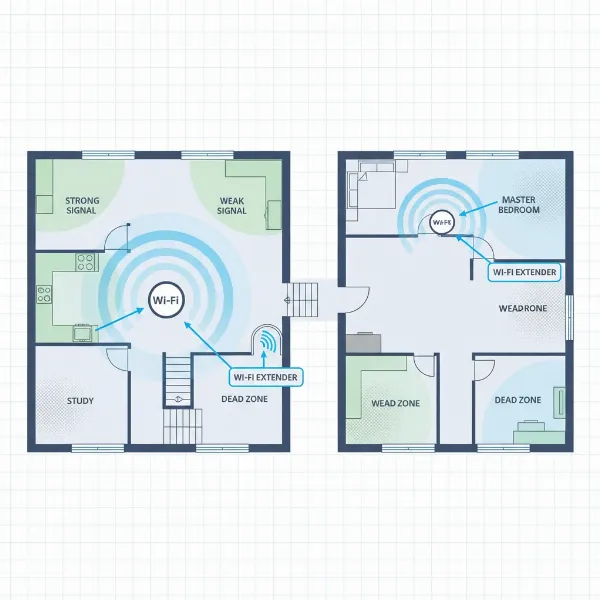
A Wi-Fi extender, also frequently called a Wi-Fi booster or repeater, is a device designed to expand the coverage area of your existing wireless network. Its primary purpose is to capture the Wi-Fi signal from your main router and rebroadcast it, allowing internet access in parts of your home where the original signal is weak or non-existent. Think of it as a digital middleman, relaying signals to ensure your devices stay connected even at a distance.
The technical process is relatively straightforward: the extender establishes a connection with your primary router, much like any other wireless device. Once connected, it then creates a secondary network, extending the reach of your Wi-Fi. While some older models might create a separate network name (SSID), many modern extenders can operate under the same SSID, offering a more seamless roaming experience as you move around your home. However, it’s important to note that fundamentally, they are still retransmitting a signal that has already traveled once.
[image-1|wifi-extender-concept|Wifi Extender extending wireless network signal in a multi-room house with a central router, showing signal propagation.|
A realistic, clean illustration of a modern home with a Wi-Fi router in one room and a sleek, white Wi-Fi extender plugged into an outlet in another. Visible curved lines represent the Wi-Fi signal originating from the router, weakening, and then being boosted and extended by the extender to reach a device in a previously dead zone. The overall aesthetic is clean, modern, and illustrative of signal coverage.]
2. Unpacking Powerline Adapters: The Electrical Network Bridge
Powerline adapters offer an ingenious alternative to traditional wireless or Ethernet cabling for extending your home network. These devices transform your home’s existing electrical wiring into a robust data highway. Instead of relying on wireless signals that can be susceptible to interference from physical obstacles, Powerline technology transmits network data directly through your household electrical circuits.
A basic Powerline setup requires at least two adapters. One adapter plugs into a wall outlet near your main router and connects to it via a short Ethernet cable. The second adapter (or multiple others) plugs into a wall outlet in another room or area where you need improved internet connectivity. These adapters convert the internet signal into a modulated carrier, which then travels along the copper electrical lines throughout your home. Many modern Powerline adapters also feature built-in Wi-Fi, allowing them to not only provide a wired Ethernet port but also create a new Wi-Fi hotspot in the remote location.
3. Benefits of Using a Wifi Extender
Wi-Fi extenders offer several compelling advantages, particularly for those looking for a quick and easy solution to improve their home network. The primary benefit is undoubtedly the expanded Wi-Fi coverage, eliminating those frustrating “dead zones” where your signal previously wouldn’t reach. For homes with minor coverage gaps, an extender can be a lifesaver, ensuring devices in bedrooms, basements, or even outdoor patios can connect reliably.
Another significant draw is their straightforward installation. Most Wi-Fi extenders are designed with user-friendliness in mind, often featuring a simple plug-and-play setup. Many models include a WPS (Wi-Fi Protected Setup) button, allowing you to connect to your main router with just a press of a button, making them accessible even for those without extensive technical knowledge. Furthermore, Wi-Fi extenders are typically a cost-effective solution compared to more complex networking upgrades, and they boast broad compatibility with most existing routers, adding to their appeal.
4. Advantages of Opting for a Powerline Adapter
Powerline adapters shine in scenarios where traditional Wi-Fi struggles to deliver a consistent and robust connection. Their greatest strength lies in providing a remarkably stable and reliable connection, often superior to Wi-Fi extenders, especially when physical barriers like thick walls or multiple floors hinder wireless signals. By utilizing your home’s electrical wiring, Powerline adapters create a more direct and efficient data path.
This unique transmission method can result in faster speeds and an improved range, particularly for wired connections, making them highly suitable for bandwidth-intensive activities such as 4K video streaming, online gaming, and large file transfers in specific rooms. Powerline technology also helps reduce wireless interference, freeing up your Wi-Fi spectrum for other devices. From a security standpoint, data transmitted over electrical cables is inherently more secure than wireless signals, offering peace of mind.
[image-2|powerline-adapter-connection|Powerline adapter kit showing data transmission through home electrical wiring between a router and a remote device.|
A schematic, illustrative representation of a home’s internal electrical wiring. One powerline adapter is plugged into an outlet near a Wi-Fi router, connected via an Ethernet cable. A second adapter is plugged into an outlet in a distant room, connected to a laptop via Ethernet. Animated lines show data traveling through the wall’s electrical wires between the two adapters. The style is clear, technical, and easy to understand.]
5. When Wifi Extenders Fall Short: Key Disadvantages
Despite their convenience, Wi-Fi extenders come with several limitations that can impact your overall internet experience. One of the most common drawbacks is the potential for speed reduction. Because an extender receives a signal and then rebroadcasts it, the usable bandwidth on the extended network can often be halved, as the data is essentially transmitted twice. This “double hop” also leads to increased latency, which can be particularly detrimental for real-time applications like online gaming or video conferencing.
Wi-Fi extenders are also susceptible to wireless interference from other devices, neighboring networks, or physical obstacles such as thick walls and large appliances, all of which can further degrade performance. Their effective range is limited by the strength of the signal they receive from the main router, meaning optimal placement is crucial to avoid simply rebroadcasting an already weak signal. Additionally, some extenders create a separate network name, requiring devices to manually switch between your main router’s Wi-Fi and the extender’s network, which can disrupt connectivity and user experience.
6. Powerline Adapter Limitations: What to Consider
While Powerline adapters offer significant advantages in stability and wired speeds, they are not without their own set of limitations. A critical factor to consider is that advertised speeds are often theoretical maximums; real-world performance can be considerably lower, sometimes 20-40% less than stated, due to various environmental factors. This speed discrepancy can be disappointing if expectations are set too high based on marketing figures.
The effectiveness of Powerline technology is heavily dependent on the quality and layout of your home’s electrical wiring. Older or poorly maintained wiring, or complex circuits with multiple consumer units, can significantly degrade performance or even render the adapters ineffective. Powerline adapters are also sensitive to electrical noise generated by common household appliances like vacuum cleaners, dimmers, or even phone chargers, which can interfere with data transmission. Furthermore, they typically require a direct connection to a wall outlet and may not perform reliably when plugged into surge protectors or UPS units. Compatibility issues between different brands or HomePlug standards can also arise, complicating expansion or mixed setups.
“A powerline adapter is a fantastic solution for extending your network in homes where Wi-Fi signals are blocked by thick walls, offering a more stable connection for bandwidth-heavy tasks.” – Nguyễn Văn A, Network Specialist
7. Deciding Between Wifi Extender and Powerline: Key Factors
Choosing between a Wi-Fi extender and a Powerline adapter hinges on understanding your specific needs and the unique characteristics of your home. Start by evaluating the size and layout of your living space. If you reside in a large, multi-story home with thick walls or numerous obstacles that consistently block Wi-Fi signals, a Powerline adapter is often the superior choice for delivering a stable connection to distant rooms. For smaller homes or apartments with only minor Wi-Fi dead spots, a simple Wi-Fi extender might suffice.
Next, consider your performance needs. For tasks that demand high speed and low latency, such as 4K streaming or online gaming, especially for wired devices, Powerline adapters typically offer a more reliable experience than Wi-Fi extenders, which can introduce speed reductions and lag. While both offer relatively easy setup, Powerline adapters’ performance is intrinsically linked to your home’s electrical infrastructure, so knowing the condition and layout of your wiring can guide your decision. Finally, factor in cost and whether you prioritize an entirely wireless extension or a robust, wired-like connection.
| Feature | Wifi Extender | Powerline Adapter |
|---|---|---|
| Connectivity | Extends existing Wi-Fi wirelessly | Uses electrical wiring for data transmission |
| Speed | Can reduce bandwidth by 50%; higher latency | Stable, often faster for wired; varies by wiring |
| Stability | Prone to wireless interference, physical barriers | Less affected by physical barriers; sensitive to electrical noise |
| Installation | Plug-and-play, WPS button, easy | Plug-and-play, requires two units, easy |
| Coverage | Extends Wi-Fi to adjacent rooms, small dead zones | Excellent for distant rooms, multi-floor homes |
| Best Use Case | Minor Wi-Fi gaps, basic browsing, general coverage | Gaming, 4K streaming, home offices, stable wired connections |
| Cost | Generally more affordable for basic models | Can be more expensive, especially Wi-Fi models |
| Dependencies | Router signal strength, wireless interference | Electrical wiring quality, electrical circuit segmentation |
| Security | Wireless signals more vulnerable | Data through wires, more secure |
8. Buying Guide: How to Choose the Right Device
Making the right choice involves a careful assessment of several practical factors to ensure your selected device meets your expectations. Firstly, establish a clear budget. Wi-Fi extenders generally come at a lower entry-level price point, while Powerline adapters, particularly those with integrated Wi-Fi capabilities, can be a more significant investment. Understanding what you’re willing to spend will help narrow down your options significantly.
Secondly, clearly define your usage requirements. Are you primarily looking to extend basic internet access to a rarely used room, or do you need a high-performance connection for gaming and 4K streaming in a home office? This distinction is crucial, as a basic Wi-Fi extender might suffice for the former, while a Powerline adapter is often better for the latter. Ensure compatibility with your existing router and consider features like dual-band or tri-band support for Wi-Fi extenders, or pass-through outlets for Powerline adapters. Finally, always take the time to read user reviews and expert assessments; real-world experiences can provide invaluable insights into a device’s actual performance and reliability.
9. Popular Models for Wifi Extenders
The market offers a wide array of Wi-Fi extenders, with several brands consistently delivering reliable performance. For those seeking a balance of speed and features, models like the TP-Link RE700X AX3000 Mesh Wi-Fi 6 Extender stand out, offering Wi-Fi 6 compatibility for modern networks and often supporting mesh integration for seamless roaming. This model typically provides robust dual-band performance for extending coverage to larger areas.
Another strong contender is the Netgear Nighthawk EAX20 AX1800 Wi-Fi 6 Extender, which is favored for its powerful signal and ability to handle numerous connected devices across a substantial coverage area, often including multiple Gigabit Ethernet ports for wired connections. For users embedded in the ASUS ecosystem, the ASUS RP-AX58 AX3000 Wi-Fi 6 AiMesh Extender offers excellent integration with ASUS AiMesh systems, providing high upload speeds beneficial for gamers and remote workers, though its design might block adjacent outlets. These examples demonstrate the range of features and performance available in current Wi-Fi extenders.
10. Top Powerline Adapter Recommendations
When it comes to Powerline adapters, certain models have earned a reputation for their reliability and performance, addressing various needs from basic extension to high-demand networking. The TP-Link AV2000 Powerline Adapter (TL-PA9020P KIT) is frequently recommended for its high-speed Ethernet capabilities, promising speeds up to 2000 Mbps and often including two Gigabit Ethernet ports per adapter, making it ideal for connecting bandwidth-hungry devices like smart TVs or gaming consoles. This model usually features a pass-through outlet, ensuring you don’t lose a power socket.
For a comprehensive solution that includes Wi-Fi, the Devolo Magic 2 Wi-Fi 6 kit combines high-speed Powerline with modern Wi-Fi 6 technology, offering excellent range and stability across large homes. This system can transform a wireless dead zone into a productive networking hub with multiple Ethernet ports and far-reaching dual-band Wi-Fi. Another solid choice for extending Wi-Fi via Powerline is the TP-Link TL-WPA8631P, which provides a cost-effective way to extend your network with three Ethernet sockets and dual-band Wi-Fi 5, easily set up using WPS. These models represent robust options for leveraging your home’s electrical wiring for improved internet.
Conclusion
Choosing between a Wi-Fi extender and a Powerline adapter ultimately comes down to a careful evaluation of your unique home environment and networking demands. While Wi-Fi extenders offer an easy, affordable way to patch minor coverage gaps and extend wireless access, they often come with tradeoffs in speed and stability. Powerline adapters, on the other hand, leverage your home’s existing electrical infrastructure to deliver a more stable and potentially faster connection, especially for wired devices in hard-to-reach areas.
Consider the layout of your home, the quality of your electrical wiring, and the specific activities you’ll be performing in the extended zones. For critical tasks like 4K streaming or online gaming, a Powerline adapter often provides a superior, more reliable experience. For simpler needs, a Wi-Fi extender might be a perfectly adequate and budget-friendly solution. By understanding these key distinctions, you are now equipped to select the optimal technology to ensure seamless internet connectivity throughout your entire home. What kind of connectivity challenges are you looking to solve in your home?
Frequently Asked Questions
Do Wifi extenders really work?
|
Our Picks for the Best Wifi extender in 2026
As an Amazon Associate I earn from qualifying purchases.
|
||
| Num | Product | Action |
|---|---|---|
| 1 | WiFi Extender, WiFi Extenders Signal Booster for Home Up to 5000 sq.ft and 50 Devices, WiFi Range Extender, Wireless Repeater, Long Range Amplifier with Ethernet Port, 1-Tap Setup, Alexa Compatible |

|
| 2 | TP-Link WiFi Extender with Ethernet Port, Dual Band 5GHz/2.4GHz, Up to 44% More Bandwidth Than Single Band, Covers Up to 1200 Sq.ft and 30 Devices, Signal Booster Amplifier Supports OneMesh(RE220) |
|
| 3 | 2026 WiFi Extender Signal Booster - 2.4GHz 300Mbps WiFi Booster for Home, Covers Up to 9999 Sq. Ft, Easy Setup, Ethernet Port & Access Point, Stable Internet Performance with 60+ Devices(White) |
|
| 4 | WiFi Extender Signal Booster, WiFi Booster Dual Band 5.8GHz&2.4GHz, Covers Up to 10000 Sq.ft, 1.2Gbps WiFi Repeater with One Ethernet Port, One-tap Setup |
|
| 5 | TP-Link AC1900 WiFi Range Extender RE550 | Dual-Band Wireless Repeater Amplifier w/Gigabit Ethernet Port | Up to 2200 Sq. Ft., 32 Devices | Internet Signal Booster | APP Setup | EasyMesh Compatible |
|
| 6 | 1200Mbps WiFi Extender Signal Booster for Home, Dual Band 5GHz/2.4GHz Wireless Internet Repeater with 4 External Antennas, Covers Up to 3600 Sq.ft & Supports 80 Devices, AP Mode with Ethernet Port |
|
| 7 | WiFi Extender WiFi Booster 1200 Mbps Dual Band (5GHz/2.4GHz) WiFi Extenders Signal Booster for Home, Internet Extended Booster WiFi Repeater (White) |
|
| 8 | TP-Link AC1200 WiFi Extender, 2023 Engadget Best Budget Pick, 1.2Gbps Signal Booster for Home, Dual Band 5GHz/2.4GHz, Covers Up to 1500 Sq.ft and 30 Devices,Support Onemesh, One Ethernet Port (RE315) |
|
| 9 | TP-Link AX3000 WiFi 6 Range Extender | PCMag Editor's Choice | Dual-Band Wireless Repeater w/Ethernet Port | Up to 2400 Sq. Ft., 64 Devices | Internet Signal Booster | APP Setup | EasyMesh (RE715X) |
|
| 10 | WiFi Extender Signal Booster for Home 2026 Internet Repeater Long Range Up to 9995 Sq. Ft. Whole Home WiFi Coverage |
|
Yes, Wi-Fi extenders do work by capturing your existing Wi-Fi signal and rebroadcasting it to extend coverage into dead zones. However, their effectiveness can vary significantly based on placement, distance from the main router, and the presence of interference. They are best suited for smaller areas or minor coverage improvements.
Can a Powerline adapter replace my Wi-Fi router?
No, a Powerline adapter cannot replace your Wi-Fi router. It works in conjunction with your router by extending the network signal through your home’s electrical wiring. You still need a main router connected to your internet service provider for the Powerline system to function and provide internet access.
Is a Powerline adapter better for gaming?
For gaming, a Powerline adapter is generally considered better than a Wi-Fi extender, especially if you can utilize its Ethernet ports for a wired connection. It offers a more stable connection with lower latency compared to a Wi-Fi extender, which can suffer from signal degradation and increased lag due to repeated wireless transmission.
Can I use both a Wifi extender and a Powerline adapter?
Yes, it is possible to use both a Wi-Fi extender and a Powerline adapter in your home network. For instance, you could use a Powerline adapter to bring a strong, wired connection to a distant room, and then a Wi-Fi extender in that room (or another area) to create a local Wi-Fi hotspot, further expanding wireless coverage if needed.