Is your home plagued by frustrating Wi-Fi dead zones, slow speeds in certain rooms, or unreliable connections on your favorite devices? You’re not alone. Many households struggle with inconsistent wireless coverage, especially in larger homes, multi-story buildings, or spaces with thick walls. The good news is that you don’t necessarily need to overhaul your entire internet setup. A Wi-Fi extender could be the straightforward, cost-effective solution you’ve been searching for to blanket your entire property with strong, stable Wi-Fi. This comprehensive guide will walk you through everything you need to know about Wi-Fi extenders, helping you make an informed decision and finally enjoy seamless connectivity throughout your home.
1. What is a Wifi Extender and How Does It Work?
A Wi-Fi extender is a device designed to increase the reach of your existing wireless network, essentially eliminating dead spots and providing a stronger signal where your main router falls short. It acts as an intermediary, picking up the Wi-Fi signal from your primary router and then rebroadcasting it to expand coverage. Think of it as a relay runner for your internet signal, ensuring the message reaches farther without losing its strength.
These devices primarily work by connecting wirelessly to your existing Wi-Fi network. Once connected and strategically placed, the extender amplifies and rebroadcasts this signal, extending its effective range. This process creates an expanded network that covers areas previously unreachable or suffering from weak signals, giving your devices a more reliable connection. While sometimes used interchangeably, Wi-Fi “extenders” and “repeaters” both serve the fundamental purpose of boosting coverage, often creating a single, seamless network or a secondary one for better reach.
[image-1|wifi-extender-working-concept|A diagram showing how a Wifi extender captures and rebroadcasts a signal from a router to cover dead zones.|
An illustrative infographic displaying a Wi-Fi router emitting signals, a Wi-Fi extender positioned midway, and then rebroadcasting stronger signals to previously uncovered areas and devices. The signals should be represented by expanding arcs, clearly showing the extended coverage. The setting is a cozy home environment with devices like laptops and smartphones. Bright, clear, and easy-to-understand visual style.]
2. Benefits of Using a Wifi Extender
The advantages of integrating a Wi-Fi extender into your home network are numerous and can significantly improve your overall online experience. The primary benefit is the dramatic expansion of your Wi-Fi coverage, reaching those notorious “dead zones” where signals previously struggled to penetrate. This means you can enjoy reliable internet in every corner of your house, from the attic to the basement, and even out in the garden.
Beyond just extending reach, a good Wi-Fi extender can also improve the speed and stability of your connection in these previously problematic areas. By providing a stronger signal, it reduces buffering, lag, and dropped connections, which is crucial for streaming high-definition content, online gaming, and video conferencing. Compared to upgrading your internet plan or investing in a whole new mesh system, an extender is often a more budget-friendly solution to solve coverage issues. Furthermore, most modern Wi-Fi extenders are remarkably easy to set up, often requiring just a few minutes and a button press to get them up and running.
3. When Do You Need a Wifi Extender?
Deciding if a Wi-Fi extender is right for you often comes down to specific connectivity challenges within your home or office. If you regularly experience dropped connections or extremely slow internet speeds in particular rooms, a Wi-Fi extender is likely a sensible investment. Homes with multiple floors or a large sprawling layout frequently suffer from signal degradation as the Wi-Fi waves struggle to travel long distances or through structural barriers.
Thick walls, concrete, and even large appliances can significantly weaken your Wi-Fi signal, creating frustrating dead zones. An extender can bypass these obstacles by picking up the signal before it becomes too weak and rebroadcasting it. If you enjoy using your devices outdoors on a patio or in the garden, an extender can help bring your Wi-Fi signal to these areas. Moreover, in households with numerous connected devices—smartphones, tablets, smart TVs, gaming consoles, and smart home gadgets—an extender can help distribute the load and maintain stable connections for everyone.
4. Factors to Consider When Choosing a Wifi Extender
Selecting the right Wi-Fi extender requires careful consideration of several technical specifications and features to ensure it meets your specific needs and integrates well with your existing network. Overlooking these factors can lead to an extender that underperforms or doesn’t solve your connectivity issues effectively. Taking the time to evaluate these points will help you choose a device that truly enhances your home Wi-Fi.
Tốc độ Wifi: Choosing the Right Speed
|
Our Picks for the Best Wifi extender in 2026
As an Amazon Associate I earn from qualifying purchases.
|
||
| Num | Product | Action |
|---|---|---|
| 1 | TP-Link AX3000 WiFi 6 Range Extender | PCMag Editor's Choice | Dual-Band Wireless Repeater w/Ethernet Port | Up to 2400 Sq. Ft., 64 Devices | Internet Signal Booster | APP Setup | EasyMesh (RE715X) |

|
| 2 | WiFi Extender, WiFi Extenders Signal Booster for Home Up to 5000 sq.ft and 50 Devices, WiFi Range Extender, Wireless Repeater, Long Range Amplifier with Ethernet Port, 1-Tap Setup, Alexa Compatible |
|
| 3 | WiFi Extender WiFi Booster 1200 Mbps Dual Band (5GHz/2.4GHz) WiFi Extenders Signal Booster for Home, Internet Extended Booster WiFi Repeater (White) |
|
| 4 | TP-Link WiFi Extender with Ethernet Port, Dual Band 5GHz/2.4GHz, Up to 44% More Bandwidth Than Single Band, Covers Up to 1200 Sq.ft and 30 Devices, Signal Booster Amplifier Supports OneMesh(RE220) |
|
| 5 | TP-Link AC1200 WiFi Extender, 2023 Engadget Best Budget Pick, 1.2Gbps Signal Booster for Home, Dual Band 5GHz/2.4GHz, Covers Up to 1500 Sq.ft and 30 Devices,Support Onemesh, One Ethernet Port (RE315) |
|
| 6 | 1200Mbps WiFi Extender Signal Booster for Home, Dual Band 5GHz/2.4GHz Wireless Internet Repeater with 4 External Antennas, Covers Up to 3600 Sq.ft & Supports 80 Devices, AP Mode with Ethernet Port |
|
| 7 | WiFi Extender Signal Booster, WiFi Booster Dual Band 5.8GHz&2.4GHz, Covers Up to 10000 Sq.ft, 1.2Gbps WiFi Repeater with One Ethernet Port, One-tap Setup |
|
| 8 | TP-Link AC1900 WiFi Range Extender RE550 | Dual-Band Wireless Repeater Amplifier w/Gigabit Ethernet Port | Up to 2200 Sq. Ft., 32 Devices | Internet Signal Booster | APP Setup | EasyMesh Compatible |
|
| 9 | WiFi Extender Signal Booster for Home 2026 Internet Repeater Long Range Up to 9995 Sq. Ft. Whole Home WiFi Coverage |
|
| 10 | 2026 WiFi Extender Signal Booster - 2.4GHz 300Mbps WiFi Booster for Home, Covers Up to 9999 Sq. Ft, Easy Setup, Ethernet Port & Access Point, Stable Internet Performance with 60+ Devices(White) |
|
The speed of your Wi-Fi extender is paramount to its effectiveness. Ideally, you should choose an extender that offers speeds comparable to or higher than your primary router to avoid creating a bottleneck in your network. Look for extenders labeled with Wi-Fi standards like Wi-Fi 5 (802.11ac) or Wi-Fi 6 (802.11ax) for modern performance. A higher “AC” or “AX” rating generally indicates faster theoretical speeds and better handling of multiple devices.
Băng tần: Dual-Band for Better Performance
Most modern Wi-Fi extenders are dual-band, supporting both 2.4GHz and 5GHz frequencies. The 2.4GHz band offers wider coverage and better penetration through obstacles but with slower speeds. The 5GHz band provides faster speeds but with a shorter range. A dual-band extender offers the flexibility to utilize both, often dedicating one band to communicate with the router and the other to connect with your devices, leading to more efficient and stable performance.
Phạm vi phủ sóng: Matching Coverage to Your Needs
Consider the size of the area you need to cover. Extenders come with varying degrees of signal amplification and antenna configurations, impacting their effective range. While manufacturers often provide estimated coverage areas, real-world performance can vary due to environmental factors. Opt for an extender with a sufficient coverage capacity to reach your desired dead zones without overspending on features you don’t need.
Số lượng cổng Ethernet: Wired Connection Options
If you have devices that benefit from a wired connection, such as gaming consoles, desktop PCs, or smart TVs, consider an extender with one or more Ethernet ports. These ports allow you to connect devices directly to the extender, providing a stable, high-speed connection that bypasses potential wireless interference. Gigabit Ethernet ports are preferable for maximum performance if your internet speed is high.
Tính năng bổ sung: Advanced Features for Enhanced Experience
Many extenders now come with advanced features that can significantly enhance performance. MU-MIMO (Multi-User, Multiple-Input, Multiple-Output) allows the extender to communicate with multiple devices simultaneously, improving efficiency in busy networks. Beamforming technology directs the Wi-Fi signal directly to your connected devices, rather than broadcasting in all directions, leading to stronger, more focused connections. Some extenders also include USB ports for sharing storage or printers, or smart indicators for optimal placement.
Thương hiệu và giá cả: Reputation and Budget
Stick to reputable brands known for their networking equipment, such as TP-Link, Netgear, Linksys, or D-Link. These brands generally offer reliable products with good customer support and firmware updates. While price is a factor, avoid extremely cheap extenders that might compromise on performance and longevity. Balance your budget with the features and performance you need, viewing it as an investment in consistent connectivity.
5. So sánh các loại Wifi Extender phổ biến trên thị trường
Choosing from the myriad of Wi-Fi extenders can be daunting, but understanding the market leaders and their offerings can simplify the process. Here’s a comparative overview of popular types, focusing on key features, performance, and where they excel.
| Feature | TP-Link RE605X | Netgear Nighthawk AX1800 (EAX15) | Linksys RE7000 |
|---|---|---|---|
| Brand | TP-Link | Netgear | Linksys |
| Wifi Speed | AX1800 (1200Mbps @ 5GHz, 574Mbps @ 2.4GHz) | AX1800 (1200Mbps @ 5GHz, 600Mbps @ 2.4GHz) | AC1900 (1733Mbps @ 5GHz, 300Mbps @ 2.4GHz) |
| Band | Dual-Band (2.4GHz & 5GHz) | Dual-Band (2.4GHz & 5GHz) | Dual-Band (2.4GHz & 5GHz) |
| Coverage Range | Up to 1500 sq. ft. | Up to 1500 sq. ft. | Up to 2500 sq. ft. (Max) |
| Ethernet Ports | 1 Gigabit | 1 Gigabit | 1 Gigabit |
| Additional Features | Wi-Fi 6, OneMesh, Adaptive Path Selection, AP Mode | Wi-Fi 6, Mesh Smart Roaming, App Control, AP Mode | Cross-Band technology, Beamforming+, AP Mode, Spot Finder Tech |
| Price | Mid-range | Mid-to-High range | Mid-range |
| Pros | – Latest Wi-Fi 6 standard – OneMesh compatibility – Solid performance for gaming/streaming |
– Excellent performance – App for easy management – Mesh capabilities |
– Strong coverage for larger homes – Good value for AC speeds – Easy setup |
| Cons | – Only one Ethernet port – No wall-plug design (desktop) |
– Higher price point – Larger physical footprint |
– Wi-Fi 5 (older standard) – Performance can drop with distance |
[image-2|top-wifi-extenders-comparison|A visual comparison of popular Wifi extender models from different brands, highlighting their key features and design.|
A clean, professional product lineup showing three different Wi-Fi extender models (e.g., TP-Link, Netgear, Linksys) side-by-side. Each extender is distinct, showcasing their physical design (wall-plug vs. desktop) and subtle branding. Below each product, minimalist icons or text boxes highlight key features like Wi-Fi standard (Wi-Fi 6), number of antennas, and presence of Ethernet ports. The background is neutral, allowing the products to stand out. Editorial product photography style.]
6. Hướng dẫn cài đặt và sử dụng Wifi Extender
Setting up a Wi-Fi extender is typically a straightforward process, designed to be user-friendly even for those without extensive technical knowledge. Most modern extenders offer a quick setup method, often through a WPS (Wi-Fi Protected Setup) button. Once installed, a few optimization tips can help ensure you get the best possible performance from your new network.
Step-by-Step Installation Guide
- Unpack and Plug In: Unbox your extender and plug it into a power outlet. It’s best to initially place it in the same room as your main router for the first-time setup.
- Connect to Power: Wait for the extender’s indicator lights to stabilize, typically signifying it’s ready for connection.
- WPS Setup (Recommended for ease):
- Press the WPS button on your main Wi-Fi router.
- Within two minutes, press the WPS button on your Wi-Fi extender.
- The indicator lights on both devices should flash and then turn solid, indicating a successful connection.
- Manual Setup (If WPS isn’t available or fails):
- Connect your computer or smartphone to the extender’s temporary Wi-Fi network (usually named something like “TP-Link_Extender” or “Netgear_Ext”).
- Open a web browser and enter the default IP address or web address provided in your extender’s manual (e.g.,
tplinkrepeater.netormywifiext.net). - Follow the on-screen instructions to select your home Wi-Fi network and enter its password.
- You may be prompted to create a new network name for the extended network or use the same one as your main router.
- Relocate the Extender: Once successfully set up, unplug the extender and move it to an ideal location.
Mẹo tối ưu hóa hiệu suất Wifi Extender
- Optimal Placement: The most crucial factor for performance is placement. Position the extender roughly halfway between your main router and the Wi-Fi dead zone. It needs to receive a strong signal from the router to effectively rebroadcast it. Many extenders have indicator lights to help you find the best spot.
- Avoid Obstacles: Keep the extender away from large metal objects, thick concrete walls, microwaves, and cordless phones, which can interfere with the signal.
- Firmware Updates: Regularly check for and install firmware updates for your extender. Manufacturers often release updates that improve performance, stability, and security.
- Channel Optimization: If you experience interference, try changing the Wi-Fi channel on your main router to a less congested one. You can use Wi-Fi analyzer apps to identify the best channels.
Khắc phục các sự cố thường gặp khi sử dụng Wifi Extender
- Slow Speeds: If speeds are slow on the extended network, the extender might be too far from the main router. Try moving it closer. Also, ensure your main internet speed isn’t the bottleneck.
- Dropped Connections: This could be due to interference, poor placement, or an outdated extender. Check placement, look for firmware updates, and consider a higher-quality extender.
- Cannot Connect: Double-check that you entered the correct Wi-Fi password for your main network during setup. If using WPS, ensure both buttons were pressed within the time limit. A factory reset and re-setup can often resolve connection issues.
7. Mua Wifi Extender ở đâu?
Once you’ve decided on the perfect Wi-Fi extender, the next step is finding a reputable place to purchase it. Fortunately, Wi-Fi extenders are widely available both online and in physical retail stores, offering you several convenient options. Knowing where to buy can influence not only the price but also the level of customer service and return policies you receive.
Reputable Stores for Purchasing Wifi Extenders
- Electronics Retailers: Large electronics stores like Best Buy, Walmart, Target, and Micro Center often stock a wide range of Wi-Fi extenders from various brands. These stores allow you to physically see the product, compare models, and sometimes get advice from sales associates.
- Online Marketplaces: E-commerce giants such as Amazon, Newegg, and the official websites of manufacturers (e.g., TP-Link, Netgear, Linksys) offer the widest selection, often at competitive prices. Online shopping provides convenience and access to extensive customer reviews, which can be invaluable for decision-making.
- Internet Service Providers (ISPs): Some ISPs may offer their own branded extenders or recommend compatible models, sometimes with special deals or bundled with your internet plan. In some cases, these might be optimized for their network.
Lưu ý khi mua Wifi Extender online
When buying online, always verify the seller’s reputation, especially on marketplace platforms. Look for official stores or highly-rated third-party sellers. Pay close attention to the return policy and warranty information before making a purchase. While online reviews are helpful, try to cross-reference them across different sites to get a balanced perspective. Be wary of deals that seem too good to be true, as they might indicate counterfeit products or a lack of proper support.
8. Buying Guide: Hướng dẫn mua Wifi Extender
Navigating the market for Wi-Fi extenders can feel overwhelming with the array of options available. This buying guide distills the essential considerations into a simple framework, helping you confidently choose the best device for your unique situation. By focusing on your specific needs, budget, and existing setup, you can pinpoint an extender that delivers tangible improvements to your home network.
Ngân sách: Determine Your Budget
Before diving into features, establish how much you’re willing to spend. Wi-Fi extenders range from budget-friendly options under $50 to premium models costing over $150. While more expensive models generally offer better performance, newer Wi-Fi standards (like Wi-Fi 6), and advanced features, a mid-range extender often provides an excellent balance of cost and capability for most homes. Setting a budget helps narrow down your choices efficiently.
Nhu cầu sử dụng: Identify Your Usage Needs
Clearly define why you need an extender. Are you merely trying to extend Wi-Fi to a small patio, or do you need to cover a large, multi-story home with numerous streaming and gaming devices? If it’s just basic extension, a simpler model might suffice. For demanding applications and a large number of connected devices, prioritize extenders with higher speeds (Wi-Fi 6), dual-band support, and features like MU-MIMO.
Khả năng tương thích: Ensure Compatibility
Always check for compatibility with your existing router. Most extenders are designed to work with any standard Wi-Fi router, but some brands offer extenders specifically optimized for their own routers, sometimes with enhanced “mesh” features. While generally not an issue, a quick check of your router’s specifications and the extender’s compatibility list can prevent future headaches.
Đọc đánh giá: Research User Reviews and Expert Opinions
Before finalizing your purchase, invest time in reading user reviews on e-commerce sites and expert reviews from tech publications. Real-world user experiences can highlight common issues, ease of setup, and actual performance. Pay attention to feedback regarding speed, signal stability, and customer support. This collective insight is invaluable for validating your choice and avoiding potential disappointments.
“A well-chosen Wi-Fi extender can transform your home’s connectivity, turning dead zones into productive spaces without the expense and complexity of a full network overhaul. It’s about smart solutions for common problems.” – Alice Chen, Network Infrastructure Specialist
Conclusion
Wi-Fi extenders offer a practical and often budget-friendly solution to conquer the pervasive issue of inconsistent wireless coverage. By understanding what they are, how they work, and what factors truly matter when making a purchase, you can effectively eliminate dead zones, boost speeds, and enjoy robust connectivity throughout your entire home. From optimizing placement to leveraging advanced features, a well-implemented Wi-Fi extender ensures your digital life remains uninterrupted. Don’t let weak signals dictate where you can connect—take control and transform your home network. What are you waiting for? Find the perfect Wi-Fi extender today and unlock the full potential of your internet connection!
Câu Hỏi Thường Gặp
Does a Wifi extender really work?
Yes, Wi-Fi extenders are effective at expanding your existing Wi-Fi signal to cover areas that previously experienced weak or no signal. Their effectiveness largely depends on proper placement—midway between the router and the dead zone—and the quality of the extender itself. While they may not offer the exact same speed as directly connected to the main router, they significantly improve connectivity in problematic areas.
Do Wifi extenders slow down internet speed?
A common concern is that Wi-Fi extenders might halve internet speed. While some extenders using a single radio for both receiving and transmitting can introduce some latency or speed reduction, modern dual-band extenders minimize this. By utilizing separate bands (one for router communication, one for device communication), or through features like cross-band technology, they can maintain strong speeds, especially in the extended areas.
Is a Wifi extender better than a mesh system?
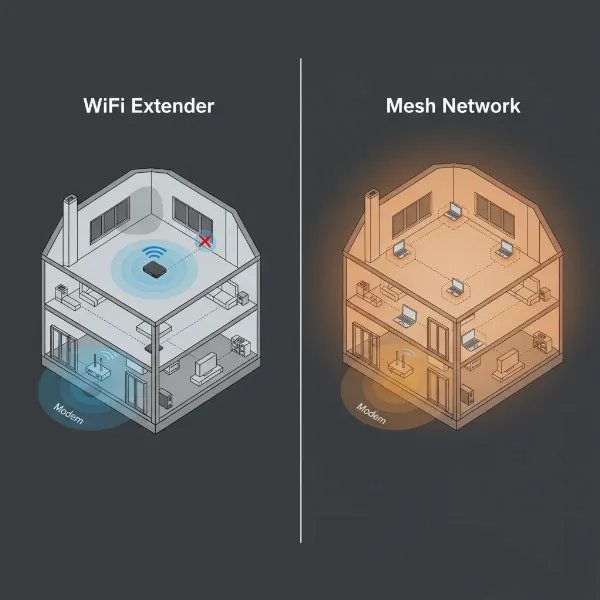
A Wi-Fi extender is generally more affordable and simpler to set up, making it ideal for filling specific dead zones or extending coverage to a single problematic area. A mesh Wi-Fi system, on the other hand, is a more comprehensive solution that replaces your existing router, creating a single, robust network across your entire home with superior roaming, speed, and capacity for many devices. The “better” option depends on your budget, home size, and specific connectivity needs.
Where is the best place to put a Wifi extender?
The optimal placement for a Wi-Fi extender is approximately halfway between your main Wi-Fi router and the area where you need extended coverage. It must be close enough to your router to pick up a strong signal, but also close enough to the dead zone to effectively rebroadcast that signal. Many extenders feature indicator lights that help you identify the ideal location by showing the strength of the signal they are receiving from your main router.
Can I use multiple Wifi extenders in my home?
While technically possible, using multiple traditional Wi-Fi extenders can sometimes lead to network congestion and interference, potentially degrading overall performance. It’s often more effective to invest in a single, powerful extender or consider a mesh Wi-Fi system if you need to cover a very large area or multiple dead zones. If you do use multiple extenders, ensure they are placed strategically and don’t overlap too much.