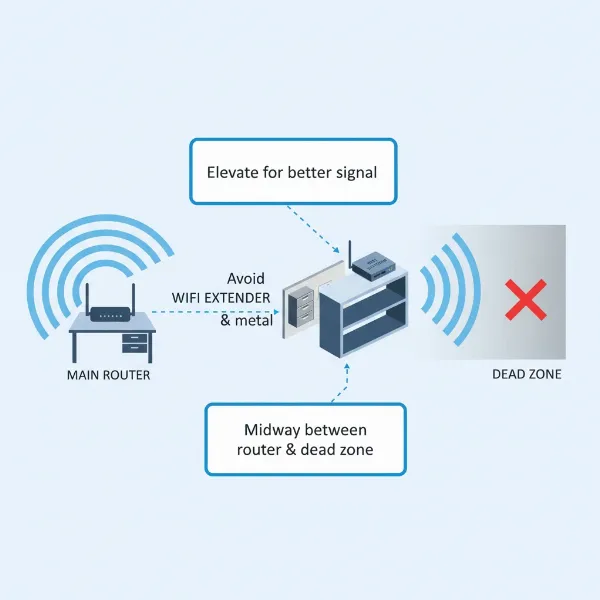
Is your home plagued by frustrating Wi-Fi dead zones, where streaming stalls, video calls freeze, and browsing becomes a test of patience? You’re not alone. Many households struggle with inconsistent Wi-Fi coverage, leading to digital frustration. A Wi-Fi extender might be the simple, cost-effective solution you’ve been searching for to banish those signal struggles. This comprehensive review dives deep into what Wi-Fi extenders are, how they work, and what you absolutely need to know to pick the best one for your needs, ensuring a smoother, more reliable internet experience throughout your entire home.
1. What is a Wifi Extender and How Does It Work?
A Wi-Fi extender, also commonly known as a Wi-Fi repeater or range extender, is a device designed to expand the coverage of your existing wireless network. Its primary function is to capture the Wi-Fi signal from your main router and rebroadcast it, extending its reach to areas of your home or office where the signal is weak or nonexistent. Essentially, it acts as a bridge, making your Wi-Fi available in more places without needing new wiring.
The operation of a Wi-Fi extender is quite straightforward. It connects wirelessly to your existing router, receives the Wi-Fi signal, amplifies it, and then transmits it as a new, extended Wi-Fi network. While some advanced models might use an Ethernet cable for a more stable “backhaul” connection to the router, most common extenders operate wirelessly. There are generally two types of extenders: plug-in extenders, which are compact units that plug directly into a wall outlet, and desktop extenders, which are larger devices that sit on a surface and often offer more Ethernet ports or powerful antennas.
2. Benefits of Using a Wifi Extender
Deploying a Wi-Fi extender can significantly enhance your home network experience, offering several compelling advantages. The most apparent benefit is the extended coverage, eliminating those annoying “dead zones” where your Wi-Fi signal previously couldn’t reach, allowing you to enjoy consistent connectivity in every corner of your house.
Beyond expanding reach, Wi-Fi extenders are a cost-effective solution compared to upgrading your entire router or installing a complex mesh Wi-Fi system. They offer an affordable way to improve your network without a hefty investment. Furthermore, their easy installation process is a major draw; most models are designed for quick plug-and-play setup, often requiring just a few button presses or a simple app-guided configuration. This simplicity makes them accessible even for those without extensive technical expertise. Finally, extenders provide flexible placement, as their compact design means they can be easily moved to different outlets to find the optimal spot for signal propagation, adapting to changing home layouts or connectivity needs.
3. When Do You Need a Wifi Extender?
Identifying the right time to introduce a Wi-Fi extender into your home network can save you from ongoing connectivity woes. You likely need a Wi-Fi extender if your home has multiple floors or a large footprint, where the single signal from your main router struggles to cover all areas evenly. Similarly, thick walls or other physical obstructions, such as large appliances or concrete, can severely degrade Wi-Fi signals, creating isolated pockets of poor or no reception; an extender can bypass these blockages.
If you enjoy working or relaxing outdoors in your garden, patio, or balcony but find your Wi-Fi doesn’t quite reach, an extender can extend your network beyond the interior of your home. Lastly, while not a perfect solution for extremely high-demand scenarios, if you have many devices connecting to Wi-Fi simultaneously and experience slowdowns in specific distant areas, an extender can help distribute the load and provide a more robust connection to those furthest devices, though it’s important to manage expectations regarding overall speed for bandwidth-intensive tasks.
[image-1|wifi-extender-signal-coverage|A graphic illustrating a Wi-Fi extender extending signal coverage in a multi-story house, showing dead zones being eliminated.|
An illustrative diagram showing a home with multiple floors. A central router emits Wi-Fi, with some areas on upper floors or far rooms marked as “dead zones” with weak signals. A Wi-Fi extender, plugged into a wall outlet, is strategically placed halfway between the router and a dead zone, effectively expanding the green Wi-Fi signal area to cover the previously uncovered spots. The style is clean, modern, and infographic-like, with clear signal lines.]
4. Factors to Consider When Choosing a Wifi Extender
Selecting the right Wi-Fi extender involves evaluating several key factors to ensure it meets your specific needs and integrates seamlessly with your existing network. First, consider the Wi-Fi speed and standard; ideally, choose an extender that matches or exceeds your main router’s Wi-Fi standard (e.g., Wi-Fi 5 or Wi-Fi 6) to avoid creating a bottleneck. An extender with a higher standard, like Wi-Fi 6 or even Wi-Fi 7, will be more future-proof, but its full potential can only be realized if your router also supports that standard.
Bands are crucial, with dual-band extenders (supporting both 2.4GHz and 5GHz frequencies) generally offering better performance and flexibility than single-band models. The 2.4GHz band provides wider coverage, while the 5GHz band offers faster speeds over shorter distances. Evaluate the range and coverage advertised, ensuring it aligns with the size of the area you need to extend. If you plan to connect wired devices like gaming consoles or PCs, look for extenders with Ethernet ports.
Additional features can include MU-MIMO (for efficient communication with multiple devices), Beamforming (to direct Wi-Fi signals towards devices), or intuitive mobile apps for easy setup and management. Lastly, research brand reputation and price; trusted brands often offer better reliability and support, and while budget options exist, investing a bit more can often lead to significantly better performance and stability.
5. Comparison of Popular Wifi Extenders
When navigating the market for a Wi-Fi extender, several models stand out for their performance and features. Here’s a comparison of some popular options, highlighting their key specifications and what makes them suitable for different users.
| Feature | TP-Link RE315 AC1200 | Netgear EAX17 AX3000 | TP-Link RE700X AX3000 | Asus RP-AX58 AX3000 | Netgear Nighthawk EAX80 AX6000 |
|---|---|---|---|---|---|
| Wi-Fi Standard | Wi-Fi 5 (802.11ac) | Wi-Fi 6 (802.11ax) | Wi-Fi 6 (802.11ax) | Wi-Fi 6 (802.11ax) | Wi-Fi 6 (802.11ax) |
| Speed (Max) | AC1200 (300 Mbps on 2.4GHz, 867 Mbps on 5GHz) | AX3000 (Supports speeds up to 3Gbps) | AX3000 (Supports speeds up to 3Gbps) | AX3000 (Supports speeds up to 3Gbps) | AX6000 (Supports speeds up to 6Gbps) |
| Bands | Dual-band (2.4GHz & 5GHz) | Dual-band (2.4GHz & 5GHz) | Dual-band (2.4GHz & 5GHz) | Dual-band (2.4GHz & 5GHz) | Dual-band (2.4GHz & 5GHz) |
| Ethernet Ports | 1x Gigabit Ethernet | 1x Gigabit Ethernet | 1x Gigabit Ethernet | 1x Gigabit Ethernet | 4x Gigabit Ethernet, 1x USB 3.0 |
| Coverage (Sq Ft) | Up to 1,500 sq ft | Good for general home extension | Good for medium to large homes | Excellent for larger homes (tested up to 115 feet) | Up to 2,500 sq ft |
| Key Features | OneMesh support, Tether app, Signal Indicator | OneMesh Compatible, Smart Roaming, Universal Comp. | OneMesh support, Tether app, High-gain antenna | AiMesh compatible, Seamless Roaming, OFDMA, MU-MIMO | Gaming-focused, Powerful processor, Explicit Beamforming |
| Ideal Use | Budget-friendly, extending to one extra room, IoT | Good compatibility with any router, moderate extension | Overall best plug-in, fast and easy setup | Wi-Fi 6 routers needing extra range, fast speeds | Heavy use, gaming, many wired devices, large homes |
| Pros | Affordable, easy setup, compact | Strong signal, excellent router compatibility | Fast, reliable, compact design | Longest range in testing, affordable, fast | Extremely fast, multiple Ethernet ports, powerful |
| Cons | Limited coverage area, lower speeds at distance | Can block other outlets, not as fast as Wi-Fi 7 | Not as robust for very large homes or heavy use | Pricey compared to budget options | Very pricey, potentially overkill for average user |
This table provides a snapshot of popular choices, illustrating that while some are excellent for budget-conscious users or smaller extensions, others cater to gamers or large homes demanding premium performance. Always consider your router’s capabilities and your home’s size when making a selection.
6. How to Install and Optimize Your Wifi Extender
Installing and optimizing your Wi-Fi extender effectively can make a significant difference in your network’s performance. Most extenders are designed for easy setup. You’ll typically start by plugging the extender into a power outlet near your main router. Many devices feature a WPS (Wi-Fi Protected Setup) button; pressing this on both your router and the extender will automatically establish a connection. Alternatively, you can use a mobile app provided by the manufacturer (like TP-Link’s Tether app or Netgear’s Nighthawk app) which guides you through a few simple steps to connect the extender to your network and configure its settings.
For optimal performance, placement is critical. A common rule of thumb is to position the extender roughly halfway between your main router and the area where you experience weak Wi-Fi. It needs to receive a sufficiently strong signal from the router to rebroadcast it effectively. Placing it too far from the router will result in a weak signal for the extender itself, leading to poor extension. Many extenders have signal indicator lights that help you find the best spot.
If you encounter common issues like slower speeds or intermittent connections, try adjusting the extender’s position. Sometimes, interference from other electronics or physical barriers can be resolved by slightly moving the device. If speed is a major concern, remember that extenders can sometimes halve the data rate, as they are both receiving and transmitting on the same band. For critical devices, using an Ethernet port on the extender (if available) can provide a more stable, faster wired connection.
7. Where to Buy a Wifi Extender?
When you’re ready to purchase a Wi-Fi extender, you have several reliable avenues to explore. Major online retailers such as Amazon, Best Buy, and Walmart are excellent places to start. They offer a vast selection of brands and models, often with competitive pricing and detailed customer reviews that can help inform your decision. Shopping online also provides the convenience of comparing specifications and features side-by-side from the comfort of your home.
For those who prefer a more hands-on approach or need immediate assistance, physical electronics stores like Best Buy or local computer shops often carry a range of Wi-Fi extenders. Sales associates can provide personalized recommendations and answer specific questions about compatibility with your existing router. When purchasing, whether online or in-store, always ensure the retailer is reputable and offers a good return policy, just in case the chosen extender doesn’t meet your expectations or isn’t compatible with your setup. It is also wise to cross-reference prices and look out for seasonal sales or discounts.
[image-2|wifi-extender-online-shopping|A person using a laptop to shop for Wi-Fi extenders online, with various extender models displayed on the screen.|
A close-up shot of a person’s hands typing on a laptop keyboard. The laptop screen displays an e-commerce website with several Wi-Fi extender products, showing their images, prices, and star ratings. The setting is a modern home office, with soft ambient lighting and a focus on the digital shopping experience.]
8. Buying Guide: Finding Your Ideal Wifi Extender
Navigating the array of Wi-Fi extenders can feel overwhelming, but a systematic approach ensures you find the perfect fit. First, establish your budget. Basic models can start around $20-$30, while high-performance Wi-Fi 6 or 7 compatible extenders can exceed $100. Knowing your spending limit will narrow down your options significantly.
Next, clearly define your usage needs. Are you simply trying to get a signal to one specific “dead spot” in a small apartment, or are you aiming to cover a large multi-story home? Your requirements will dictate the necessary range and speed capabilities. Crucially, verify compatibility with your existing main router. While most extenders are universally compatible, some brands offer “mesh-compatible” extenders that integrate more seamlessly with their specific routers, often under a unified network name.
Always make it a point to read user reviews and expert assessments. Real-world feedback can offer invaluable insights into a product’s actual performance, ease of use, and potential quirks that specifications alone might not reveal. Keep in mind that for very large homes or those requiring absolutely seamless roaming, a mesh Wi-Fi system might be a more robust, albeit costlier, alternative to a traditional extender. However, for targeting specific dead zones or extending coverage to a patio, a well-chosen Wi-Fi extender remains an excellent and economical choice.
Conclusion
Wi-Fi extenders serve as practical and budget-friendly solutions for tackling common wireless connectivity issues like dead zones and patchy signals. They work by intelligently rebroadcasting your existing Wi-Fi, effectively stretching its reach to areas that your main router alone cannot adequately cover. By considering factors such as speed compatibility, dual-band support, Ethernet ports, and strategic placement, you can select a device that significantly enhances your home’s network performance. While not a substitute for a full mesh system in every scenario, a properly chosen and configured Wi-Fi extender can dramatically improve your online experience, bringing robust internet to every corner of your living space. Are you ready to say goodbye to frustrating Wi-Fi dead zones and embrace seamless connectivity throughout your home?
Frequently Asked Questions
Do Wi-Fi extenders reduce internet speed?
|
Our Picks for the Best Wifi extender in 2026
As an Amazon Associate I earn from qualifying purchases.
|
||
| Num | Product | Action |
|---|---|---|
| 1 | WiFi Extender, WiFi Extenders Signal Booster for Home Up to 5000 sq.ft and 50 Devices, WiFi Range Extender, Wireless Repeater, Long Range Amplifier with Ethernet Port, 1-Tap Setup, Alexa Compatible |

|
| 2 | 1200Mbps WiFi Extender Signal Booster for Home, Dual Band 5GHz/2.4GHz Wireless Internet Repeater with 4 External Antennas, Covers Up to 3600 Sq.ft & Supports 80 Devices, AP Mode with Ethernet Port |
|
| 3 | 2026 WiFi Extender Signal Booster - 2.4GHz 300Mbps WiFi Booster for Home, Covers Up to 9999 Sq. Ft, Easy Setup, Ethernet Port & Access Point, Stable Internet Performance with 60+ Devices(White) |
|
| 4 | TP-Link AC1900 WiFi Range Extender RE550 | Dual-Band Wireless Repeater Amplifier w/Gigabit Ethernet Port | Up to 2200 Sq. Ft., 32 Devices | Internet Signal Booster | APP Setup | EasyMesh Compatible |
|
| 5 | WiFi Extender WiFi Booster 1200 Mbps Dual Band (5GHz/2.4GHz) WiFi Extenders Signal Booster for Home, Internet Extended Booster WiFi Repeater (White) |
|
| 6 | TP-Link AX3000 WiFi 6 Range Extender | PCMag Editor's Choice | Dual-Band Wireless Repeater w/Ethernet Port | Up to 2400 Sq. Ft., 64 Devices | Internet Signal Booster | APP Setup | EasyMesh (RE715X) |
|
| 7 | TP-Link WiFi Extender with Ethernet Port, Dual Band 5GHz/2.4GHz, Up to 44% More Bandwidth Than Single Band, Covers Up to 1200 Sq.ft and 30 Devices, Signal Booster Amplifier Supports OneMesh(RE220) |
|
| 8 | TP-Link AC1200 WiFi Extender, 2023 Engadget Best Budget Pick, 1.2Gbps Signal Booster for Home, Dual Band 5GHz/2.4GHz, Covers Up to 1500 Sq.ft and 30 Devices,Support Onemesh, One Ethernet Port (RE315) |
|
| 9 | WiFi Extender Signal Booster for Home 2026 Internet Repeater Long Range Up to 9995 Sq. Ft. Whole Home WiFi Coverage |
|
| 10 | WiFi Extender Signal Booster, WiFi Booster Dual Band 5.8GHz&2.4GHz, Covers Up to 10000 Sq.ft, 1.2Gbps WiFi Repeater with One Ethernet Port, One-tap Setup |
|
Wi-Fi extenders can potentially reduce internet speed due to the way they operate. Since they receive and then rebroadcast the signal, there’s often a “double hop” which can introduce latency and effectively halve the bandwidth, especially if the extender is using the same frequency band to communicate with both the router and your devices. However, dual-band extenders can mitigate this by using one band for communication with the router and the other for devices, offering better performance. The actual speed reduction depends on the extender’s quality, placement, and network congestion.
What’s the difference between a Wi-Fi extender and a mesh Wi-Fi system?
The key difference lies in their architecture and functionality. A Wi